Example: Litefuse Prompt Management for OpenAI functions (Python)
Litefuse Prompt Management helps to version control and manage prompts collaboratively in one place. This example demostrates how to use the flexible config object on Litefuse prompts to store function calling options and model parameters.
Setup
%pip install langfuse openai --upgradeimport os
# Get keys for your project
os.environ["LANGFUSE_PUBLIC_KEY"] = ""
os.environ["LANGFUSE_SECRET_KEY"] = ""
os.environ["LANGFUSE_BASE_URL"] = "https://litefuse.cloud"
# OpenAI key
os.environ["OPENAI_API_KEY"] = ""from langfuse import get_client
langfuse = get_client()TrueAdd prompt to Litefuse Prompt Management
We add the prompt used in this example via the SDK. Alternatively, you can also edit and version the prompt in the Litefuse UI.
Namethat identifies the prompt in Litefuse Prompt Management- Prompt with
json_schemavariable - Config including
model_name,temperature, andjson_schema labelsto includeproductionto immediately use the prompt as the default
langfuse.create_prompt(
    name="story_summarization",
    prompt="Extract the key information from this text and return it in JSON format. Use the following schema: {{json_schema}}",
    config={
        "model":"gpt-3.5-turbo-1106",
        "temperature": 0,
        "json_schema":{
            "main_character": "string (name of protagonist)",
            "key_content": "string (1 sentence)",
            "keywords": "array of strings",
            "genre": "string (genre of story)",
            "critic_review_comment": "string (write similar to a new york times critic)",
            "critic_score": "number (between 0 bad and 10 exceptional)"
        }
    },
    labels=["production"]
);
Prompt in Litefuse UI
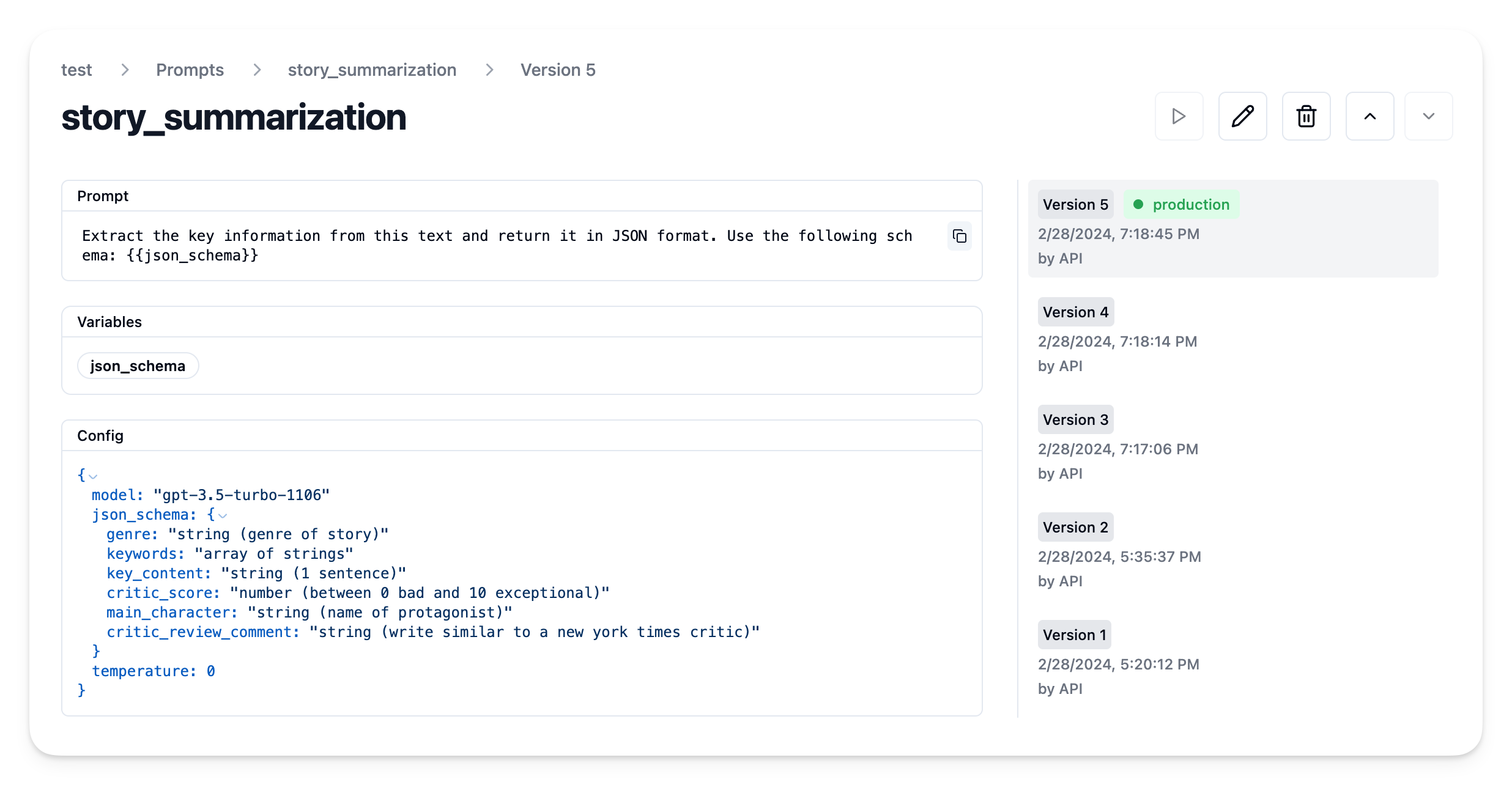
Example application
Get current prompt version from Litefuse
prompt = langfuse.get_prompt("story_summarization")We can now use the prompt to compile our system message
prompt.compile(json_schema="TEST SCHEMA")'Extract the key information from this text and return it in JSON format. Use the following schema: TEST SCHEMA'And it includes the config object
prompt.config{'model': 'gpt-3.5-turbo-1106',
'json_schema': {'genre': 'string (genre of story)',
'keywords': 'array of strings',
'key_content': 'string (1 sentence)',
'critic_score': 'number (between 0 bad and 10 exceptional)',
'main_character': 'string (name of protagonist)',
'critic_review_comment': 'string (write similar to a new york times critic)'},
'temperature': 0}Create example function
In this example we use the native Litefuse OpenAI integration by importing from langfuse.openai. This enables tracing in Litefuse and is not required for using Litefuse prompts management.
from langfuse.openai import OpenAI
client = OpenAI()
Use Litefuse prompt to construct the summarize_story example function.
Note: You can link the generation in Litefuse Tracing to the prompt version by passing the langfuse_prompt parameter to the create method. Have a look at our prompt management docs to learn how to link prompt and generation with other integrations and SDKs.
import json

def summarize_story(story):
  # Stringify the JSON schema
  json_schema_str = ', '.join([f"'{key}': {value}" for key, value in prompt.config["json_schema"].items()])

  # Compile prompt with stringified version of json schema
  system_message = prompt.compile(json_schema=json_schema_str)

  # Format as OpenAI messages
  messages = [
      {"role":"system","content": system_message},
      {"role":"user","content":story}
  ]

  # Get additional config
  model = prompt.config["model"]
  temperature = prompt.config["temperature"]

  # Execute LLM call
  res = client.chat.completions.create(
    model = model,
    temperature = temperature,
    messages = messages,
    response_format = { "type": "json_object" },
    langfuse_prompt = prompt # capture used prompt version in trace
  )

  # Parse response as JSON
  res = json.loads(res.choices[0].message.content)

  return res
Execute it
# Thanks ChatGPT for the story
STORY = """
In a bustling city where the nighttime glittered with neon signs and the rush never calmed, lived a lonely cat named Whisper. Amidst the ceaseless clatter, Whisper discovered an abandoned hat one day. To her enigmatic surprise, this was no ordinary accessory; it had the unusual power to make her invisible to any onlooker.
Whisper, now carrying a peculiar power, started a journey that was unexpected. She became a benevolent spirit to the less fortunate, the homeless people who equally shared the cold nights with her. Nights that were once barren turned miraculous as warm meals mysteriously appeared to those who needed them most. No one could see her, yet her actions spoke volumes, turning her into an unsung hero in the hidden corners of the city.
As she carried on with her mysterious deed, she found an unanticipated reward. Joy started to kindle in her heart, born not from the invisibility, but from the result of her actions; the growing smiles on the faces of those she surreptitiously helped. Whisper might have remained unnoticed to the world, but amidst her secret kindness, she discovered her true happiness.
"""
summary = summarize_story(STORY){'genre': 'Fantasy',
'keywords': ['lonely cat',
'invisible',
'benevolent spirit',
'unsung hero',
'mysterious deed',
'true happiness'],
'key_content': 'In a bustling city, a lonely cat named Whisper discovers an abandoned hat with the power to make her invisible, leading her to become a benevolent spirit and unsung hero to the less fortunate.',
'critic_score': 9,
'main_character': 'Whisper',
'critic_review_comment': "Whisper's journey from loneliness to self-discovery through acts of kindness is a heartwarming and enchanting tale that captivates the reader with its magical elements and profound message about true happiness."}View trace in Litefuse
As we used the native Litefuse integration with the OpenAI SDK, we can view the trace in Litefuse.
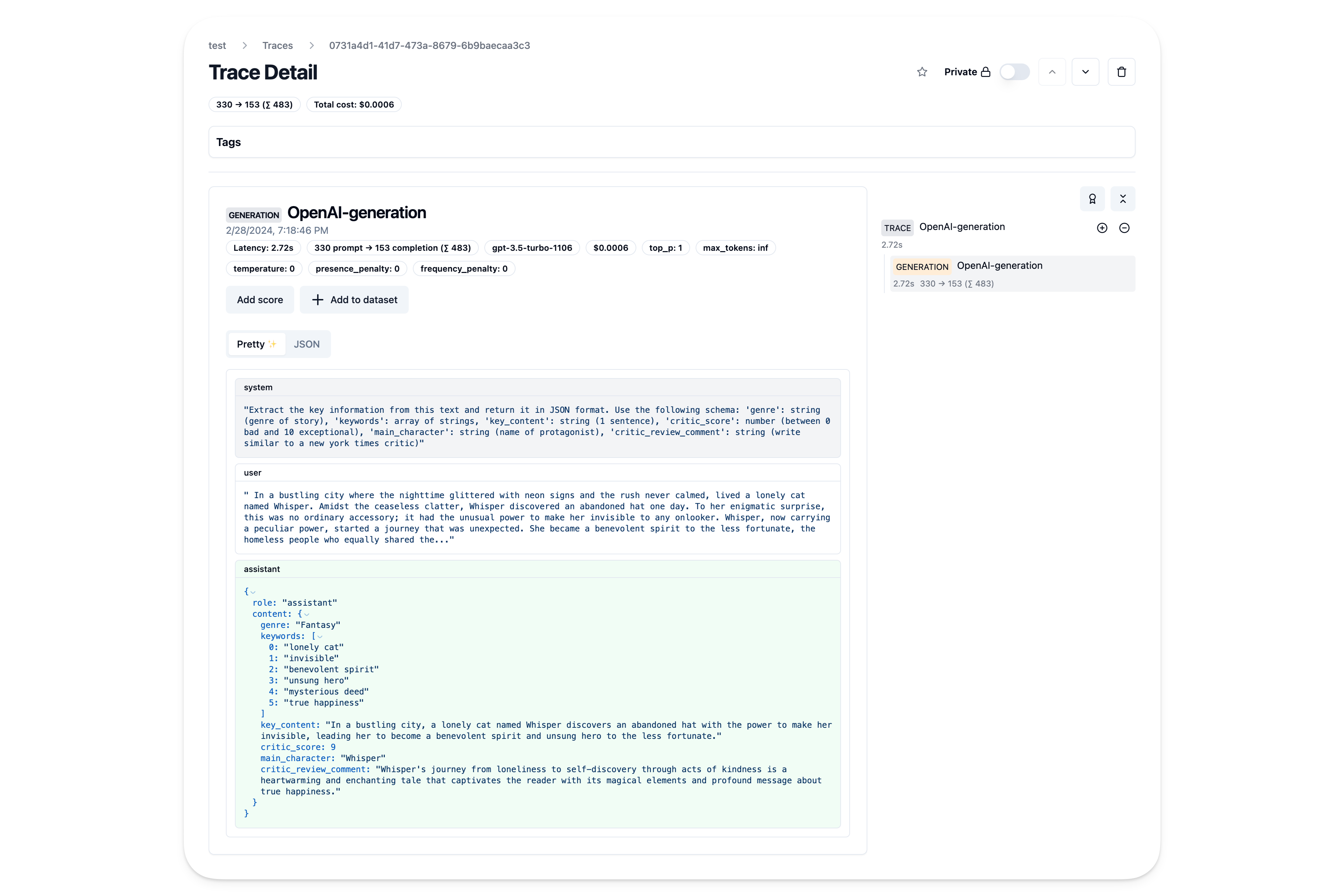
Iterate on prompt in Litefuse
We can now iterate on the prompt in Litefuse UI including model parameters and function calling options without changing the code or redeploying the application.