LLM Connections
LLM connections are used to call models in the Litefuse Playground or for LLM-as-a-Judge evaluations.
Setup
- Navigate to your
Project Settings>LLM Connectionsand click onAdd new LLM API key. - Enter the name of the LLM connection and the API key for the model you want to use.
Supported providers
The Litefuse platform is currently supporting the following LLM providers:
- OpenAI
- Azure OpenAI
- Anthropic
- Google AI Studio
- Google Vertex AI
- Amazon Bedrock
Supported models
Currently the playground supports the following models by default. You may configure additional custom model names when adding your LLM API Key in the Litefuse project settings, e.g. when using a custom model or proxy.
- Any model that supports the OpenAI API schema: The Playground and LLM-as-a-Judge evaluations can be used by any framework that supports the OpenAI API schema such as Groq, OpenRouter, Vercel AI Gateway, LiteLLM, Hugging Face, and more. Just replace the API Base URL with the appropriate endpoint for the model you want to use and add the providers API keys for authentication.
- OpenAI / Azure OpenAI: o3, o3-2025-04-16, o4-mini, o4-mini-2025-04-16, gpt-4.1, gpt-4.1-2025-04-14, gpt-4.1-mini-2025-04-14, gpt-4.1-nano-2025-04-14, gpt-4o, gpt-4o-2024-08-06, gpt-4o-2024-05-13, gpt-4o-mini, gpt-4o-mini-2024-07-18, o3-mini, o3-mini-2025-01-31, o1-preview, o1-preview-2024-09-12, o1-mini, o1-mini-2024-09-12, gpt-4-turbo-preview, gpt-4-1106-preview, gpt-4-0613, gpt-4-0125-preview, gpt-4, gpt-3.5-turbo-16k-0613, gpt-3.5-turbo-16k, gpt-3.5-turbo-1106, gpt-3.5-turbo-0613, gpt-3.5-turbo-0301, gpt-3.5-turbo-0125, gpt-3.5-turbo
- Anthropic: claude-3-7-sonnet-20250219, claude-3-5-sonnet-20241022, claude-3-5-sonnet-20240620, claude-3-opus-20240229, claude-3-sonnet-20240229, claude-3-5-haiku-20241022, claude-3-haiku-20240307, claude-2.1, claude-2.0, claude-instant-1.2
- Google Vertex AI: gemini-2.5-pro-exp-03-25, gemini-2.0-pro-exp-02-05, gemini-2.0-flash-001, gemini-2.0-flash-lite-preview-02-05, gemini-2.0-flash-exp, gemini-1.5-pro, gemini-1.5-flash, gemini-1.0-pro. You may also add additional model names supported by Google Vertex AI platform and enabled in your GCP account through the `Custom model names` section in the LLM API Key creation form.
- Google AI Studio: gemini-2.5-pro-exp-03-25, gemini-2.0-flash, gemini-2.0-flash-lite-preview-02-05, gemini-2.0-flash-thinking-exp-01-21, gemini-1.5-pro, gemini-1.5-flash, gemini-1.5-flash-8b
- Amazon Bedrock: All Amazon Bedrock models are supported. The required permission on AWS is `bedrock:InvokeModel` and `bedrock:InvokeModelWithResponseStream`.
You may connect to third party LLM providers if their API schema implements the schema of one of our supported provider adapters. For example, you may connect to Mistral by using the OpenAI adapter in Litefuse to connect to Mistral’s OpenAI compliant API.
OpenAI-compatible and Anthropic-compatible providers
Litefuse includes provider-specific compatibility handling for selected providers that expose OpenAI-compatible or Anthropic-compatible APIs but require small protocol adjustments for reliable structured output in the Playground and evaluator jobs.
This is especially relevant for LLM-as-a-Judge evaluations, which rely on structured responses and tool/function calling.
- Qwen / DashScope: Litefuse detects Qwen connections by provider name or DashScope host, normalizes Anthropic-compatible
/v1/messagesbase URLs, disables thinking by default unless you override it, and uses function calling for structured output to avoid JSON mode incompatibilities. - MiniMax: Litefuse detects MiniMax connections by provider name or MiniMax host, normalizes Anthropic-compatible
/v1/messagesbase URLs, keepsreasoning_split: trueby default for OpenAI-compatible requests, uses function calling for structured output, removes<think>...</think>content from responses before parsing, and applies provider-specific thinking defaults for models such asMiniMax-M2.7andMiniMax-M3.
To use these providers, create an LLM connection with the OpenAI or Anthropic adapter, set the provider API key, set the provider’s compatible Base URL, and add the model name under Custom model names if it is not listed by default.
You can still use provider options to pass explicit provider-specific overrides when the selected provider supports them.
If your provider exposes a compatible API but is not listed above, you can still connect it through the matching adapter. The provider must support tool/function calling in the selected API format for LLM-as-a-Judge evaluations to return structured scores reliably.
Advanced configurations
Additional provider options
Provider options are not set up in the Project Settings > LLM Connections page but either when selecting a LLM Connection on the Playground or during LLM-as-a-Judge Evaluator setup.
LLM calls from a created LLM connection can be configured with a specific set of parameters, such as temperature, top_p, and max_tokens.
However, many LLM providers allow for additional parameters, including reasoning_effort, service_tier, and others when invoking a model. These parameters often differ between providers.
You can provide additional configurations as a JSON object for all LLM invocations. In the model parameters settings, you will find a “provider options” field at the bottom. This field allows you to enter specific key-value pairs accepted by your LLM provider’s API endpoint.
Please see your providers API reference for what additional fields are supported:
- Anthropic Messages API Reference
- OpenAI Chat Completions API Reference
- Google Gemini API Reference
- Google Vertex AI Gemini API Reference
This feature is currently available for the adapters for:
- Anthropic
- OpenAI
- Google AI Studio
- Google Vertex AI
- AWS (Amazon Bedrock)
Example for forcing reasoning effort minimal on an OpenAI gpt-5 invocation:
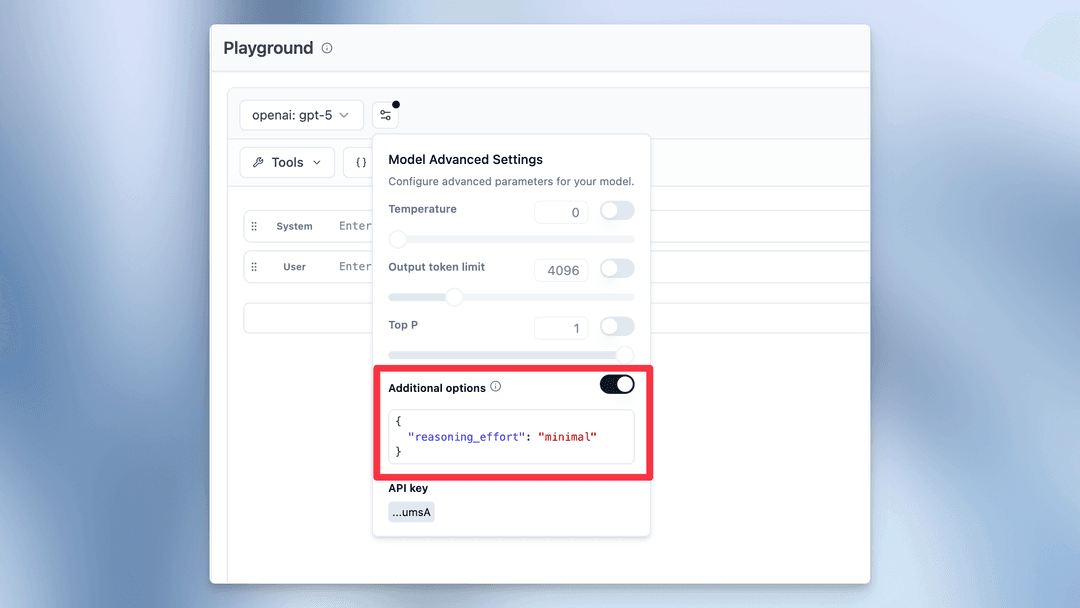
Example provider options for Google models (Google AI Studio and Google Vertex AI) to control thinking:
{
  "thinkingLevel": "MEDIUM",
  "thinkingBudget": 2048
}
thinkingLevel controls the reasoning depth, and thinkingBudget sets the token budget for thinking. These options are only valid for Google models that support thinking.
Connecting via a gateway
If you route LLM calls through an OpenAI-compatible gateway such as LiteLLM, OpenRouter, or Portkey, you can use it as your LLM connection for the Playground and LLM-as-a-Judge evaluations.
To set this up:
- Navigate to Project Settings > LLM Connections and click Add new LLM API key.
- Select OpenAI as the provider.
- Enter the API key for your gateway.
- Under Advanced Settings, set the Base URL to your gateway’s endpoint, e.g.
https://your-litellm-instance.com/v1. - Add any custom model names that your gateway exposes.
The gateway must support tool calling in the OpenAI format for LLM-as-a-Judge evaluations to work.
For OpenAI-compatible gateways, here is an example tool calling request that must be handled by the gateway to support LLM-as-a-Judge in Litefuse:
curl -X POST 'https://<host set in project settings>/chat/completions' \
-H 'accept: application/json' \
-H 'content-type: application/json' \
-H 'authorization: Bearer <api key entered in project settings>' \
-H 'x-test-header-1: <custom header set in project settings>' \
-H 'x-test-header-2: <custom header set in project settings>' \
-d '{
  "model": "<model set in project settings>",
  "temperature": 0,
  "top_p": 1,
  "frequency_penalty": 0,
  "presence_penalty": 0,
  "max_tokens": 256,
  "n": 1,
  "stream": false,
  "tools": [
    {
      "type": "function",
      "function": {
        "name": "extract",
        "parameters": {
          "type": "object",
          "properties": {
            "score": {
              "type": "string"
            },
            "reasoning": {
              "type": "string"
            }
          },
          "required": [
            "score",
            "reasoning"
          ],
          "additionalProperties": false,
          "$schema": "http://json-schema.org/draft-07/schema#"
        }
      }
    }
  ],
  "tool_choice": {
    "type": "function",
    "function": {
      "name": "extract"
    }
  },
  "messages": [
    {
      "role": "user",
      "content": "Evaluate the correctness of the generation on a continuous scale from 0 to 1. A generation can be considered correct (Score: 1) if it includes all the key facts from the ground truth and if every fact presented in the generation is factually supported by the ground truth or common sense.\n\nExample:\nQuery: Can eating carrots improve your vision?\nGeneration: Yes, eating carrots significantly improves your vision, especially at night. This is why people who eat lots of carrots never need glasses. Anyone who tells you otherwise is probably trying to sell you expensive eyewear or does not want you to benefit from this simple, natural remedy. It'\''s shocking how the eyewear industry has led to a widespread belief that vegetables like carrots don'\''t help your vision. People are so gullible to fall for these money-making schemes.\nGround truth: Well, yes and no. Carrots won'\''t improve your visual acuity if you have less than perfect vision. A diet of carrots won'\''t give a blind person 20/20 vision. But, the vitamins found in the vegetable can help promote overall eye health. Carrots contain beta-carotene, a substance that the body converts to vitamin A, an important nutrient for eye health.  An extreme lack of vitamin A can cause blindness. Vitamin A can prevent the formation of cataracts and macular degeneration, the world'\''s leading cause of blindness. However, if your vision problems aren'\''t related to vitamin A, your vision won'\''t change no matter how many carrots you eat.\nScore: 0.1\nReasoning: While the generation mentions that carrots can improve vision, it fails to outline the reason for this phenomenon and the circumstances under which this is the case. The rest of the response contains misinformation and exaggerations regarding the benefits of eating carrots for vision improvement. It deviates significantly from the more accurate and nuanced explanation provided in the ground truth.\n\n\n\nInput:\nQuery: {{query}}\nGeneration: {{generation}}\nGround truth: {{ground_truth}}\n\n\nThink step by step."
    }
  ]
}'