Tracing Koog Agents with Litefuse
Koog provides built-in support for exporting agent traces to Litefuse. With Litefuse integration, you can visualize, analyze, and debug how your Koog agents interact with LLMs, APIs, and other components.
What is Koog? Koog is a Kotlin-based framework designed to build and run AI agents entirely in idiomatic Kotlin. It lets you create agents that can interact with tools, handle complex workflows, and communicate with users. For background on Koog’s OpenTelemetry support, see the OpenTelemetry support.
What is Litefuse? Litefuse is an open-source LLM engineering platform. It offers tracing and monitoring capabilities for AI applications. Litefuse helps developers debug, analyze, and optimize their AI systems by providing detailed insights and integrating with a wide array of tools and frameworks through native integrations, OpenTelemetry, and dedicated SDKs.
Setup Litefuse
- Sign up for Litefuse Cloud or self-host Litefuse.
- Create a Litefuse project. Follow the setup guide at Create new project in Litefuse
- Obtain API credentials. Retrieve your Litefuse
public keyandsecret keyas described in Where are Langfuse API keys? - Set environment variables. Add the following variables to your environment:
   export LANGFUSE_BASE_URL="https://litefuse.cloud" # 🇪🇺 EU region
   # export LANGFUSE_BASE_URL="https://litefuse.cloud" # 🇺🇸 US region

   export LANGFUSE_PUBLIC_KEY="pk-lf-..."
   export LANGFUSE_SECRET_KEY="sk-lf-..."
Once configured, Koog automatically forwards OpenTelemetry traces to your Litefuse instance.
Configure Koog
To enable Litefuse export, install the OpenTelemetry feature and add the LangfuseExporter.
The exporter uses OtlpHttpSpanExporter under the hood to send traces to Litefuse’s OpenTelemetry endpoint.
Example: Agent with Litefuse Tracing
fun main() = runBlocking {
    val agent = AIAgent(
        executor = simpleOpenAIExecutor(ApiKeyService.openAIApiKey),
        llmModel = OpenAIModels.CostOptimized.GPT4oMini,
        systemPrompt = "You are a code assistant. Provide concise code examples."
    ) {
        install(OpenTelemetry) {
            addLangfuseExporter()
        }
    }

    println("Running agent with Langfuse tracing")

    val result = agent.run("Tell me a joke about programming")

    println("Result: $result\nSee traces on the Langfuse instance")
}
See traces in Litefuse
When enabled, the Litefuse exporter captures the same spans as Koog’s general OpenTelemetry integration, including:
- Agent lifecycle events – agent start, stop, errors
- LLM interactions – prompts, responses, token usage, latency
- Tool and API calls – execution traces for function/tool invocations
- System context – metadata such as model name, environment, Koog version
Koog also captures span attributes required by Litefuse to show Agent Graphs. This allows you to correlate agent reasoning with API calls and user inputs in a structured way within Litefuse.
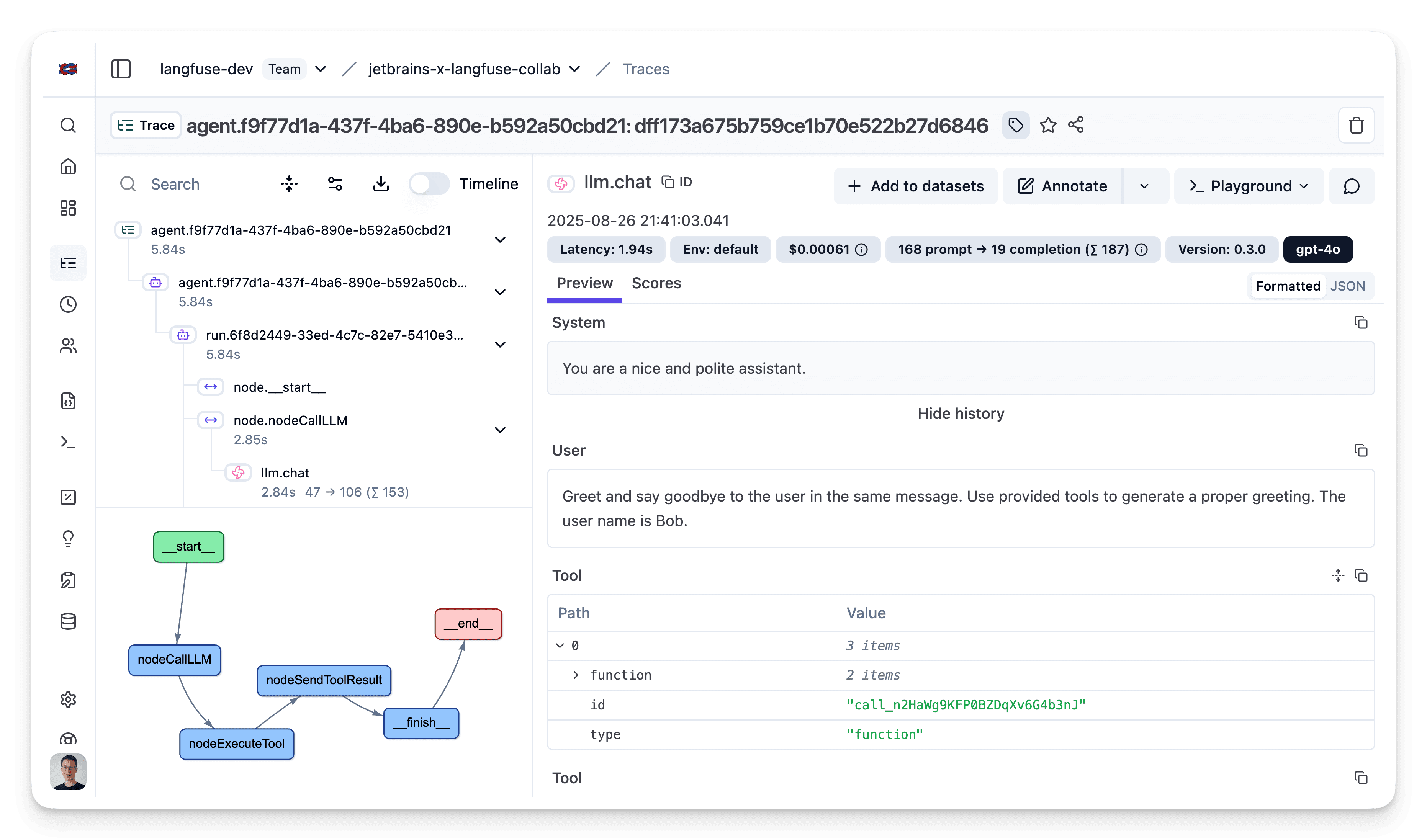
For more details on Litefuse OTLP tracing, see the Litefuse OpenTelemetry Docs.
Troubleshooting
- No traces appear in Litefuse
- Double-check that
LANGFUSE_BASE_URL,LANGFUSE_PUBLIC_KEY, andLANGFUSE_SECRET_KEYare set in your environment. - If running on self-hosted Litefuse, confirm that the
LANGFUSE_BASE_URLis reachable from your application environment. - Verify that the public/secret key pair belongs to the correct project.
- Double-check that