Observability for VoltAgent with Litefuse
This guide shows you how to integrate Litefuse with VoltAgent for observability and tracing. By following these steps, you’ll be able to monitor and debug your VoltAgent agents in the Litefuse dashboard.
What is VoltAgent? VoltAgent is an open-source TypeScript framework that acts as this essential toolkit. It simplifies the development of AI agent applications by providing modular building blocks, standardized patterns, and abstractions. Whether you’re creating chatbots, virtual assistants, automated workflows, or complex multi-agent systems, VoltAgent handles the underlying complexity, allowing you to focus on defining your agents’ capabilities and logic.
Integration
Create a VoltAgent project
If you don’t have a VoltAgent project yet, you can create one using the VoltAgent CLI:
npm create voltagent-app@latestMove into the project directory:
cd my-voltagent-appYou can get the full VoltAgent installation instructions here
Set up Litefuse project
Create a project in Litefuse and get your API keys from the project settings page.
Add environment variables
Create or update your .env.development file with the following variables:
# Your LLM API key
OPENAI_API_KEY=your-api-key

# Langfuse credentials
LANGFUSE_SECRET_KEY=sk-lf-...
LANGFUSE_PUBLIC_KEY=pk-lf-...
LANGFUSE_BASE_URL=https://litefuse.cloud # Optional. Defaults to https://litefuse.cloud
Install the @voltagent/langfuse-exporter package
Add the @voltagent/langfuse-exporter package to your project:
npm install @voltagent/langfuse-exporterConfigure Litefuse Exporter
Modify your main application file (e.g., index.ts where VoltAgent is initialized) to import LangfuseExporter and configure it within the VoltAgent options:
import { VoltAgent, Agent } from "@voltagent/core";
import { VercelAIProvider } from "@voltagent/vercel-ai";
import { openai } from "@ai-sdk/openai";

import { LangfuseExporter } from "@voltagent/langfuse-exporter";

const langfuseExporter = new LangfuseExporter({
  publicKey: process.env.LANGFUSE_PUBLIC_KEY,
  secretKey: process.env.LANGFUSE_SECRET_KEY,
  baseUrl: process.env.LANGFUSE_BASE_URL,
});

const agent = new Agent({
  name: "my-voltagent-app",
  description: "A helpful assistant that answers questions without using tools",
  llm: new VercelAIProvider(),
  model: openai("gpt-4o-mini"),
});

new VoltAgent({
  agents: {
    agent,
  },
  telemetryExporter: langfuseExporter,
});
Ensure your agent definition (new Agent({...})) and the VoltAgent instantiation (new VoltAgent({...})) match your project structure. The key change is adding the LangfuseExporter and the telemetryExporter option.
Run your VoltAgent application
Start the VoltAgent development server or run your application as usual:
npm run devWhen you run the dev command, tsx will compile and run your code. You should see the VoltAgent server startup message in your terminal:
══════════════════════════════════════════════════
  VOLTAGENT SERVER STARTED SUCCESSFULLY
══════════════════════════════════════════════════
  ✓ HTTP Server: http://localhost:3141

  Developer Console:    https://console.voltagent.dev
══════════════════════════════════════════════════
[VoltAgent] All packages are up to date
Your agent is now running! To interact with it:
- Open the Console: Click the
https://console.voltagent.devlink in your terminal output (or copy-paste it into your browser). - Find Your Agent: On the VoltAgent Console page, you should see your agent listed (e.g., “my-agent”).
- Open Agent Details: Click on your agent’s name.
- Start Chatting: On the agent detail page, click the chat icon in the bottom right corner to open the chat window.
- Send a Message: Type a message like “Hello” and press Enter.
View traces in Litefuse
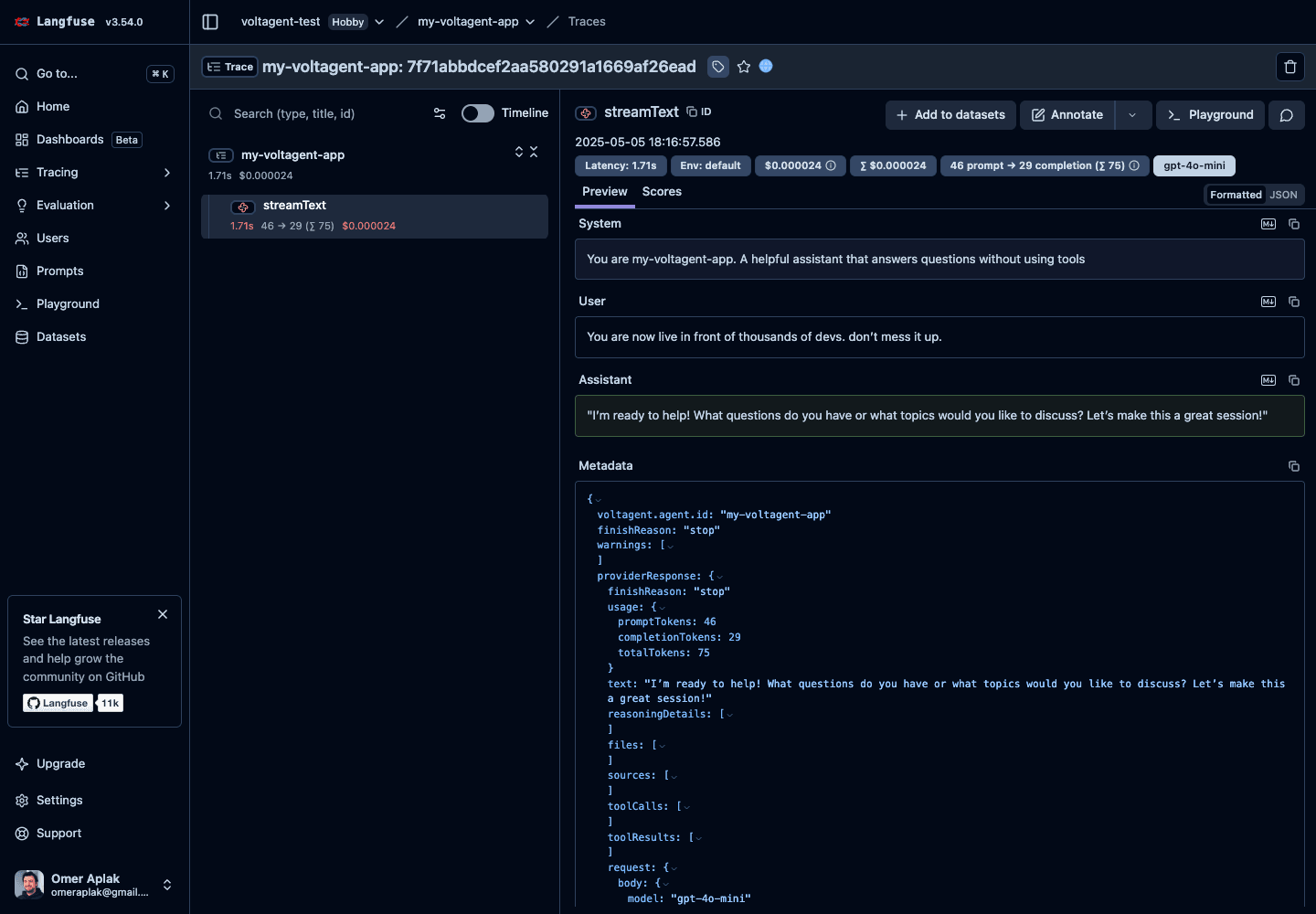
Head over to your Litefuse dashboard and you’ll see the traces from your agent interactions. You can analyze the prompts, completions, and other details of your AI interactions.
Here’s an example of a trace:
References
- VoltAgent Project Repository
- VoltAgent Documentation
- Litefuse Documentation
- @voltagent/langfuse-exporter package