Observability for Cohere with Litefuse
This guide shows you how to integrate Cohere with Litefuse using the OpenAI SDK Compatibility API. Trace and monitor your applications seamlessly.
What is Cohere? Cohere is an AI platform that provides state-of-the-art language models via API, allowing developers to build applications with natural language understanding capabilities.
What is Litefuse? Litefuse is an open source LLM engineering platform for tracing, monitoring, and debugging LLM applications.
Step 1: Install Dependencies
Ensure you have the necessary Python packages installed:
%pip install openai langfuseStep 2: Set Up Environment Variables
import os

# Get keys for your project from the project settings page
# https://litefuse.cloud

os.environ["LANGFUSE_PUBLIC_KEY"] = "pk-lf..."
os.environ["LANGFUSE_SECRET_KEY"] = "sk-lf..."
os.environ["LANGFUSE_BASE_URL"] = "https://litefuse.cloud" # 🇪🇺 EU region
# os.environ["LANGFUSE_BASE_URL"] = "https://litefuse.cloud" # 🇺🇸 US region

# Set your Cohere API key from your Cohere account settings
os.environ["COHERE_API_KEY"] = "..."
Step 3: Use Cohere with the OpenAI SDK
Leverage the Compatibility API by replacing the base URL with Cohere’s endpoint when initializing the client.
# Instead of importing openai directly, use Langfuse's drop-in replacement
from langfuse.openai import openai

client = openai.OpenAI(
  api_key=os.environ.get("COHERE_API_KEY"),
  base_url="https://api.cohere.ai/compatibility/v1"  # Cohere Compatibility API endpoint
)
Step 4: Run an Example
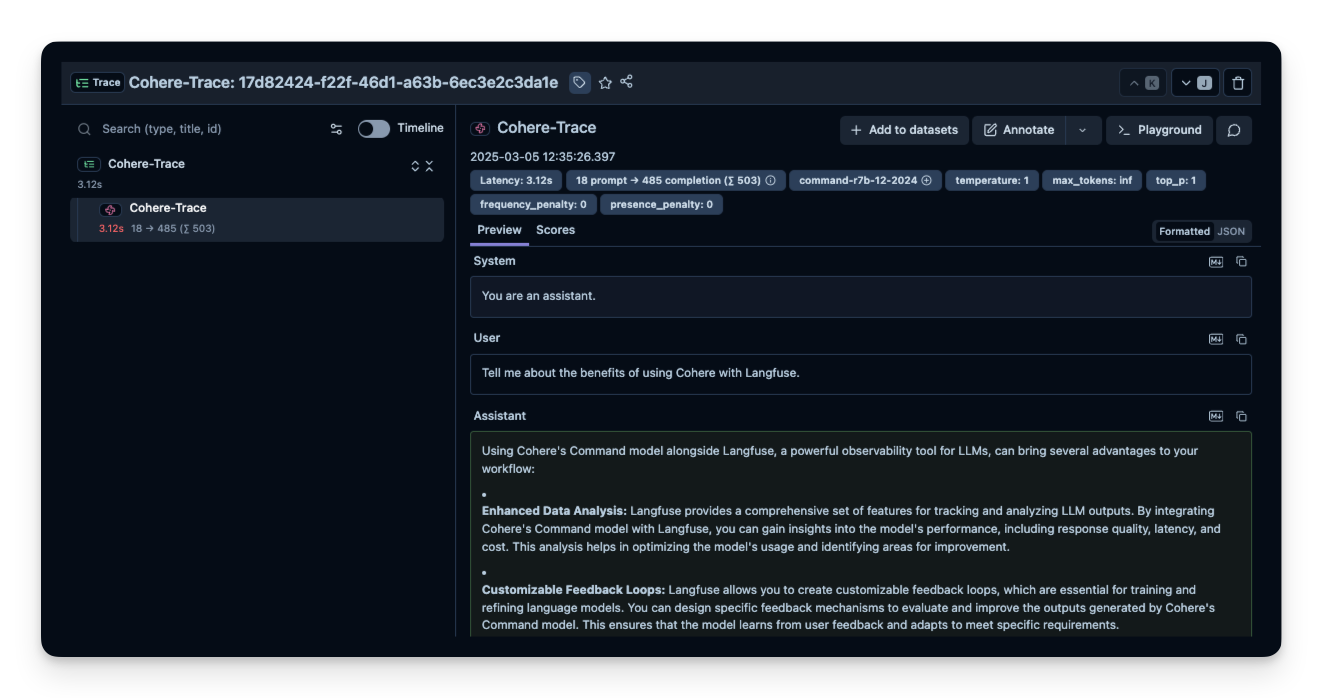
The example below demonstrates a basic chat completion request. All API calls are automatically traced by Litefuse.
response = client.chat.completions.create(
  model="command-r7b-12-2024",  # Replace with the desired Cohere model
  messages=[
    {"role": "system", "content": "You are an assistant."},
    {"role": "user", "content": "Tell me about the benefits of using Cohere with Langfuse."}
  ],
  name="Cohere-Trace"
)

print(response.choices[0].message.content)
Step 5: See Traces in Litefuse
After running the example, log in to Litefuse to view the detailed traces, including request parameters, response content, token usage, and latency metrics.