通过 SDK 运行实验
通过 SDK 运行实验是指使用编程方式让你的应用或 prompt 遍历一个数据集,并可选地对结果应用评估方法。你可以使用托管在 Litefuse 上的数据集,也可以使用本地数据集作为实验基础。
更多关于通过 SDK 运行实验的细节,请参阅 JS/TS SDK 参考和 Python SDK 参考。
为什么使用 SDK 实验?
- 完全的灵活性,使用你自己的应用逻辑
- 使用自定义打分函数评估单个条目和整个运行的输出
- 在同一个数据集上并行运行多个实验
- 易于与你已有的评估基础设施集成
实验运行器 SDK
Python 与 JS/TS SDK 都为在数据集上运行实验提供了高层抽象。数据集既可以是本地的,也可以托管在 Litefuse 上。使用实验运行器是我们 SDK 推荐的运行实验方式。
实验运行器自动处理:
- 任务的并发执行,可配置上限
- 自动 trace 所有执行,方便观测
- 灵活评估,同时支持条目级别和运行级别的评估器
- 错误隔离,单个失败不会中断整个实验
- 数据集集成,便于比较和跟踪
实验运行器 SDK 同时支持 Litefuse 上托管的数据集和本地数据集。如果实验使用 Litefuse 上托管的数据集,SDK 会自动为你创建一个数据集运行,你可以在 Litefuse UI 中查看和比较。对于不在 Litefuse 上的本地数据集,仅 trace 和分数(若使用了评估)会被记录在 Litefuse 中。
基础用法
从最简单的实验开始,在本地数据上测试你的任务函数。如果你已经在 Litefuse 上有数据集,见此处。
from langfuse import get_client
from langfuse.openai import OpenAI

# Initialize client
langfuse = get_client()

# Define your task function
def my_task(*, item, **kwargs):
    question = item["input"]
    response = OpenAI().chat.completions.create(
        model="gpt-4.1", messages=[{"role": "user", "content": question}]
    )

    return response.choices[0].message.content


# Run experiment on local data
local_data = [
    {"input": "What is the capital of France?", "expected_output": "Paris"},
    {"input": "What is the capital of Germany?", "expected_output": "Berlin"},
]

result = langfuse.run_experiment(
    name="Geography Quiz",
    description="Testing basic functionality",
    data=local_data,
    task=my_task,
)

# Use format method to display results
print(result.format())在本地数据上运行实验时,Litefuse 中只会创建 trace —— 不会生成数据集运行。每次任务执行都会为可观测性和调试创建一条独立的 trace。
与 Litefuse 数据集一起使用
直接在 Litefuse 上的数据集上运行实验,可以自动获得 trace 与对比能力。
from langfuse import get_client
from langfuse.openai import OpenAI

# Initialize client
langfuse = get_client()

# Define your task function
def my_task(*, item, **kwargs):
    question = item.input # `run_experiment` passes a `DatasetItem` to the task function. The input of the dataset item is available as `item.input`.
    response = OpenAI().chat.completions.create(
        model="gpt-4.1", messages=[{"role": "user", "content": question}]
    )

    return response.choices[0].message.content

# Get dataset from Litefuse
dataset = langfuse.get_dataset("my-evaluation-dataset")

# Run experiment directly on the dataset
result = dataset.run_experiment(
    name="Production Model Test",
    description="Monthly evaluation of our production model",
    task=my_task # see above for the task definition
)

# Use format method to display results
print(result.format())使用 Litefuse 数据集时,数据集运行会自动创建在 Litefuse 中,并可在 UI 中进行对比。这能帮你跟踪实验性能随时间的变化,并比较同一数据集上的不同方案。
实验始终在实验运行时的最新数据集版本上执行。SDK 对指定数据集版本运行实验的支持很快会上线。
进阶功能
通过评估器和高级配置选项增强你的实验。
评估器
评估器对每个条目层面的任务输出进行质量评估。它们接收每个条目的 input、metadata、output 和期望输出,返回评估指标,最终在 Litefuse 中作为 trace 上的分数被记录。
from langfuse import Evaluation

# Define evaluation functions
def accuracy_evaluator(*, input, output, expected_output, metadata, **kwargs):
    if expected_output and expected_output.lower() in output.lower():
        return Evaluation(name="accuracy", value=1.0, comment="Correct answer found")

    return Evaluation(name="accuracy", value=0.0, comment="Incorrect answer")

def length_evaluator(*, input, output, **kwargs):
    return Evaluation(name="response_length", value=len(output), comment=f"Response has {len(output)} characters")

# Use multiple evaluators
result = langfuse.run_experiment(
    name="Multi-metric Evaluation",
    data=test_data,
    task=my_task,
    evaluators=[accuracy_evaluator, length_evaluator]
)

print(result.format())运行级别评估器
运行级别评估器评估完整的实验结果并计算聚合指标。在 Litefuse 数据集上运行时,这些分数会附加到完整的数据集运行上,用于跟踪整体实验表现。
from langfuse import Evaluation

def average_accuracy(*, item_results, **kwargs):
    """Calculate average accuracy across all items"""
    accuracies = [
        eval.value for result in item_results
        for eval in result.evaluations
        if eval.name == "accuracy"
    ]

    if not accuracies:
        return Evaluation(name="avg_accuracy", value=None)

    avg = sum(accuracies) / len(accuracies)

    return Evaluation(name="avg_accuracy", value=avg, comment=f"Average accuracy: {avg:.2%}")

result = langfuse.run_experiment(
    name="Comprehensive Analysis",
    data=test_data,
    task=my_task,
    evaluators=[accuracy_evaluator],
    run_evaluators=[average_accuracy]
)

print(result.format())异步任务和评估器
任务函数和评估器都可以是异步的。
import asyncio
from langfuse.openai import AsyncOpenAI

async def async_llm_task(*, item, **kwargs):
    """Async task using OpenAI"""
    client = AsyncOpenAI()
    response = await client.chat.completions.create(
        model="gpt-4",
        messages=[{"role": "user", "content": item["input"]}]
    )

    return response.choices[0].message.content

# Works seamlessly with async functions
result = langfuse.run_experiment(
    name="Async Experiment",
    data=test_data,
    task=async_llm_task,
    max_concurrency=5  # Control concurrent API calls
)

print(result.format())配置选项
通过各种配置选项自定义实验行为。
result = langfuse.run_experiment(
    name="Configurable Experiment",
    run_name="Custom Run Name", # will be dataset run name if dataset is used
    description="Experiment with custom configuration",
    data=test_data,
    task=my_task,
    evaluators=[accuracy_evaluator],
    run_evaluators=[average_accuracy],
    max_concurrency=10,  # Max concurrent executions
    metadata={  # Attached to all traces
        "model": "gpt-4",
        "temperature": 0.7,
        "version": "v1.2.0"
    }
)

print(result.format())在 CI 环境中测试
把实验运行器与 Pytest、Vitest 等测试框架集成,在 CI 流水线中运行自动化评估。利用评估器创建可在评估结果不达标时让测试失败的断言。
# test_geography_experiment.py
import pytest
from langfuse import get_client, Evaluation
from langfuse.openai import OpenAI

# Test data for European capitals
test_data = [
    {"input": "What is the capital of France?", "expected_output": "Paris"},
    {"input": "What is the capital of Germany?", "expected_output": "Berlin"},
    {"input": "What is the capital of Spain?", "expected_output": "Madrid"},
]

def geography_task(*, item, **kwargs):
    """Task function that answers geography questions"""
    question = item["input"]
    response = OpenAI().chat.completions.create(
        model="gpt-4",
        messages=[{"role": "user", "content": question}]
    )
    return response.choices[0].message.content

def accuracy_evaluator(*, input, output, expected_output, **kwargs):
    """Evaluator that checks if the expected answer is in the output"""
    if expected_output and expected_output.lower() in output.lower():
        return Evaluation(name="accuracy", value=1.0)

    return Evaluation(name="accuracy", value=0.0)

def average_accuracy_evaluator(*, item_results, **kwargs):
    """Run evaluator that calculates average accuracy across all items"""
    accuracies = [
        eval.value for result in item_results
        for eval in result.evaluations if eval.name == "accuracy"
    ]

    if not accuracies:
        return Evaluation(name="avg_accuracy", value=None)

    avg = sum(accuracies) / len(accuracies)

    return Evaluation(name="avg_accuracy", value=avg, comment=f"Average accuracy: {avg:.2%}")

@pytest.fixture
def langfuse_client():
    """Initialize Langfuse client for testing"""
    return get_client()

def test_geography_accuracy_passes(langfuse_client):
    """Test that passes when accuracy is above threshold"""
    result = langfuse_client.run_experiment(
        name="Geography Test - Should Pass",
        data=test_data,
        task=geography_task,
        evaluators=[accuracy_evaluator],
        run_evaluators=[average_accuracy_evaluator]
    )

    # Access the run evaluator result directly
    avg_accuracy = next(
        eval.value for eval in result.run_evaluations
        if eval.name == "avg_accuracy"
    )

    # Assert minimum accuracy threshold
    assert avg_accuracy >= 0.8, f"Average accuracy {avg_accuracy:.2f} below threshold 0.8"

def test_geography_accuracy_fails(langfuse_client):
    """Example test that demonstrates failure conditions"""
    # Use a weaker model or harder questions to demonstrate test failure
    def failing_task(*, item, **kwargs):
        # Simulate a task that gives wrong answers
        return "I don't know"

    result = langfuse_client.run_experiment(
        name="Geography Test - Should Fail",
        data=test_data,
        task=failing_task,
        evaluators=[accuracy_evaluator],
        run_evaluators=[average_accuracy_evaluator]
    )

    # Access the run evaluator result directly
    avg_accuracy = next(
        eval.value for eval in result.run_evaluations
        if eval.name == "avg_accuracy"
    )

    # This test will fail because the task gives wrong answers
    with pytest.raises(AssertionError):
assert avg_accuracy >= 0.8, f"Expected test to fail with low accuracy: {avg_accuracy:.2f}"这些示例展示了如何利用实验运行器的评估结果在 CI 流水线中创建有意义的测试断言。当准确率低于可接受阈值时,测试将失败,从而自动维持模型质量标准。
Autoevals 集成
通过 autoevals 库集成,使用预构建的评估函数。
Python SDK 通过直接集成支持 AutoEvals 评估器:
from langfuse.experiment import create_evaluator_from_autoevals
from autoevals.llm import Factuality

evaluator = create_evaluator_from_autoevals(Factuality())

result = langfuse.run_experiment(
    name="Autoevals Integration Test",
    data=test_data,
    task=my_task,
    evaluators=[evaluator]
)

print(result.format())低层 SDK 方法
如果你需要对数据集运行有更细致的控制,可以使用低层 SDK 方法,自行遍历数据集条目并执行你的应用逻辑。
加载数据集
使用 Python 或 JS/TS SDK 加载数据集。
from langfuse import get_client

dataset = get_client().get_dataset("<dataset_name>")为你的应用埋点
我们先创建一个应用执行的辅助函数。在下一步中它会被每个数据集条目调用。如果你已经在生产中使用 Litefuse 进行可观测性,你不需要修改应用代码。
对于数据集运行,重要的是你的应用要为每次执行创建 Litefuse trace,这样它们才能被关联到数据集条目。具体框架的埋点方式请参考集成页面。
假设你已经有一个用 Litefuse 埋点过的 LLM 应用:
from langfuse import get_client, observe
from langfuse.openai import OpenAI

@observe
def my_llm_function(question: str):
    response = OpenAI().chat.completions.create(
        model="gpt-4o", messages=[{"role": "user", "content": question}]
    )
    output = response.choices[0].message.content

    # Update observation input / output
    get_client().update_current_observation(input=question, output=output)

    return output
更多细节见 Python SDK 文档。







在数据集上运行实验
在数据集上运行实验时,被测试的应用会针对数据集中的每一个条目执行一次。执行 trace 会被关联到对应的数据集条目。这让你能在同一数据集上比较同一个应用的不同运行。
每次实验由唯一的 run_name 标识。如果你复用同一个 run_name,新的运行不会作为单独条目出现在 Litefuse 数据集运行 UI 中。一个好的实践是把时间戳放到 run_name 中,确保唯一性(实验运行器 SDK 会自动这样做)。
接下来你可以为每个数据集条目执行该 LLM 应用,从而创建一次数据集运行:
在 Python SDK v4 中,item.run() 已被移除。请改用 dataset.run_experiment(),它会自动处理属性传播。详见 Python v3 → v4 迁移。
from datetime import datetime
from langfuse import get_client
from .app import my_llm_application

# Load the dataset
dataset = get_client().get_dataset("<dataset_name>")

# Include a timestamp to ensure the run_name is unique
run_name = f"my-experiment-{datetime.now().isoformat()}"

# Loop over the dataset items
for item in dataset.items:
    # Use the item.run() context manager for automatic trace linking
    with item.run(
        run_name=run_name,
        run_description="My first run",
        run_metadata={"model": "llama3"},
    ) as root_span:
        # Execute your LLM-app against the dataset item input
        output = my_llm_application.run(item.input)

        # Optionally: Add scores computed in your experiment runner, e.g. json equality check
        root_span.score_trace(
            name="<example_eval>",
            value=my_eval_fn(item.input, output, item.expected_output),
            comment="This is a comment",  # optional, useful to add reasoning
        )

# Flush the langfuse client to ensure all data is sent to the server at the end of the experiment run
get_client().flush()
关于基于 OpenTelemetry 的新版 SDK 详情,请参见 Python SDK 文档。
如果你想了解如何从代码里添加评估分数,请参考下方文档:
可选:在 Litefuse 中运行评估
上面我们展示了如何从你的实验代码向数据集运行添加分数。
或者,你也可以在 Litefuse 中运行评估。如果你想用 LLM-as-a-judge 功能评估数据集运行的输出,这会非常合适。
比较数据集运行
每次在数据集上完成实验运行后,你都可以在数据集运行表中查看聚合分数,并并排比较结果。
可选:在 UI 中触发 SDK 实验
在通过 SDK 运行实验时,能够从 Litefuse UI 触发实验运行往往很有用。
你需要设置一个 webhook 来接收 Litefuse 发出的触发请求。
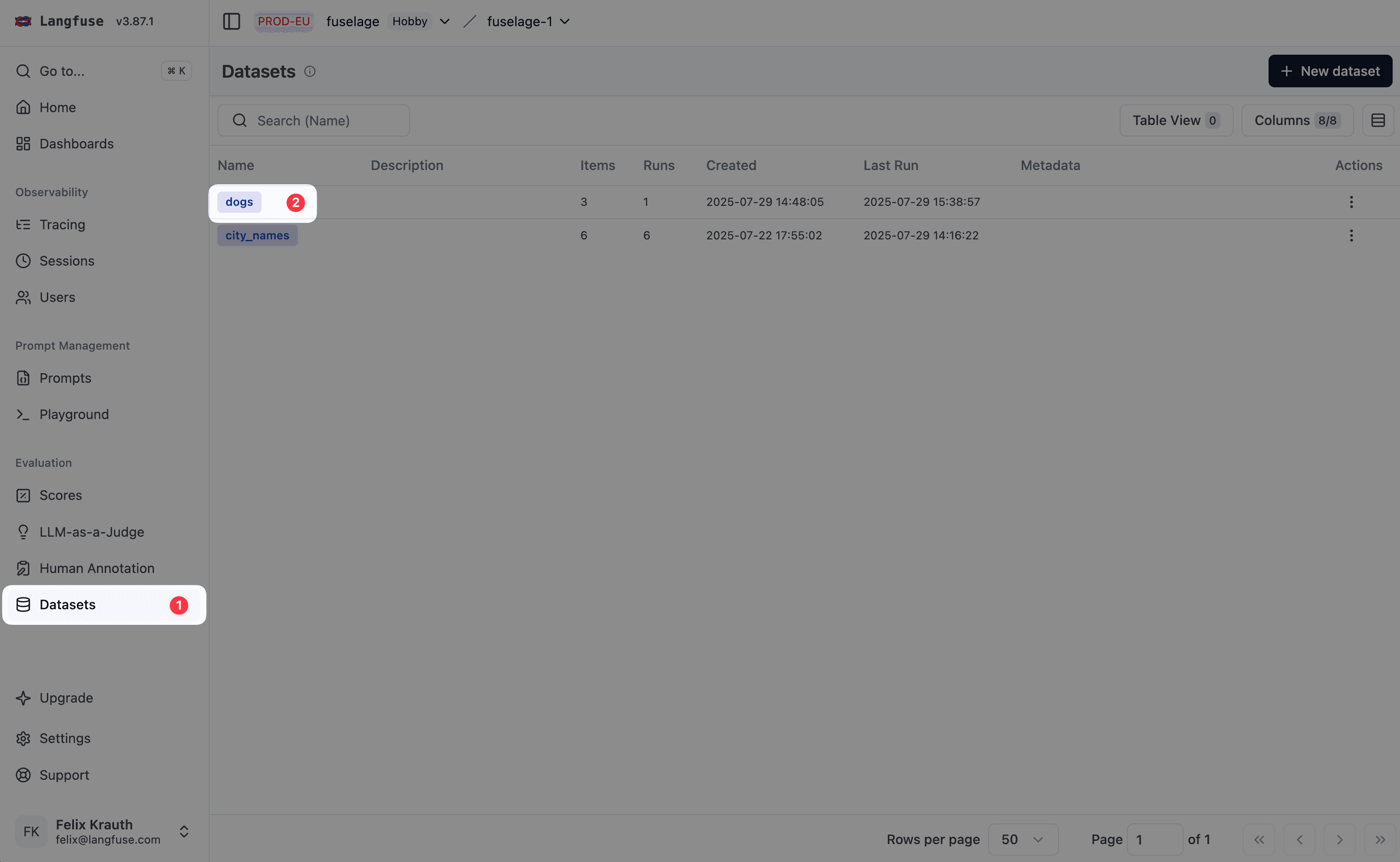
进入数据集
- 进入
Your Project>Datasets - 点击你想为其设置远程实验触发的数据集
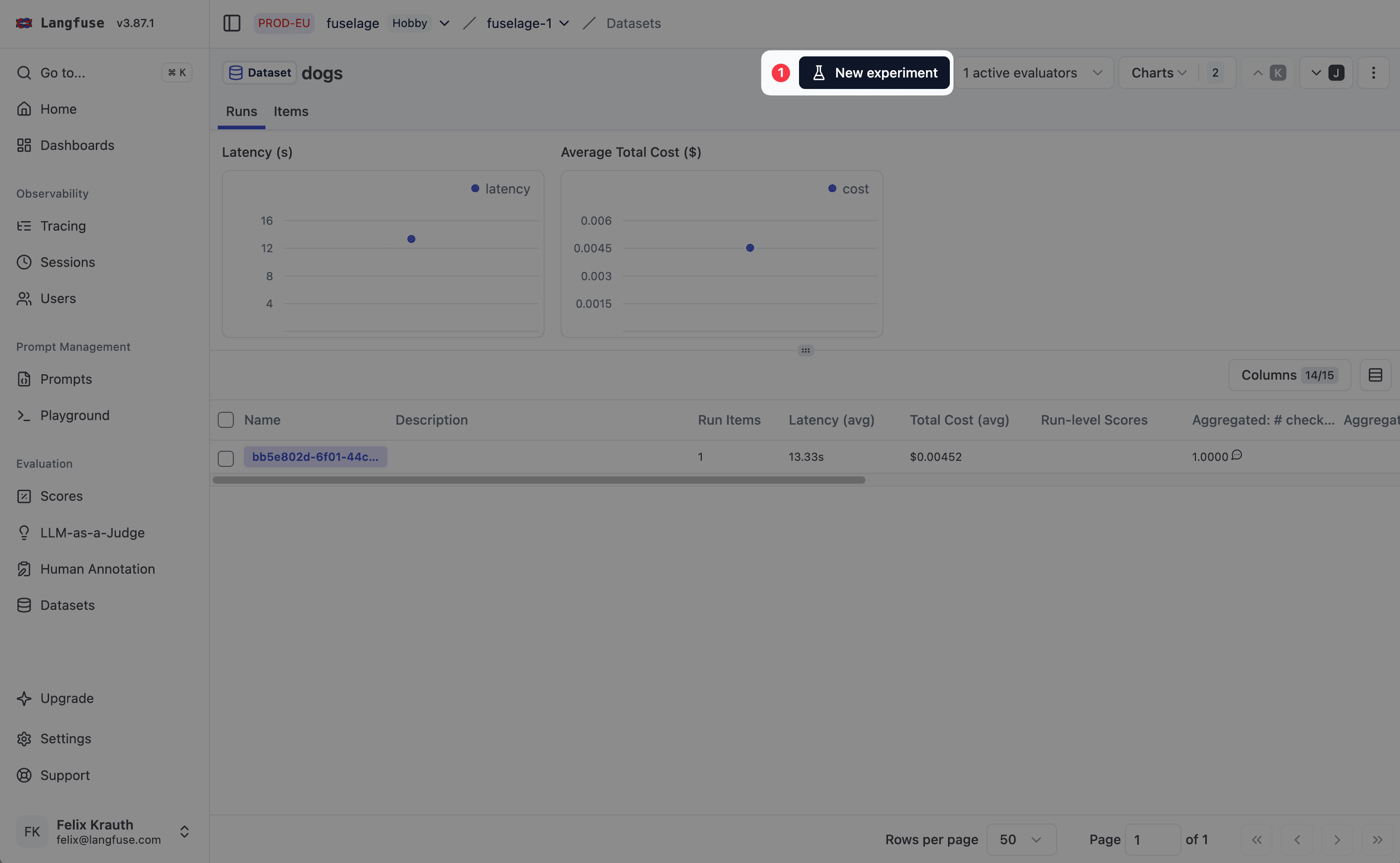
打开设置页面
点击 Start Experiment 打开设置页面
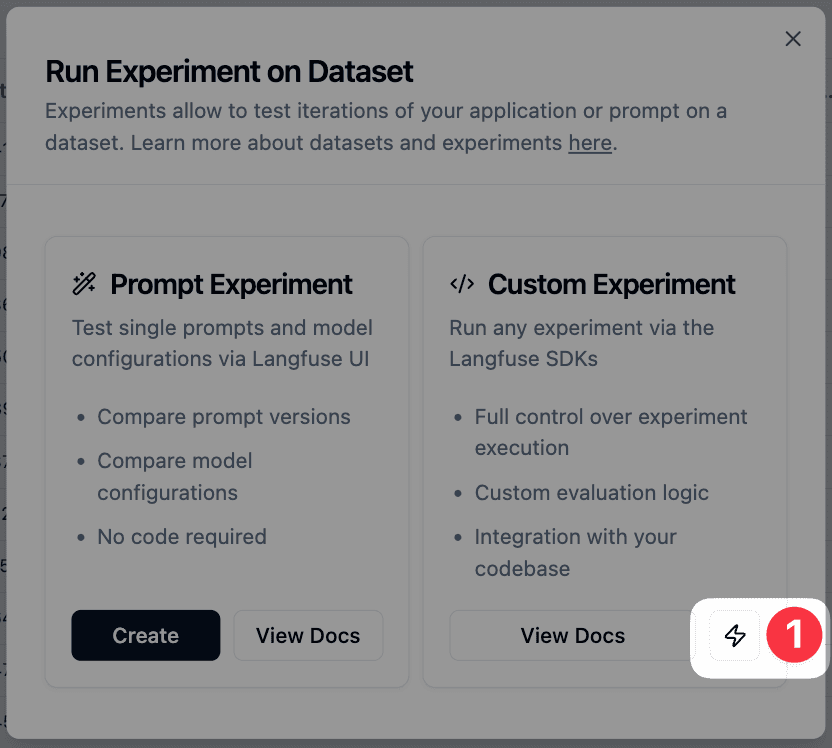
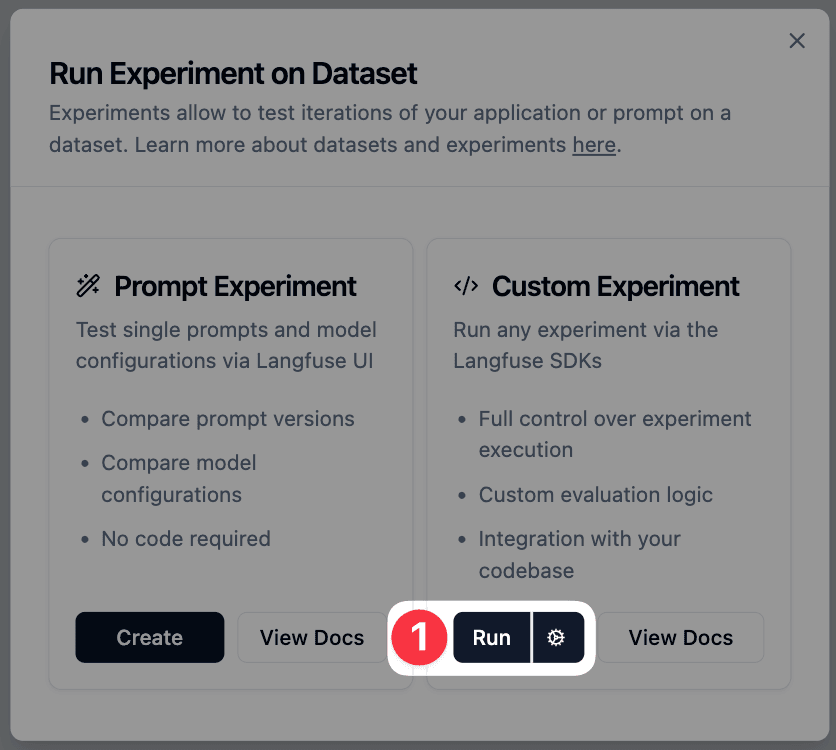
点击 Custom Experiment 下方的 ⚡
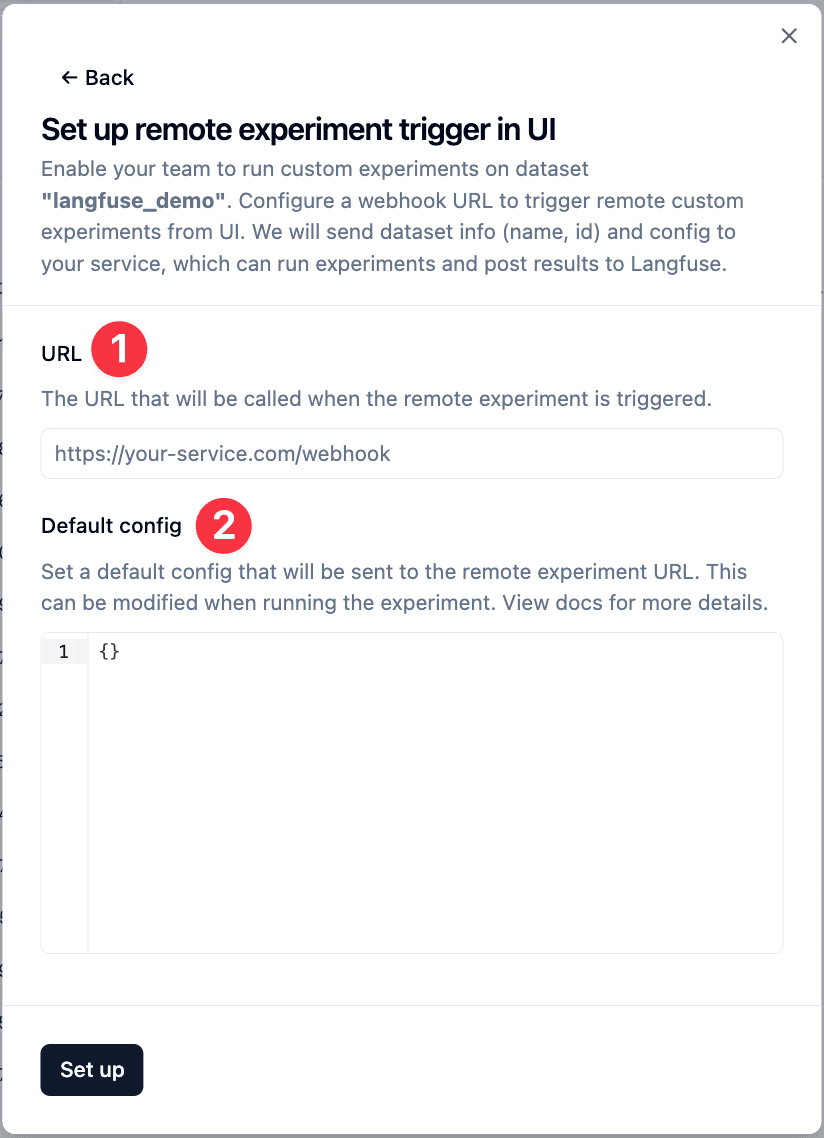
配置 webhook
输入外部评估服务的 URL,触发实验时该 URL 会接收 webhook。 指定一份默认配置,会被发送到你的 webhook。用户在触发实验时可以修改它。
触发实验
配置完成后,团队成员可以通过 Custom Experiment 选项下的 Run 按钮触发远程实验。Litefuse 会把数据集元信息(ID 和名称)以及任何自定义配置一起发到你的 webhook。
典型工作流:你的 webhook 收到请求 → 从 Litefuse 拉取数据集 → 在数据集条目上运行你的应用 → 评估结果 → 把分数作为新的实验运行写回 Litefuse。