Prompt 配置
Litefuse 中的 prompt config 是挂载在每个 prompt 上的可选任意 JSON 对象,可以被执行 LLM 调用的代码使用。常见用途包括:
- 存储模型参数(
model、temperature、max_tokens) - 存储结构化输出 schema(
response_format) - 存储 function/tool 定义(
tools、tool_choice)
由于 config 与 prompt 一起进行版本管理,你可以在一处统一管理所有参数。这样可以方便地切换模型、更新 schema 或调整行为,无需改动应用代码。
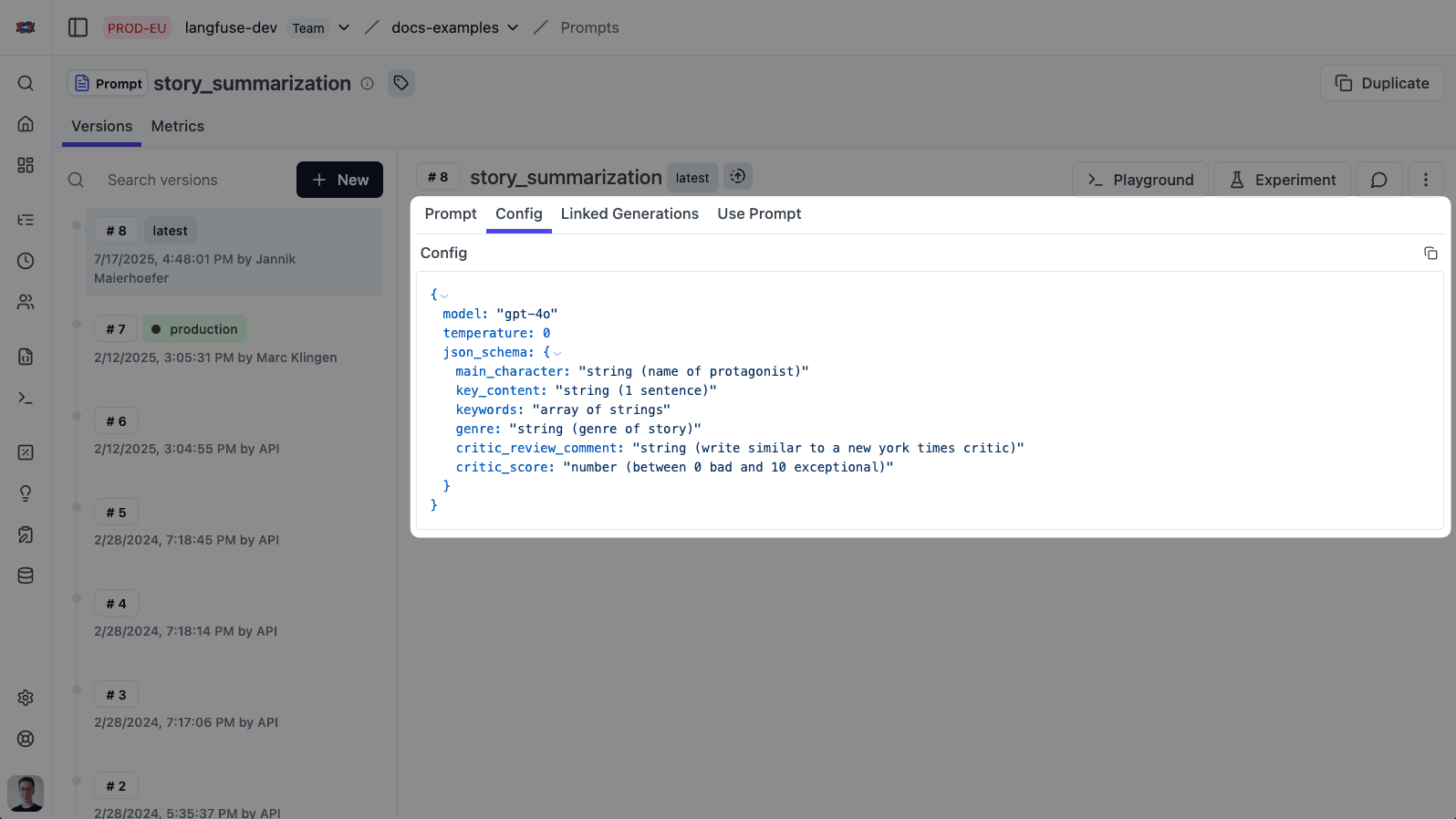
设置 config
设置 config 既可以通过 Litefuse 的 prompt UI,也可以通过 SDK 完成。
为你的 prompt 添加或编辑 config:
- 在 Litefuse UI 中进入 Prompt Management
- 选择或创建一个 prompt
- 在 prompt 编辑器中找到 Config 字段(JSON 编辑器)
- 输入合法的 JSON 对象作为 config
- 保存 prompt —— config 现在已经与该 prompt 版本一起进行版本管理
你可以直接在 Playground 中测试带 config 的 prompt。
使用 config
下面的示例从 prompt config 中读取模型和 temperature。
拉取 prompt 之后,通过 config 属性访问配置,并把值传给你的 LLM 调用。
下面的示例使用 Litefuse OpenAI 集成进行 tracing,但这是可选的。 你可以用任意方式调用 LLM(例如直接用 OpenAI SDK、其他厂商等)。
from langfuse import get_client

# Initialize Langfuse OpenAI client for this example.
from langfuse.openai import OpenAI
client = OpenAI()

langfuse = get_client()

# Fetch prompt
prompt = langfuse.get_prompt("invoice-extractor")

# Access config values
cfg = prompt.config
model = cfg.get("model")
temperature = cfg.get("temperature")

# Use in your LLM call
client.chat.completions.create(
  model=model,
  temperature=temperature,
  messages=prompt.prompt
)示例用例
结构化输出
当你需要 LLM 返回特定 JSON 格式的数据时,把 schema 存到 prompt config 中。这样 schema 就和 prompt 一起进行版本管理,可以无需改代码就更新它。
最佳实践: 使用 response_format,并设置 type: "json_schema" 和 strict: true 来强制约束 schema。这样可以确保模型输出严格匹配你期望的结构。如果你用的是 Pydantic 模型,可以用 type_to_response_format_param 转换 —— 参见 OpenAI 结构化输出指南。
from langfuse import get_client
from langfuse.openai import OpenAI

langfuse = get_client()
client = OpenAI()

# Fetch prompt with config containing response_format
prompt = langfuse.get_prompt("invoice-extractor")
system_message = prompt.compile()

# Extract parameters from config
cfg = prompt.config

# Example config:
# {
#   "response_format": {
#     "type": "json_schema",
#     "json_schema": {
#       "name": "invoice_schema",
#       "schema": {
#         "type": "object",
#         "properties": {
#           "invoice_number": { "type": "string" },
#           "total": { "type": "number" }
#         },
#         "required": ["invoice_number", "total"],
#         "additionalProperties": false
#       },
#       "strict": true
#     }
#   }
# }

response_format = cfg.get("response_format")

res = client.chat.completions.create(
  model="gpt-4o",
  messages=[
    {"role": "system", "content": system_message},
    {"role": "user", "content": "Extract invoice number and total from: ..."},
  ],
  response_format=response_format,
  langfuse_prompt=prompt,  # Links this generation to the prompt version in Langfuse
)

# Response is guaranteed to match your schema
content = res.choices[0].message.content
函数调用
对于 agent 和使用工具的应用,可以把函数定义存到 prompt config 中。这样你就能把可用工具与 prompt 一起进行版本管理和更新。
最佳实践: 把 tools(包含 JSON Schema 参数的函数定义)和 tool_choice 存到 config 中。这样函数签名也跟着进行版本管理,并且无需部署代码改动就能添加、修改或移除工具。
from langfuse import get_client
from langfuse.openai import OpenAI

langfuse = get_client()
client = OpenAI()

# Fetch prompt with config containing tools
prompt = langfuse.get_prompt("weather-agent")
system_message = prompt.compile()

# Extract parameters from config
cfg = prompt.config

# Example config:
# {
#   "tools": [
#     {
#       "type": "function",
#       "function": {
#         "name": "get_current_weather",
#         "description": "Get the current weather in a given location",
#         "parameters": {
#           "type": "object",
#           "properties": {
#             "location": { "type": "string", "description": "City and country" },
#             "unit": { "type": "string", "enum": ["celsius", "fahrenheit"] }
#           },
#           "required": ["location"],
#           "additionalProperties": false
#         }
#       }
#     }
#   ],
#   "tool_choice": { "type": "auto" }
# }

tools = cfg.get("tools", [])
tool_choice = cfg.get("tool_choice")

res = client.chat.completions.create(
  model="gpt-4o",
  messages=[
    {"role": "system", "content": system_message},
    {"role": "user", "content": "What's the weather in Berlin?"},
  ],
  tools=tools,
  tool_choice=tool_choice,
  langfuse_prompt=prompt,  # Links this generation to the prompt version in Langfuse
)
完整的端到端示例,参见 OpenAI Functions cookbook 和结构化输出 cookbook。