在 Litefuse 中 Trace Claude Agent SDK JS/TS


Claude Agent SDK 是 Anthropic 用 TypeScript 构建 AI Agent 的开源框架。将 Claude Agent SDK 与 Litefuse 结合,你可以在开发和生产环境中 trace、监控并分析每一个 Agent 步骤、工具调用和模型响应。
本 notebook 演示如何使用 OpenInference 提供的 ClaudeAgentSDKInstrumentation 库自动 instrument Claude Agent SDK 调用,并将 OpenTelemetry span 发送到 Litefuse。
什么是 Claude Agent SDK?
Claude Agent SDK 是 Anthropic 用于构建 AI Agent 的开源框架。它通过query()函数提供简洁的 API,用于创建可调用工具的 Agent,原生支持 MCP server 和自定义工具。
什么是 Litefuse?
Litefuse 是一个用于 LLM 可观测性与监控的开源平台。它通过捕获元数据、prompt 详情、token 使用、延迟等信息,帮助你 trace 和监控 AI 应用。
第 1 步:安装依赖
安装所需依赖:
npm install @anthropic-ai/claude-agent-sdk @arizeai/openinference-instrumentation-claude-agent-sdk @langfuse/otel @opentelemetry/sdk-node注意:本 cookbook 使用 Deno.js 执行,导入包以及设置环境变量的语法与 Node.js 不同。在 Node.js 应用中流程类似,但使用标准的
npm包以及process.env。
第 2 步:配置环境
设置你的 Litefuse 与 Anthropic API Key。你可以通过注册免费的 Litefuse Cloud 账号或 自托管 Litefuse 获取 Litefuse Key。Anthropic API Key 可在 Anthropic Console 获取。
Deno.env.set("ANTHROPIC_API_KEY", "sk-ant-...");

Deno.env.set("LANGFUSE_PUBLIC_KEY", "pk-lf-...");
Deno.env.set("LANGFUSE_SECRET_KEY", "sk-lf-...");

Deno.env.set("LANGFUSE_BASE_URL", "https://litefuse.cloud");
第 3 步:使用 Litefuse 初始化 OpenTelemetry
使用 OpenTelemetry SDK 配合 LangfuseSpanProcessor 以及 OpenInference 提供的 ClaudeAgentSDKInstrumentation。该 instrumentation 会自动捕获 Agent 运行和工具调用,并将其作为 OpenTelemetry span 发送到 Litefuse。
我们还提供了一个自定义的 shouldExportSpan 过滤器,在 Litefuse 默认过滤器的基础上额外包含来自 @arizeai/openinference-instrumentation-claude-agent-sdk instrumentation scope 的 span。
import { NodeSDK } from "npm:@opentelemetry/sdk-node";
import { LangfuseSpanProcessor, isDefaultExportSpan } from "npm:@langfuse/otel";
import { ClaudeAgentSDKInstrumentation } from "npm:@arizeai/openinference-instrumentation-claude-agent-sdk";

import * as ClaudeAgentSDKModule from "npm:@anthropic-ai/claude-agent-sdk";

// Create mutable copy — Deno's ESM namespace objects are read-only
const ClaudeAgentSDK = { ...ClaudeAgentSDKModule };

const instrumentation = new ClaudeAgentSDKInstrumentation();
instrumentation.manuallyInstrument(ClaudeAgentSDK);

const sdk = new NodeSDK({
  spanProcessors: [
    new LangfuseSpanProcessor({
      shouldExportSpan: ({ otelSpan }) =>
        isDefaultExportSpan(otelSpan) ||
        otelSpan.instrumentationScope.name ===
          "@arizeai/openinference-instrumentation-claude-agent-sdk",
    }),
  ],
  instrumentations: [instrumentation],
});

sdk.start();
第 4 步:运行 Agent
使用 Claude Agent SDK 的 query() 函数运行 Agent。所有 Agent 步骤、工具调用以及模型 completion 都会自动被 trace 并发送到 Litefuse。
const { query } = ClaudeAgentSDK;

for await (const message of query({
  prompt: "What is the capital of France? Answer in a single sentence.",
  options: {
    model: "claude-sonnet-4-5",
  },
})) {
  if (message.type === "assistant") {
    console.log(message.message.content);
  }
}

await sdk.shutdown();
在 Litefuse 中查看 Trace
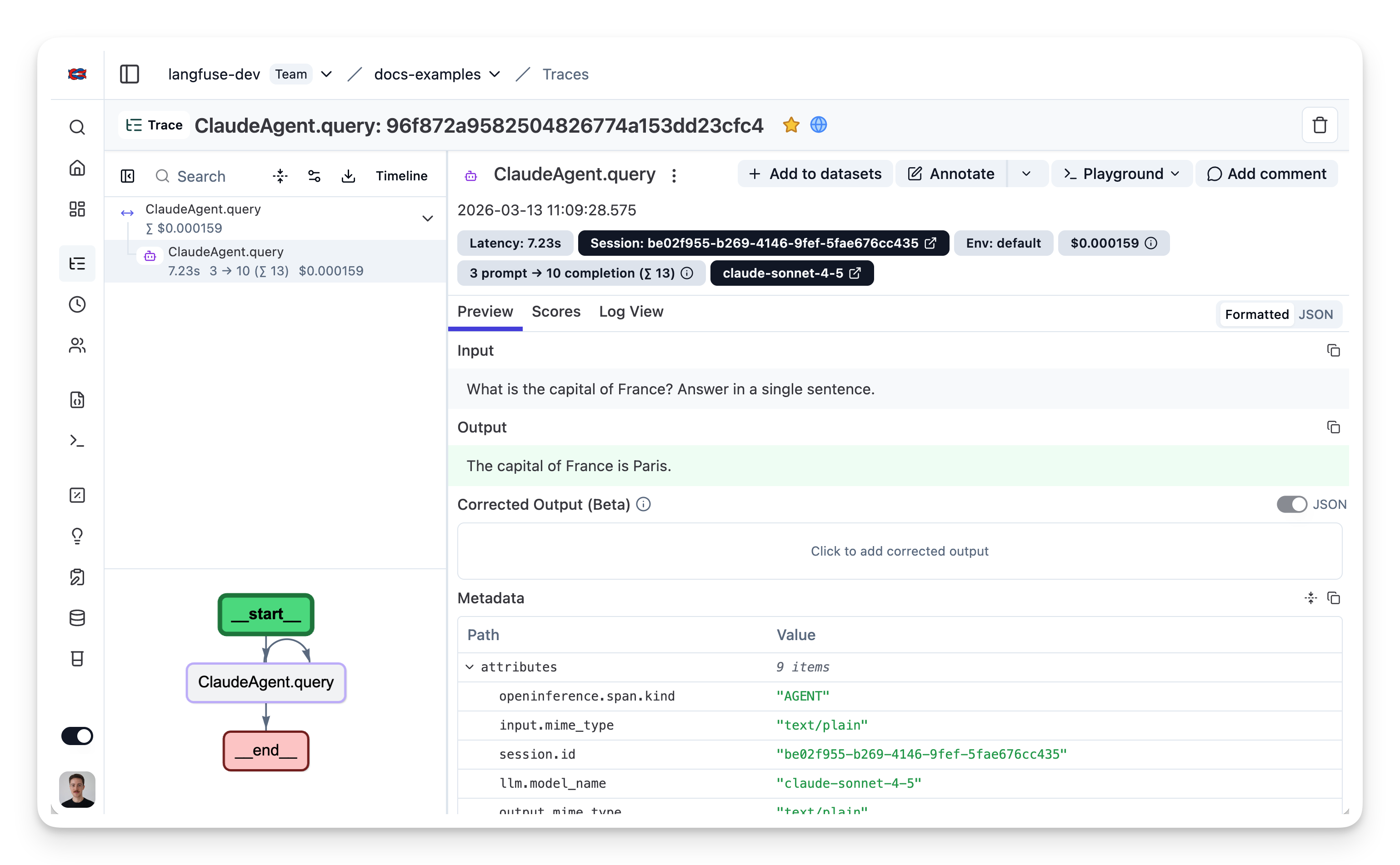
运行 Agent 后,进入你的 Litefuse Trace 表。你将看到 Agent 执行的详细 trace,包括每一个 Agent 步骤、工具调用、输入、输出以及性能指标的洞察。
Interoperability with the JS/TS SDK
You can use this integration together with the Litefuse SDKs to add additional attributes or group observations into a single trace.
The Context Manager allows you to wrap your instrumented code using context managers (with with statements), which allows you to add additional attributes to the trace. Any observation created inside the callback will automatically be nested under the active observation, and the observation will be ended when the callback finishes.
import { startActiveObservation, propagateAttributes } from "npm:@langfuse/tracing";

await startActiveObservation("context-manager", async (span) => {
  span.update({
    input: { query: "What is the capital of France?" },
  });

  // Propagate userId to all child observations
  await propagateAttributes(
    {
      userId: "user-123",
      sessionId: "session-123",
      metadata: {
        source: "api",
        region: "us-east-1",
      },
      tags: ["api", "user"],
      version: "1.0.0",
    },
    async () => {

      // YOUR CODE HERE
      const { text } = await generateText({
        model: openai("gpt-5"),
        prompt: "What is the capital of France?",
        experimental_telemetry: { isEnabled: true },
      });
    }
  );
  span.update({ output: "Paris" });
});
Learn more about using the Context Manager in the Langfuse SDK instrumentation docs.
Troubleshooting
No traces appearing
First, enable debug mode in the JS/TS SDK:
export LANGFUSE_LOG_LEVEL="DEBUG"Then run your application and check the debug logs:
- OTel spans appear in the logs: Your application is instrumented correctly but traces are not reaching Litefuse. To resolve this:
- Call
forceFlush()at the end of your application to ensure all traces are exported. This is especially important in short-lived environments like serverless functions. - Verify that you are using the correct API keys and base URL.
- Call
- No OTel spans in the logs: Your application is not instrumented correctly. Make sure the instrumentation runs before your application code.
Unwanted observations in Litefuse
The Langfuse SDK is based on OpenTelemetry. Other libraries in your application may emit OTel spans that are not relevant to you. These still count toward your billable units, so you should filter them out. See Unwanted spans in Litefuse for details.
Missing attributes
Some attributes may be stored in the metadata object of the observation rather than being mapped to the Litefuse data model. If a mapping or integration does not work as expected, please raise an issue on GitHub.
Next Steps
Once you have instrumented your code, you can manage, evaluate and debug your application: