通过 Kong API Gateway 用 Litefuse 追踪 AI API
本指南演示如何把 Litefuse 集成 到 Kong API Gateway,无需修改应用代码即可自动监控、调试和评估 AI API 调用。
什么是 Kong API Gateway?:Kong Gateway 是一个云原生、平台无关、可扩展的 API 网关,用于管理 API 与微服务。它充当 API 流量的中央控制点,提供鉴权、限流、监控等能力。
什么是 Litefuse?:Litefuse 是面向 AI Agent 的开源可观测性平台,帮助你可视化和监控 LLM 调用、工具使用、成本、延迟等。
特性
- 零代码插桩:自动追踪通过 Kong 转发的 AI API 调用
- 多 provider 支持:OpenAI 兼容 API、vLLM 与自定义 provider
- 丰富上下文捕获:用户会话、对话和元数据
- 性能指标:延迟、吞吐量和 token 级分析
- 非阻塞架构:异步运行,开销极小
- 生产就绪:错误恢复与优雅降级
支持的 AI provider
| Provider | 端点 | 状态 |
|---|---|---|
| OpenAI 兼容 | /v1/chat/completions、/v1/completions、/v1/embeddings | ✅ |
| vLLM | /generate、/v1/completions | ✅ |
| 自定义 provider | 可扩展的检测框架 | ✅ |
1. 安装 Kong 插件
下面用其中一种方式安装 Kong Litefuse Tracing 插件。
前置条件
- 已安装并运行 Kong Gateway 3.0+
- 一个 Litefuse 账号(注册)
- 可访问 Kong 的 Admin API
方式 1:通过 LuaRocks(推荐)
luarocks install kong-plugin-ai-tracing方式 2:从源码安装
git clone https://github.com/Ramtinboreili/kong-langfuse-tracing.git
cd kong-langfuse-tracing
luarocks make rockspec/kong-plugin-ai-tracing-1.0.0-1.rockspec
方式 3:Docker Compose
version: '3.8'
services:
  kong:
    image: kong:3.4
    environment:
      KONG_PLUGINS: bundled,ai-tracing
      KONG_LUA_PACKAGE_PATH: /usr/local/kong/plugins/?.lua;;
      KONG_DATABASE: postgres
      KONG_PG_HOST: postgres
      KONG_PG_USER: kong
      KONG_PG_PASSWORD: kong
    volumes:
      - ./plugins/ai-tracing:/usr/local/kong/plugins/ai-tracing
    ports:
      - "8000:8000"
      - "8001:8001"
在 Kong 中启用插件
把插件加入到 Kong 配置:
# In kong.conf
plugins = bundled,ai-tracing

# Or via environment variable
export KONG_PLUGINS=bundled,ai-tracing
重启 Kong Gateway 来加载插件。
2. 配置 Litefuse 凭据
接下来配置你的 Litefuse API Key。可以通过免费注册 Litefuse Cloud 或 自托管 Litefuse 获取。
# Get keys for your project from the project settings page
export LANGFUSE_PUBLIC_KEY="pk-lf-..."
export LANGFUSE_SECRET_KEY="sk-lf-..."
export LANGFUSE_BASE_URL="https://litefuse.cloud"
3. 在 Kong Service 上启用插件
通过 Kong Admin API 给你的 AI service 配置插件:
curl -X POST http://localhost:8001/services/YOUR_AI_SERVICE/plugins \
  -H "Content-Type: application/json" \
  -d '{
    "name": "ai-tracing",
    "config": {
      "langfuse_enabled": true,
      "langfuse_public_key": "pk-lf-...",
      "langfuse_secret_key": "sk-lf-...",
      "langfuse_endpoint": "https://litefuse.cloud/api/public/ingestion",
      "environment": "production"
    }
  }'
配置参数
| 参数 | 类型 | 默认值 | 必填 | 说明 |
|---|---|---|---|---|
langfuse_enabled | boolean | false | 是 | 启用/禁用 Litefuse 集成 |
langfuse_public_key | string | - | 是 | 你的 Litefuse public API Key |
langfuse_secret_key | string | - | 是 | 你的 Litefuse secret API Key |
langfuse_endpoint | string | https://litefuse.cloud/api/public/ingestion | 否 | Litefuse API 端点 |
langfuse_timeout | number | 5000 | 否 | HTTP 超时(毫秒) |
environment | string | production | 否 | 用于过滤 trace 的环境标签 |
log_level | string | info | 否 | 日志级别(debug、info、warn、error) |
对于自托管 Litefuse 实例,请把 langfuse_endpoint 更新为你的实例 URL,再加上 /api/public/ingestion。
4. Hello World 示例
下面通过 Kong Gateway 发送一个简单的 AI 请求。插件会自动捕获请求并在 Litefuse 中创建一个 trace。
curl -X POST http://kong-gateway:8000/v1/chat/completions \
  -H "Content-Type: application/json" \
  -H "X-User-Id: user-12345" \
  -d '{
    "model": "gpt-4",
    "messages": [
      {"role": "user", "content": "Explain quantum computing"}
    ],
    "temperature": 0.7,
    "max_tokens": 500
  }'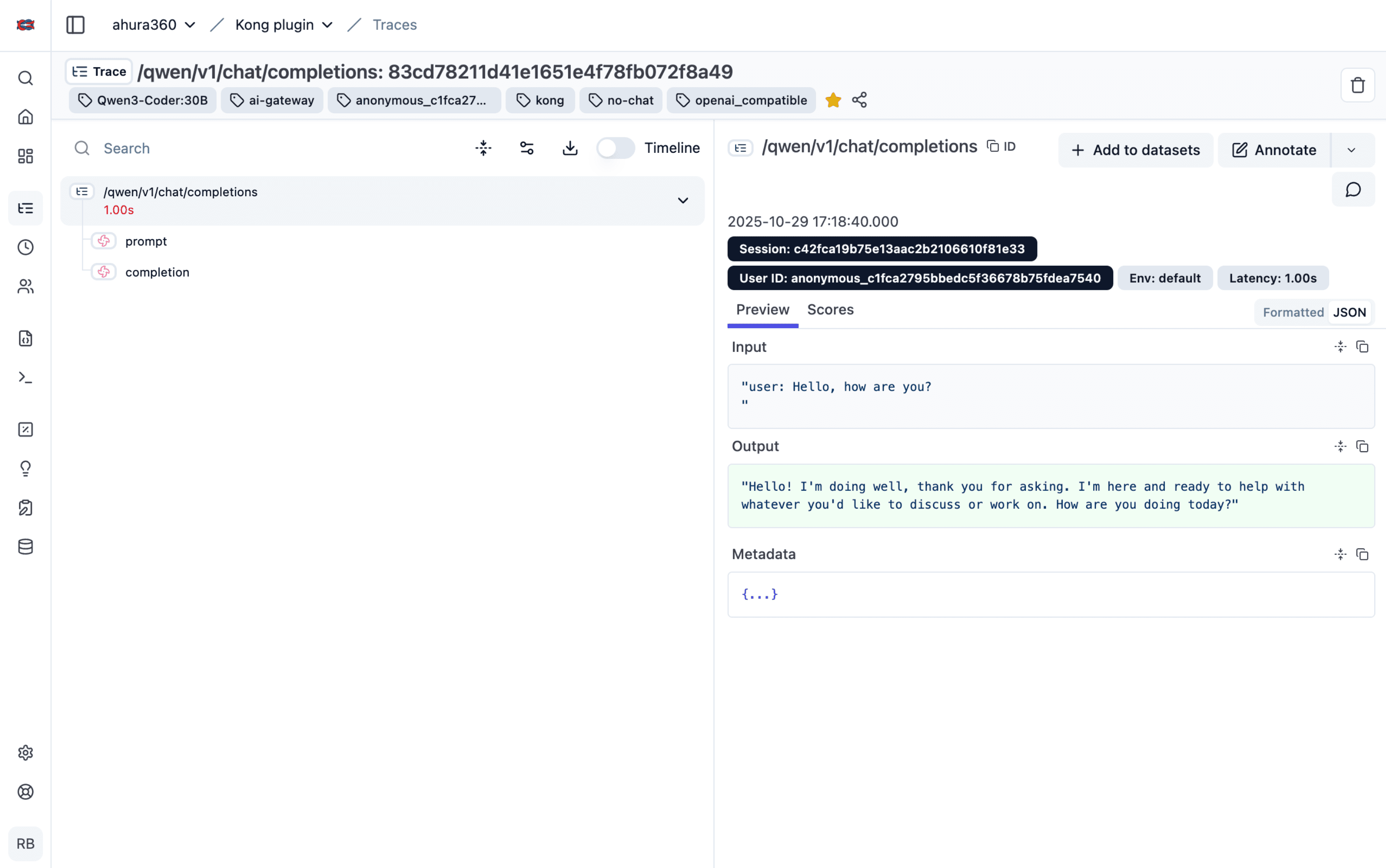
点击上面的链接(或你自己的项目链接)即可查看所有 observation、token 用量、延迟等内容,便于调试或优化。
5. 通过 header 添加上下文
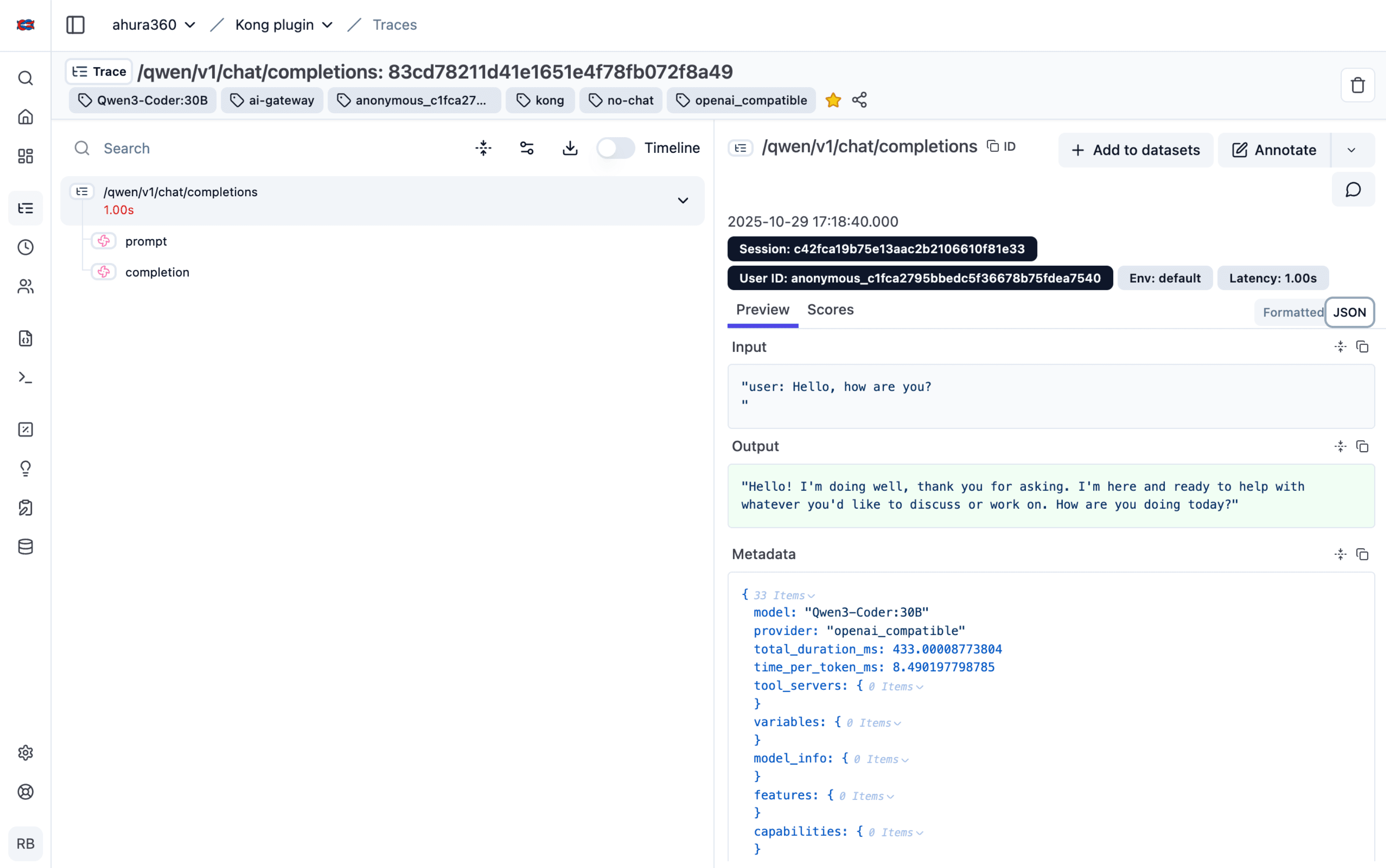
通过 HTTP header 为 trace 增加用户和会话上下文。这样你可以按用户、会话或对话过滤和分析 trace。
curl -X POST http://kong-gateway:8000/v1/chat/completions \
  -H "Content-Type: application/json" \
  -H "X-User-Id: user-12345" \
  -H "X-Session-Id: session-abc" \
  -H "X-Chat-Id: chat-789" \
  -H "X-Organization-Id: org-acme" \
  -d '{
    "model": "gpt-4",
    "messages": [
      {"role": "user", "content": "What is machine learning?"}
    ]
  }'
支持的上下文 header
| Header | 说明 | 示例 |
|---|---|---|
X-User-Id | 用户唯一标识 | user-12345 |
X-Session-Id | 会话标识 | session-abc |
X-Chat-Id | 对话/聊天 ID | chat-789 |
X-Message-Id | 单条消息 ID | msg-54321 |
X-Organization-Id | 组织上下文 | org-acme |
X-Project-Id | 项目标识 | project-xyz |
6. 添加 metadata
在请求体中加入额外的 metadata,得到更丰富的 trace。这对追踪功能、实验或用户级变量很有用。
curl -X POST http://kong-gateway:8000/v1/chat/completions \
  -H "Content-Type: application/json" \
  -H "X-User-Id: user-12345" \
  -d '{
    "model": "gpt-4",
    "messages": [
      {"role": "user", "content": "Recommend a movie"}
    ],
    "metadata": {
      "user_id": "user-12345",
      "chat_id": "chat-789",
      "project_id": "project-xyz",
      "features": {
        "web_search": true,
        "image_generation": false
      },
      "variables": {
        "user_tier": "premium",
        "language": "en"
      }
    }
  }'
Python / FastAPI 应用
import httpx
from fastapi import FastAPI

KONG_URL = "http://kong-gateway:8000"

async def chat_with_ai(user_id: str, session_id: str, message: str):
    async with httpx.AsyncClient() as client:
        response = await client.post(
            f"{KONG_URL}/v1/chat/completions",
            json={
                "model": "gpt-4",
                "messages": [{"role": "user", "content": message}],
                "metadata": {
                    "user_id": user_id,
                    "session_id": session_id
                }
            },
            headers={
                "Content-Type": "application/json",
                "X-User-Id": user_id,
                "X-Session-Id": session_id
            }
        )
        return response.json()

# Usage
result = await chat_with_ai("user-123", "session-abc", "Hello!")
print(result)
捕获的数据
插件会在 Litefuse 中创建结构化的 trace:
{
  "trace": {
    "id": "trace-12345",
    "name": "/v1/chat/completions",
    "userId": "user-12345",
    "sessionId": "session-abc",
    "metadata": {
      "provider": "openai_compatible",
      "model": "gpt-4",
      "status_code": 200,
      "environment": "production",
      "total_duration_ms": 1250,
      "time_per_token_ms": 12.5,
      "throughput_tokens_per_second": 80.0
    }
  },
  "observations": [
    {
      "type": "generation",
      "name": "chat_completion",
      "usage": {
        "promptTokens": 150,
        "completionTokens": 25,
        "totalTokens": 175
      },
      "metadata": {
        "temperature": 0.7,
        "max_tokens": 500,
        "finish_reason": "stop"
      }
    }
  ]
}
性能指标
- 总时长:端到端请求处理时间
- 每 token 耗时:每个生成 token 的平均延迟
- 吞吐量:每秒处理的 token 数
Token 分析
- Prompt token:输入 token 数
- Completion token:输出 token 数
- 总 token:合计用量
- 成本追踪:监控请求间的开销
按环境差异化配置
可以为开发、预发和生产环境配置不同的 Litefuse 项目。
开发环境
curl -X POST http://localhost:8001/services/ai-service-dev/plugins \
  --data "name=ai-tracing" \
  --data "config.langfuse_enabled=true" \
  --data "config.langfuse_public_key=pk-lf-dev-xxx" \
  --data "config.langfuse_secret_key=sk-lf-dev-xxx" \
  --data "config.environment=development" \
  --data "config.log_level=debug"
生产环境
curl -X POST http://localhost:8001/services/ai-service-prod/plugins \
  --data "name=ai-tracing" \
  --data "config.langfuse_enabled=true" \
  --data "config.langfuse_public_key=pk-lf-prod-xxx" \
  --data "config.langfuse_secret_key=sk-lf-prod-xxx" \
  --data "config.environment=production" \
  --data "config.log_level=warn"
故障排查
Litefuse 中看不到数据
- 核对凭据:确认 Litefuse API Key 正确
- 检查连通性:确认 Kong 能连到 Litefuse 端点
# View plugin status
curl http://localhost:8001/services/YOUR_SERVICE/plugins | \
  jq '.data[] | select(.name=="ai-tracing")'

# Check Kong logs
docker-compose logs kong | grep "ai-tracing"

# Test Litefuse endpoint
curl -I https://litefuse.cloud/api/public/ingestion- 查看日志:在 Kong 日志中搜索错误
缺少用户上下文
- 确认请求中正确设置了 HTTP header
- 确认 header 名称符合预期格式(是
X-User-Id,而不是X-UserId) - 确认在所有代理中都转发了这些 header
性能问题
- 在高负载时监控 Kong 指标
- 如出现超时,调整
langfuse_timeout - 在 Kong 日志中查看异步定时器性能
启用 debug 日志
curl -X PATCH http://localhost:8001/plugins/PLUGIN_ID \
  --data "config.log_level=debug"
进阶用法
自定义 AI provider
通过修改 handler.lua 中的检测逻辑,可以扩展插件支持更多 AI provider:
local function detect_ai_provider(path, headers)
  if path:find("/v1/chat/completions") then
    return "openai_compatible"
  elseif path:find("/anthropic") then
    return "anthropic"
  elseif path:find("/cohere") then
    return "cohere"
  else
    return "custom_provider"
  end
end
与其他 Kong 插件配合
AI tracing 插件可以和其他 Kong 插件一起工作:
- 限流:与限流插件配合控制成本
- 鉴权:搭配 key-auth 或 JWT 进行用户识别
- Request Transformer:在 tracing 之前修改请求
安全最佳实践:
- 安全地存放 Litefuse API Key(使用 Kong 的 vault 集成或环境变量)
- 审查导出数据是否符合 PII 合规要求
- 在生产环境限制对插件配置的访问
- 确保 Kong 与 Litefuse 之间使用 HTTPS 通信
- 针对敏感内容考虑数据保留策略
资源
- GitHub 仓库:kong-langfuse-tracing
- Kong 文档:Kong Gateway Docs
- 报告问题:GitHub Issues
- 维护者:Ramtin Boreili(ramtin.bor7hp@gmail.com)