使用 Litefuse 追踪 Temporal 工作流
本 notebook 演示如何将 Litefuse 集成到你的 Temporal 工作流中,用于监控、调试和评估你的 AI Agent 与 LLM 驱动的应用。
什么是 Temporal?:Temporal 是一个持久化执行平台,即使在出现故障的情况下也能保证应用代码的执行。它为长时间运行的工作流和分布式应用提供可靠性、可扩展性和可见性。
什么是 Litefuse?:Litefuse 是面向 AI Agent 与 LLM 应用的开源可观测性平台。它帮助你可视化和监控 LLM 调用、工具使用、成本、延迟等指标。
使用场景:基于 Temporal 的深度研究 Agent
在本示例中,我们会构建一个 深度研究 Agent,它会:
- 使用 Temporal 工作流来编排长时间运行的研究任务
- 借助 OpenAI Agents SDK 进行研究规划和内容生成
- 通过 OpenTelemetry 将所有可观测性数据发送到 Litefuse
这一套配置可以让你:
- 追踪工作流执行:查看所有工作流运行、活动以及它们的状态
- 监控 LLM 调用:查看 prompt、补全内容、token 用量和成本
- 调试故障:识别研究流水线中的瓶颈与错误
- 评估质量:随时间评估研究产出的质量
1. 安装依赖
安装 Temporal SDK、OpenTelemetry 相关包以及 Litefuse:
%pip install temporalio openai openai-agents langfuse openinference-instrumentation-openai-agents2. 配置环境变量与 API Key
设置你的 Litefuse、Temporal 与 OpenAI 凭证。你可以通过注册免费的 Litefuse Cloud 账号获取 Litefuse Key,或者自托管 Litefuse。
import os

# 从项目设置页面获取你项目的 Key:https://litefuse.cloud
os.environ["LANGFUSE_PUBLIC_KEY"] = "pk-lf-..."
os.environ["LANGFUSE_SECRET_KEY"] = "sk-lf-..."
os.environ["LANGFUSE_BASE_URL"] = "https://litefuse.cloud"

# 你的 openai key
os.environ["OPENAI_API_KEY"] = "sk-proj-..."

# Temporal 服务器地址(使用 Temporal Cloud 或本地开发服务器)
os.environ["TEMPORAL_HOST"] = "localhost:7233"
os.environ.setdefault("TEMPORAL_NAMESPACE", "default")
os.environ.setdefault("TEMPORAL_TASK_QUEUE", "agents-task-queue")
‘agents-task-queue’
3. 为 OpenAI Agents 配置 OpenTelemetry 追踪
使用 OpenAIAgentsInstrumentor 库包装 OpenAI Agents SDK,将 OpenTelemetry span 发送到 Litefuse。
from openinference.instrumentation.openai_agents import OpenAIAgentsInstrumentor

OpenAIAgentsInstrumentor().instrument()
4. 初始化 Langfuse 客户端
验证 Litefuse 连接:
from langfuse import get_client

langfuse = get_client()

# 验证连接
if langfuse.auth_check():
    print("✅ Langfuse client is authenticated and ready!")
else:
    print("❌ Authentication failed. Please check your credentials and host.")
5. 定义 Temporal 活动
创建将作为研究工作流一部分执行的活动。每个活动代表研究流程中的一个离散步骤。
from __future__ import annotations

import asyncio
from temporalio import workflow
from agents import Agent, RunConfig, Runner, WebSearchTool, custom_span, gen_trace_id, trace
from agents.model_settings import ModelSettings
from pydantic import BaseModel

# Planner Agent Models
class WebSearchItem(BaseModel):
    reason: str
    "Your reasoning for why this search is important to the query."

    query: str
    "The search term to use for the web search."

class WebSearchPlan(BaseModel):
    searches: list[WebSearchItem]
    """A list of web searches to perform to best answer the query."""

# Writer Agent Models
class ReportData(BaseModel):
    short_summary: str
    """A short 2-3 sentence summary of the findings."""

    markdown_report: str
    """The final report"""

    follow_up_questions: list[str]
    """Suggested topics to research further"""

# Agent factory functions
def new_planner_agent():
    return Agent(
        name="PlannerAgent",
        instructions=(
            "You are a helpful research assistant. Given a query, come up with a set of web searches "
            "to perform to best answer the query. Output between 5 and 20 terms to query for."
        ),
        model="gpt-4o",
        output_type=WebSearchPlan,
    )

def new_search_agent():
    return Agent(
        name="Search agent",
        instructions=(
            "You are a research assistant. Given a search term, you search the web for that term and "
            "produce a concise summary of the results. The summary must 2-3 paragraphs and less than 300 "
            "words. Capture the main points. Write succinctly, no need to have complete sentences or good "
            "grammar. This will be consumed by someone synthesizing a report, so its vital you capture the "
            "essence and ignore any fluff. Do not include any additional commentary other than the summary "
            "itself."
        ),
        tools=[WebSearchTool()],
        model_settings=ModelSettings(tool_choice="required"),
    )

def new_writer_agent():
    return Agent(
        name="WriterAgent",
        instructions=(
            "You are a senior researcher tasked with writing a cohesive report for a research query. "
            "You will be provided with the original query, and some initial research done by a research "
            "assistant.\n"
            "You should first come up with an outline for the report that describes the structure and "
            "flow of the report. Then, generate the report and return that as your final output.\n"
            "The final output should be in markdown format, and it should be lengthy and detailed. Aim "
            "for 5-10 pages of content, at least 1000 words."
        ),
        model="o3-mini",
        output_type=ReportData,
    )
6. 定义 Temporal 工作流
创建一个工作流来编排研究活动。Temporal 保证工作流可靠执行,即使发生故障也是如此。
class ResearchManager:
    def __init__(self):
        self.run_config = RunConfig()
        self.search_agent = new_search_agent()
        self.planner_agent = new_planner_agent()
        self.writer_agent = new_writer_agent()

    async def run(self, query: str) -> str:
        trace_id = gen_trace_id()
        with trace("Research trace", trace_id=trace_id):
            search_plan = await self._plan_searches(query)
            search_results = await self._perform_searches(search_plan)
            report = await self._write_report(query, search_results)

        return report.markdown_report

    async def _plan_searches(self, query: str) -> WebSearchPlan:
        result = await Runner.run(
            self.planner_agent,
            f"Query: {query}",
            run_config=self.run_config,
        )
        return result.final_output_as(WebSearchPlan)

    async def _perform_searches(self, search_plan: WebSearchPlan) -> list[str]:
        with custom_span("Search the web"):
            num_completed = 0
            tasks = [
                asyncio.create_task(self._search(item)) for item in search_plan.searches
            ]
            results = []
            for task in workflow.as_completed(tasks):
                result = await task
                if result is not None:
                    results.append(result)
                num_completed += 1
            return results

    async def _search(self, item: WebSearchItem) -> str | None:
        input = f"Search term: {item.query}\nReason for searching: {item.reason}"
        try:
            result = await Runner.run(
                self.search_agent,
                input,
                run_config=self.run_config,
            )
            return str(result.final_output)
        except Exception:
            return None

    async def _write_report(self, query: str, search_results: list[str]) -> ReportData:
        input = f"Original query: {query}\nSummarized search results: {search_results}"
        result = await Runner.run(
            self.writer_agent,
            input,
            run_config=self.run_config,
        )

        return result.final_output_as(ReportData)
from temporalio import workflow
@workflow.defn
class ResearchWorkflow:
@workflow.run
async def run(self, query: str) -> str:
return await ResearchManager().run(query)7. 运行工作流
当你执行研究工作流时,Temporal 的 OpenAIAgentsPlugin 与 OpenInference 的 OpenAIAgentsInstrumentor 都会将 OTel span 发送到 Litefuse。
注意:这需要一个正在运行的 Temporal 服务器。你可以使用以下命令启动本地开发服务器:
temporal server start-devimport sys
import os
from temporalio.client import Client
from temporalio.worker import Worker
from temporalio.contrib.openai_agents import OpenAIAgentsPlugin
from temporalio.worker import UnsandboxedWorkflowRunner
async def main():
tls = os.environ.get("TEMPORAL_TLS", "").lower() in ("1", "true", "yes")
api_key = os.environ.get("TEMPORAL_API_KEY")
plugin = OpenAIAgentsPlugin()
client = await Client.connect(
target_host=os.environ.get("TEMPORAL_ADDRESS", "localhost:7233"),
namespace=os.environ.get("TEMPORAL_NAMESPACE", "default"),
api_key=api_key or None,
tls=tls,
plugins=[plugin]
)
worker = Worker(
client,
task_queue=os.environ.get("TEMPORAL_TASK_QUEUE", "openai-agents-task-queue"),
workflows=[ResearchWorkflow],
workflow_runner=UnsandboxedWorkflowRunner()
)
async with worker:
handle = await client.start_workflow(
ResearchWorkflow.run,
id="research-workflow-01",
task_queue=os.environ.get("TEMPORAL_TASK_QUEUE", "openai-agents-task-queue"),
args=["Caribbean vacation spots in April, optimizing for surfing, hiking and water sports"],
)
result = await handle.result()
print("\nWorkflow result:\n", result)
await main()8. 在 Litefuse 中查看 Trace
运行工作流后,你可以在 Litefuse 中查看完整的 trace。该 trace 会展示:
- 工作流执行:完整的
ResearchWorkflow,包含耗时与状态 - 活动 span:每个活动(
plan_research、execute_research)作为嵌套 span - LLM 调用:OpenAI API 调用,包含 prompt、补全内容和 token 用量
- 成本追踪:基于 token 使用量估算的成本
- 延迟指标:每个组件花费的时间
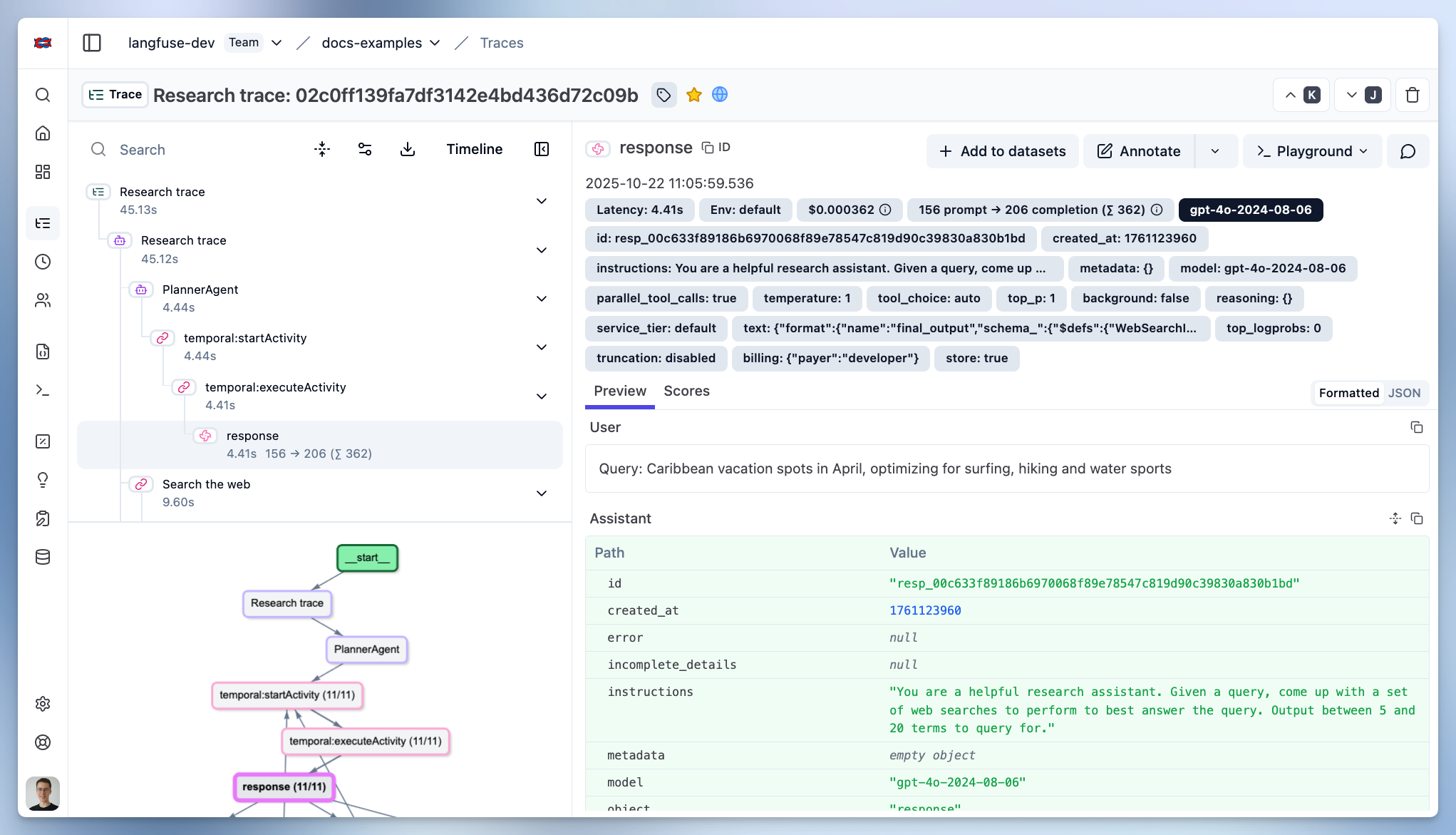
示例 Trace:在 Litefuse 中查看