使用 Litefuse Trace Koog Agent
Koog 内置支持将 Agent trace 导出到 Litefuse。借助 Litefuse 集成,你可以可视化、分析并调试 Koog Agent 与 LLM、API 以及其他组件的交互。
什么是 Koog? Koog 是一个基于 Kotlin 的框架,旨在完全使用地道的 Kotlin 构建并运行 AI Agent。它让你可以创建能与工具交互、处理复杂工作流并与用户交流的 Agent。关于 Koog 的 OpenTelemetry 支持背景,请参阅 OpenTelemetry 支持。
什么是 Litefuse? Litefuse 是一个开源的 AI Agent 可观测性与评估平台。它为 AI 应用提供 tracing 与监控能力。Litefuse 通过提供详细的洞察以及通过原生集成、OpenTelemetry 和专用 SDK 与众多工具和框架对接,帮助开发者调试、分析并优化其 AI 系统。
设置 Litefuse
- 注册 Litefuse Cloud 或 自托管 Litefuse。
- 创建一个 Litefuse 项目。请参考 在 Litefuse 中创建新项目 中的设置指南。
- 获取 API 凭证。按照 Litefuse API Key 在哪里? 的描述获取你的 Litefuse
public key和secret key。 - 设置环境变量。将以下变量加入你的环境:
   export LANGFUSE_BASE_URL="https://litefuse.cloud"

   export LANGFUSE_PUBLIC_KEY="pk-lf-..."
   export LANGFUSE_SECRET_KEY="sk-lf-..."
配置完成后,Koog 会自动将 OpenTelemetry trace 转发到你的 Litefuse 实例。
配置 Koog
要启用 Litefuse 导出,请安装 OpenTelemetry feature 并添加 LangfuseExporter。
该 exporter 在底层使用 OtlpHttpSpanExporter 将 trace 发送到 Litefuse 的 OpenTelemetry endpoint。
示例:带 Litefuse Tracing 的 Agent
fun main() = runBlocking {
    val agent = AIAgent(
        executor = simpleOpenAIExecutor(ApiKeyService.openAIApiKey),
        llmModel = OpenAIModels.CostOptimized.GPT4oMini,
        systemPrompt = "You are a code assistant. Provide concise code examples."
    ) {
        install(OpenTelemetry) {
            addLangfuseExporter()
        }
    }

    println("Running agent with Litefuse tracing")

    val result = agent.run("Tell me a joke about programming")

    println("Result: $result\nSee traces on the Litefuse instance")
}
在 Litefuse 中查看 Trace
启用后,Litefuse exporter 会捕获与 Koog 通用 OpenTelemetry 集成相同的 span,包括:
- Agent 生命周期事件 – Agent 启动、停止、错误
- LLM 交互 – prompt、响应、token 使用、延迟
- 工具和 API 调用 – 函数/工具调用的执行 trace
- 系统上下文 – 元数据,如模型名称、环境、Koog 版本
Koog 同时会捕获 Litefuse 显示 Agent Graph 所需的 span 属性。这让你能在 Litefuse 中以结构化的方式将 Agent 的推理过程与 API 调用以及用户输入关联起来。
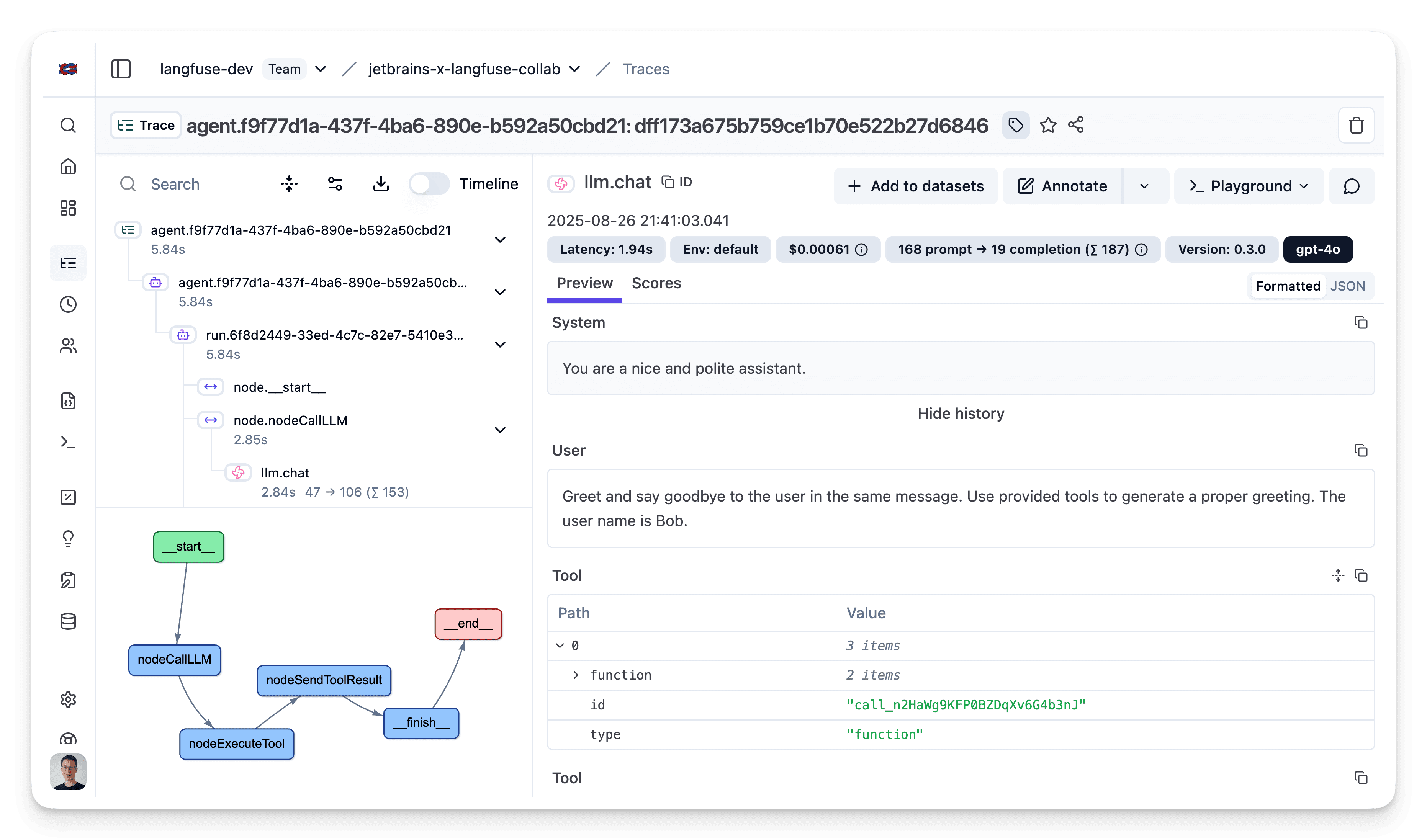
关于 Litefuse OTLP tracing 的更多细节,请查看 Litefuse OpenTelemetry 文档。
排错
- Litefuse 中没有出现 trace
- 仔细检查环境中是否设置了
LANGFUSE_BASE_URL、LANGFUSE_PUBLIC_KEY和LANGFUSE_SECRET_KEY。 - 如果运行在自托管 Litefuse 上,确认你的应用环境能访问到
LANGFUSE_BASE_URL。 - 验证 public/secret Key 对是否属于正确的项目。
- 仔细检查环境中是否设置了