使用 Litefuse 实现 Cohere 的可观测性
本指南将介绍如何通过 OpenAI SDK 兼容 API 将 Cohere 与 Litefuse 集成。无缝追踪和监控你的应用。
什么是 Cohere? Cohere 是一个 AI 平台,通过 API 提供最先进的语言模型,让开发者能够构建具备自然语言理解能力的应用。
什么是 Litefuse? Litefuse 是一个开源的 AI Agent 可观测性与评估平台,用于追踪、监控和调试 LLM 应用。
第一步:安装依赖
确保已安装所需的 Python 包:
%pip install openai langfuse第二步:设置环境变量
import os

# Get keys for your project from the project settings page
# https://litefuse.cloud

os.environ["LANGFUSE_PUBLIC_KEY"] = "pk-lf..."
os.environ["LANGFUSE_SECRET_KEY"] = "sk-lf..."
os.environ["LANGFUSE_BASE_URL"] = "https://litefuse.cloud"

# Set your Cohere API key from your Cohere account settings
os.environ["COHERE_API_KEY"] = "..."
第三步:通过 OpenAI SDK 使用 Cohere
在初始化客户端时,将 base URL 替换为 Cohere 的端点,从而利用其兼容 API。
# Instead of importing openai directly, use Langfuse's drop-in replacement
from langfuse.openai import openai

client = openai.OpenAI(
  api_key=os.environ.get("COHERE_API_KEY"),
  base_url="https://api.cohere.ai/compatibility/v1"  # Cohere Compatibility API endpoint
)
第四步:运行示例
下面的示例演示了一个基本的 chat completion 请求。所有 API 调用都会被 Litefuse 自动追踪。
response = client.chat.completions.create(
  model="command-r7b-12-2024",  # Replace with the desired Cohere model
  messages=[
    {"role": "system", "content": "You are an assistant."},
    {"role": "user", "content": "Tell me about the benefits of using Cohere with Litefuse."}
  ],
  name="Cohere-Trace"
)

print(response.choices[0].message.content)
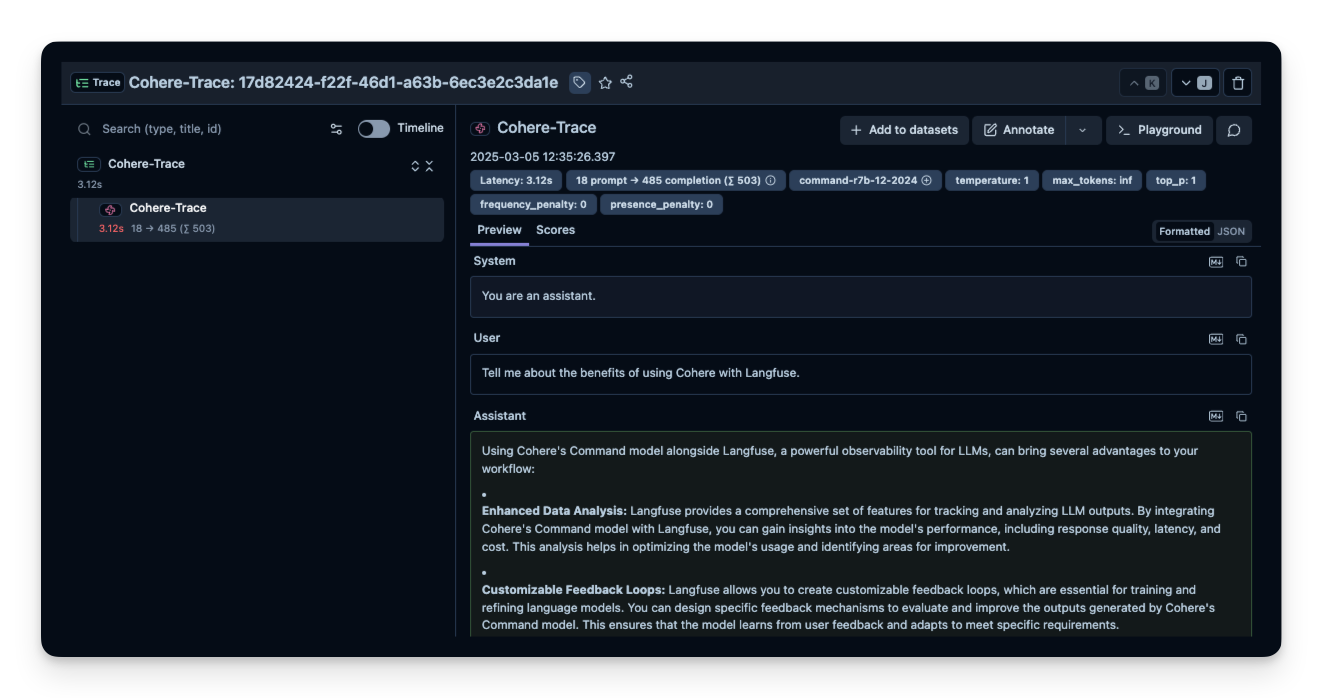
第五步:在 Litefuse 中查看 trace
运行示例后,登录 Litefuse 即可查看详细的 trace,包括请求参数、响应内容、token 用量和延迟指标。
资源
这个页面对你有帮助吗?