TrueFoundry AI Gateway 集成
什么是 Truefoundry? TrueFoundry 是企业级 AI Gateway 与控制平面,让你在统一的 OpenAI 兼容 API 后部署、治理和监控任意 LLM 或 Gen-AI 工作负载,并为生产 AI 应用提供限流、成本控制、可观测性以及本地化支持。
Truefoundry 如何与 Litefuse 集成
Truefoundry 的 AI Gateway 与 Litefuse 结合,可以在几分钟内为每个 LLM 请求带来企业级的可观测性、治理与成本控制。
统一的 OpenAI 兼容端点
把 Litefuse 的 OpenAI 客户端指向 Truefoundry 网关 URL。Truefoundry 会路由到任何受支持的模型(OpenAI、Anthropic、自托管等),同时 Litefuse 会透明地捕获每次调用 —— 无需任何代码改动。
端到端 tracing 与指标
Litefuse 提供:
- 完整的请求/响应日志(包括系统消息)
- token 用量(prompt、completion、总和)
- 每次调用的延迟拆解
- 按模型与环境的成本分析 能在数秒内深入任意 trace 进行性能优化或回归排查。
生产就绪的控制能力
Truefoundry 为你的 LLM 技术栈增加了:
- 按团队或用户的 限流与配额
- 预算告警与支出上限,防止超支
- 带 RBAC 的 范围化 API Key,区分 dev / staging / prod
- 用于完整数据主权的 本地/VPC 部署
前置条件
在把 Litefuse 与 TrueFoundry 集成之前,确认你已经有:
- TrueFoundry 账号:注册 Truefoundry 账号,至少接入一个模型 provider,并按 快速开始 与 生成 token 的指引生成 Personal Access Token
- Litefuse 账号:免费注册一个 Litefuse Cloud 账号 或自托管 Litefuse
第 1 步:安装依赖
%pip install openai langfuse第 2 步:配置环境变量
接下来配置你的 Litefuse API Key。可以通过免费注册 Litefuse Cloud 或 自托管 Litefuse 获取。这些环境变量是 Langfuse 客户端鉴权和把数据发送到你的 Litefuse 项目所必需的。
import os

# Langfuse Configuration
os.environ["LANGFUSE_PUBLIC_KEY"] = "pk-lf-..."
os.environ["LANGFUSE_SECRET_KEY"] = "sk-lf-..."
os.environ["LANGFUSE_BASE_URL"] = "https://litefuse.cloud"

# TrueFoundry Configuration
os.environ["TRUEFOUNDRY_API_KEY"] = "your-truefoundry-token"
os.environ["TRUEFOUNDRY_BASE_URL"] = "https://your-control-plane.truefoundry.cloud/api/llm"
from langfuse import get_client
# Test Langfuse authentication
get_client().auth_check()True
第 3 步:使用 Litefuse 的 OpenAI Drop-in 替代品
使用 Litefuse 的 OpenAI 兼容客户端来捕获和追踪所有经 TrueFoundry AI Gateway 转发的请求。配置网关与生成虚拟 LLM key 的详细步骤见 TrueFoundry 文档。
from langfuse.openai import OpenAI
import os

# Initialize OpenAI client with TrueFoundry Gateway
client = OpenAI(
    api_key=os.environ["TRUEFOUNDRY_API_KEY"],
    base_url=os.environ["TRUEFOUNDRY_BASE_URL"]  # Base URL from unified code snippet
)
第 4 步:运行一个示例
# Make a request through TrueFoundry Gateway with Litefuse tracing
response = client.chat.completions.create(
    model="openai-main/gpt-4o",  # Paste the model ID you copied from TrueFoundry Gateway
    messages=[
        {"role": "system", "content": "You are a helpful AI assistant specialized in explaining AI concepts."},
        {"role": "user", "content": "Why does an AI gateway help enterprises?"},
    ],
    max_tokens=500,
    temperature=0.7
)

print(response.choices[0].message.content)

# Ensure all traces are sent to Litefuse
langfuse = get_client()
langfuse.flush()
第 5 步:在 Litefuse 中查看 trace
运行示例后,登录 Litefuse 即可查看详细 trace,包括:
- 请求参数
- 响应内容
- token 用量与延迟指标
- 通过 Truefoundry 网关的 LLM 模型信息
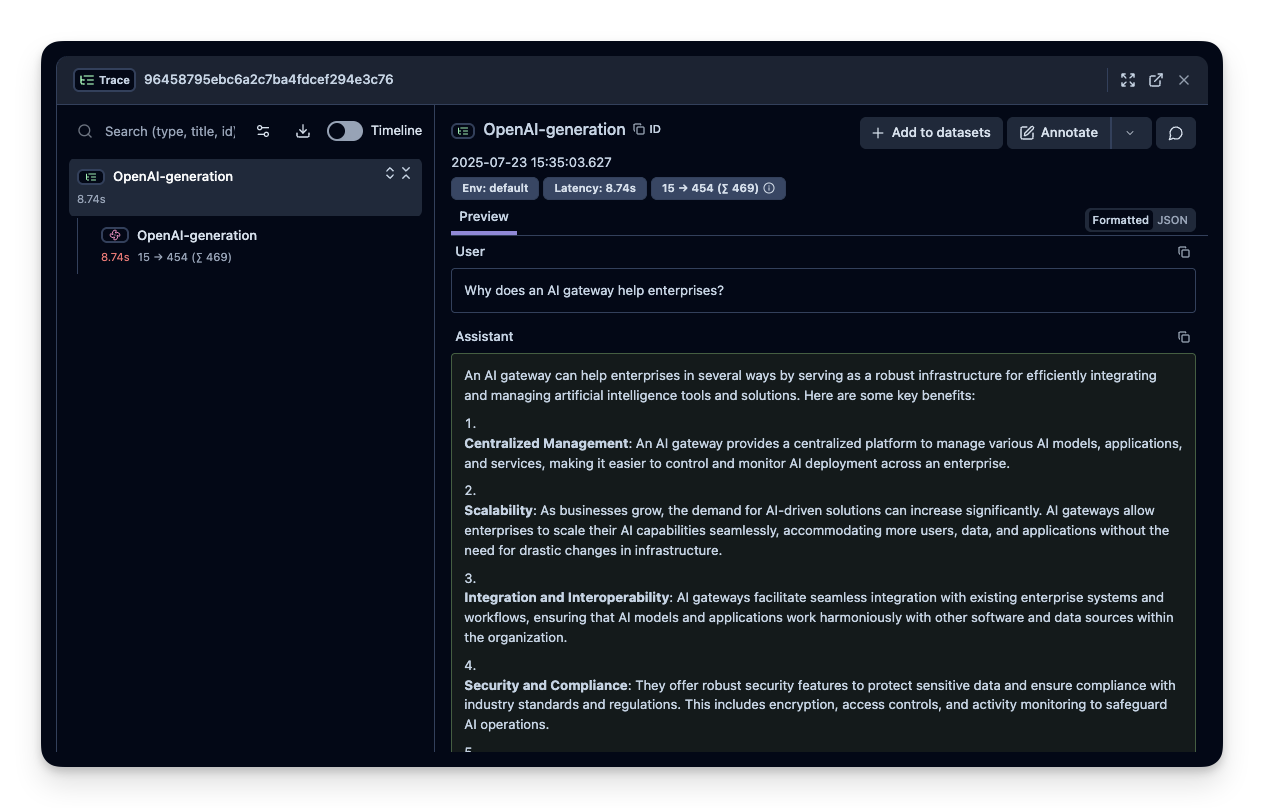
注意:Litefuse 的所有其他功能都按预期工作,包括 prompt 管理、评估、自定义仪表盘和高级可观测性能力。TrueFoundry 集成无缝支持 Litefuse 的全部能力。
通过 Langfuse Python SDK 进行进阶集成
把自动 tracing 与 Litefuse 的额外功能结合,可以增强可观测性。
使用 @observe 装饰器
@observe() 装饰器会自动包装你的函数并向 trace 添加自定义属性:
from langfuse import observe, get_client, propagate_attributes

langfuse = get_client()

@observe()
def analyze_customer_query(query, customer_id):
    """Analyze customer query using TrueFoundry Gateway with full observability"""

    # Propagate attributes to all child observations
    with propagate_attributes(
        user_id=customer_id,
        session_id=f"session_{customer_id}",
        tags=["customer-service", "truefoundry-gateway"],
        metadata={"gateway": "truefoundry"},
        version="1.0.0"
    ):

        response = client.chat.completions.create(
            model="openai-main/gpt-4o",
            messages=[
                {"role": "system", "content": "You are a customer service AI assistant."},
                {"role": "user", "content": query},
            ],
            temperature=0.3
        )

        result = response.choices[0].message.content

    # Set input and output on the current observation
    langfuse.update_current_observation(
        input={"query": query, "customer_id": customer_id},
        output={"response": result},
    )

    return result

# Usage
result = analyze_customer_query("How do I reset my password?", "customer_123")
调试模式
启用调试日志便于排查:
import logging
logging.basicConfig(level=logging.DEBUG)注意:Litefuse 的所有其他功能都按预期工作,包括 prompt 管理、评估、自定义仪表盘和高级可观测性能力。TrueFoundry 集成无缝支持 Litefuse 的全部能力。
了解更多
- TrueFoundry AI Gateway 介绍:https://docs.truefoundry.com/gateway/intro-to-llm-gateway
- TrueFoundry 鉴权指南:https://docs.truefoundry.com/gateway/authentication
Interoperability with the Python SDK
You can use this integration together with the Litefuse SDKs to add additional attributes to the observation.
The @observe() decorator provides a convenient way to automatically wrap your instrumented code and add additional attributes to the observation.
from langfuse import observe, propagate_attributes, get_client

langfuse = get_client()

@observe()
def my_llm_pipeline(input):
    # Add additional attributes (user_id, session_id, metadata, version, tags) to all spans created within this execution scope
    with propagate_attributes(
        user_id="user_123",
        session_id="session_abc",
        tags=["agent", "my-observation"],
        metadata={"email": "user@litefuse.ai"},
        version="1.0.0"
    ):

        # YOUR APPLICATION CODE HERE
        result = call_llm(input)

        return result

# Run the function
my_llm_pipeline("Hi")
Learn more about using the Decorator in the Langfuse SDK instrumentation docs.
Troubleshooting
No observations appearing
First, enable debug mode in the Python SDK:
export LANGFUSE_DEBUG="True"Then run your application and check the debug logs:
- OTel observations appear in the logs: Your application is instrumented correctly but observations are not reaching Litefuse. To resolve this:
- Call
langfuse.flush()at the end of your application to ensure all observations are exported. - Verify that you are using the correct API keys and base URL.
- Call
- No OTel spans in the logs: Your application is not instrumented correctly. Make sure the instrumentation runs before your application code.
Unwanted observations in Litefuse
The Langfuse SDK is based on OpenTelemetry. Other libraries in your application may emit OTel spans that are not relevant to you. These still count toward your billable units, so you should filter them out. See Unwanted spans in Litefuse for details.
Missing attributes
Some attributes may be stored in the metadata object of the observation rather than being mapped to the Litefuse data model. If a mapping or integration does not work as expected, please raise an issue on GitHub.
Next Steps
Once you have instrumented your code, you can manage, evaluate and debug your application: