使用 Ragas 评估 RAG pipeline
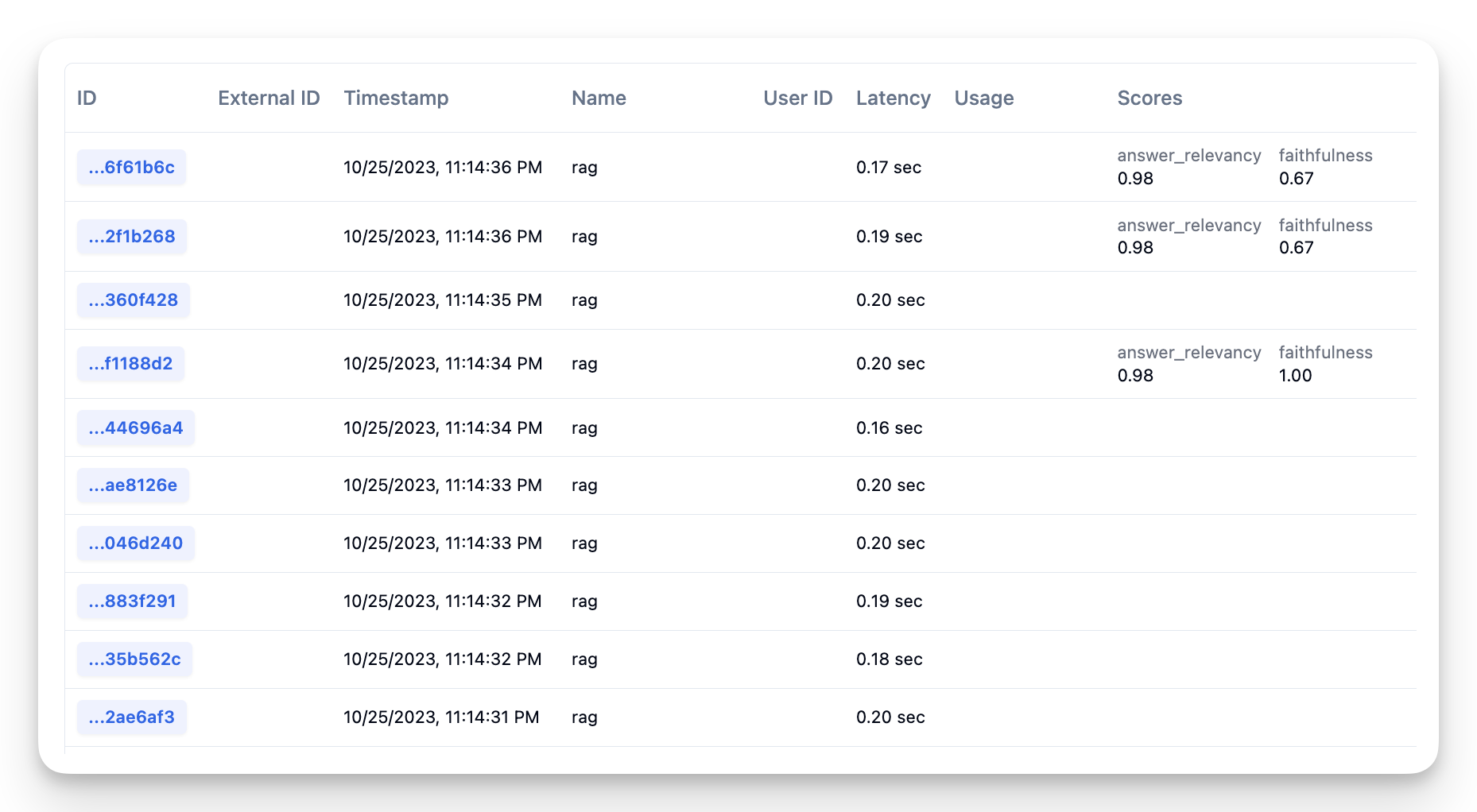
Litefuse 提供了为 trace 和 span 打分的能力,在 Litefuse 中这些分数有多种用途:
- 在 trace 上展示,提供快速概览
- 按分数对所有执行 trace 进行分段,例如找出所有质量较低的 trace
- 分析:详细的分数报表,可下钻到具体的用例和用户分群
Ragas 是一个开源工具,可以帮助你对 trace/span 运行 Model-Based Evaluation,尤其适用于 RAG pipeline。Ragas 可以对 RAG pipeline 的多个方面进行无参考评估。由于是无参考的,运行评估时不需要 ground-truth 数据,可以直接在你通过 Litefuse 收集的生产 trace 上运行。
环境准备
import os

# 在项目设置页获取你的项目密钥:https://litefuse.cloud
os.environ["LANGFUSE_PUBLIC_KEY"] = "pk-lf-..."
os.environ["LANGFUSE_SECRET_KEY"] = "sk-lf-..."
os.environ["LANGFUSE_BASE_URL"] = "https://litefuse.cloud"

# 你的 OpenAI key
os.environ["OPENAI_API_KEY"] = "sk-proj-"%pip install langfuse datasets ragas llama_index python-dotenv openai --upgrade数据
本示例使用一个已经准备好的数据集,它是通过查询一个 RAG 系统并收集其输出得到的。如何从 Litefuse 拉取生产数据,请参阅下文说明。
数据集包含以下列:
question: list[str] —— 用来评估 RAG pipeline 的问题。answer: list[str] —— RAG pipeline 生成并返回给用户的答案。contexts: list[list[str]] —— 传给 LLM 用于回答问题的上下文。ground_truths: list[list[str]] —— 问题的标准答案。在线评估中可以忽略这一列,因为我们通常拿不到 ground-truth 数据。
from datasets import load_dataset

fiqa_eval = load_dataset("explodinggradients/fiqa", "ragas_eval")['baseline']
fiqa_eval
Dataset({
features: ['question', 'ground_truths', 'answer', 'contexts'],
num_rows: 30
})指标
我们将衡量一个 RAG 系统的以下几个方面,这些指标来自 Ragas 库:
- faithfulness:衡量生成答案在给定上下文下的事实一致性。
- answer_relevancy:评估生成的答案与给定 prompt 的相关程度。
- context precision:评估 contexts 中所有与 ground-truth 相关的条目是否都排在靠前位置。理想情况下所有相关 chunk 都应当排在最前。该指标基于问题和 contexts 计算,取值范围为 0 到 1,分数越高代表精度越好。
更多关于这些指标及其原理的内容,请查看 RAGAS 文档。
# import metrics
from ragas.metrics import (
    Faithfulness,
    ResponseRelevancy,
    LLMContextPrecisionWithoutReference,
)

# metrics you chose
metrics = [
    Faithfulness(),
    ResponseRelevancy(),
    LLMContextPrecisionWithoutReference(),
]
接下来需要使用你选择的 LLM 和 Embedding 初始化这些指标。本示例使用 OpenAI。
from ragas.run_config import RunConfig
from ragas.metrics.base import MetricWithLLM, MetricWithEmbeddings


# util function to init Ragas Metrics
def init_ragas_metrics(metrics, llm, embedding):
    for metric in metrics:
        if isinstance(metric, MetricWithLLM):
            metric.llm = llm
        if isinstance(metric, MetricWithEmbeddings):
            metric.embeddings = embedding
        run_config = RunConfig()
        metric.init(run_config)
from langchain_openai.chat_models import ChatOpenAI
from langchain_openai.embeddings import OpenAIEmbeddings
# wrappers
from ragas.llms import LangchainLLMWrapper
from ragas.embeddings import LangchainEmbeddingsWrapper
llm = ChatOpenAI()
emb = OpenAIEmbeddings()
init_ragas_metrics(
metrics,
llm=LangchainLLMWrapper(llm),
embedding=LangchainEmbeddingsWrapper(emb),
)接入方式
使用 Ragas 进行基于模型的评估有两种方式:
- 为每个 trace 打分:对每个 trace 项都运行评估。这能让你清楚每次 RAG pipeline 调用的表现,但成本可能较高。
- 批量打分:在固定周期内随机采样一批 trace 进行打分。能降低成本,提供应用性能的粗略估计,但可能漏掉一些重要样本。
本 cookbook 会演示两种方式的接入。
为 trace 打分
我们先看一个小例子,对单个 trace 用 Ragas 打分。先加载数据。
row = fiqa_eval[0]
row['question'], row['answer']
('How to deposit a cheque issued to an associate in my business into my business account?',
'\nThe best way to deposit a cheque issued to an associate in your business into your business account is to open a business account with the bank. You will need a state-issued "dba" certificate from the county clerk\'s office as well as an Employer ID Number (EIN) issued by the IRS. Once you have opened the business account, you can have the associate sign the back of the cheque and deposit it into the business account.')接下来初始化 Langfuse 客户端 SDK 以便对应用进行 instrument。
from langfuse import get_client

langfuse = get_client()
# Verify connection
if langfuse.auth_check():
print("Langfuse client is authenticated and ready!")
else:
print("Authentication failed. Please check your credentials and host.")Langfuse client is authenticated and ready!下面定义一个工具函数,用你选择的指标为 trace 打分。
from ragas.dataset_schema import SingleTurnSample

async def score_with_ragas(query, chunks, answer):
    scores = {}
    for m in metrics:
        sample = SingleTurnSample(
            user_input=query,
            retrieved_contexts=chunks,
            response=answer,
        )
        print(f"calculating {m.name}")
        scores[m.name] = await m.single_turn_ascore(sample)
    return scores
你可以在每个请求时计算分数。下面是一个示意应用,包含以下步骤:
- 从用户处接收问题
- 从数据库或向量库中获取可用于回答用户问题的上下文
- 将问题和上下文一起传给 LLM 生成答案
所有这些步骤都会作为 span 记录在 Litefuse 的同一个 trace 中。关于 trace 和 span 的更多内容,请参阅 litefuse 文档。
# start a new trace when you get a question
question = row['question']
contexts = row['contexts']
answer = row['answer']

with langfuse.start_as_current_observation(as_type="span", name="rag") as trace:
    # Store trace_id for later use
    trace_id = trace.trace_id

    # retrieve the relevant chunks
    # chunks = get_similar_chunks(question)

    # pass it as span
    with trace.start_as_current_observation(
        name="retrieval",
        input={'question': question},
        output={'contexts': contexts}
    ):
        pass

    # use llm to generate a answer with the chunks
    # answer = get_response_from_llm(question, chunks)

    with trace.start_as_current_observation(
        name="generation",
        input={'question': question, 'contexts': contexts},
        output={'answer': answer}
    ):
        pass

    # compute scores for the question, context, answer tuple
    ragas_scores = await score_with_ragas(question, contexts, answer)

print("RAGAS Scores:", ragas_scores)
ragas_scores
calculating faithfulness
calculating answer_relevancy
calculating llm_context_precision_without_reference
RAGAS Scores: {'faithfulness': 0.8, 'answer_relevancy': np.float64(0.9825100521118072), 'llm_context_precision_without_reference': 0.9999999999}
{'faithfulness': 0.8,
'answer_relevancy': np.float64(0.9825100521118072),
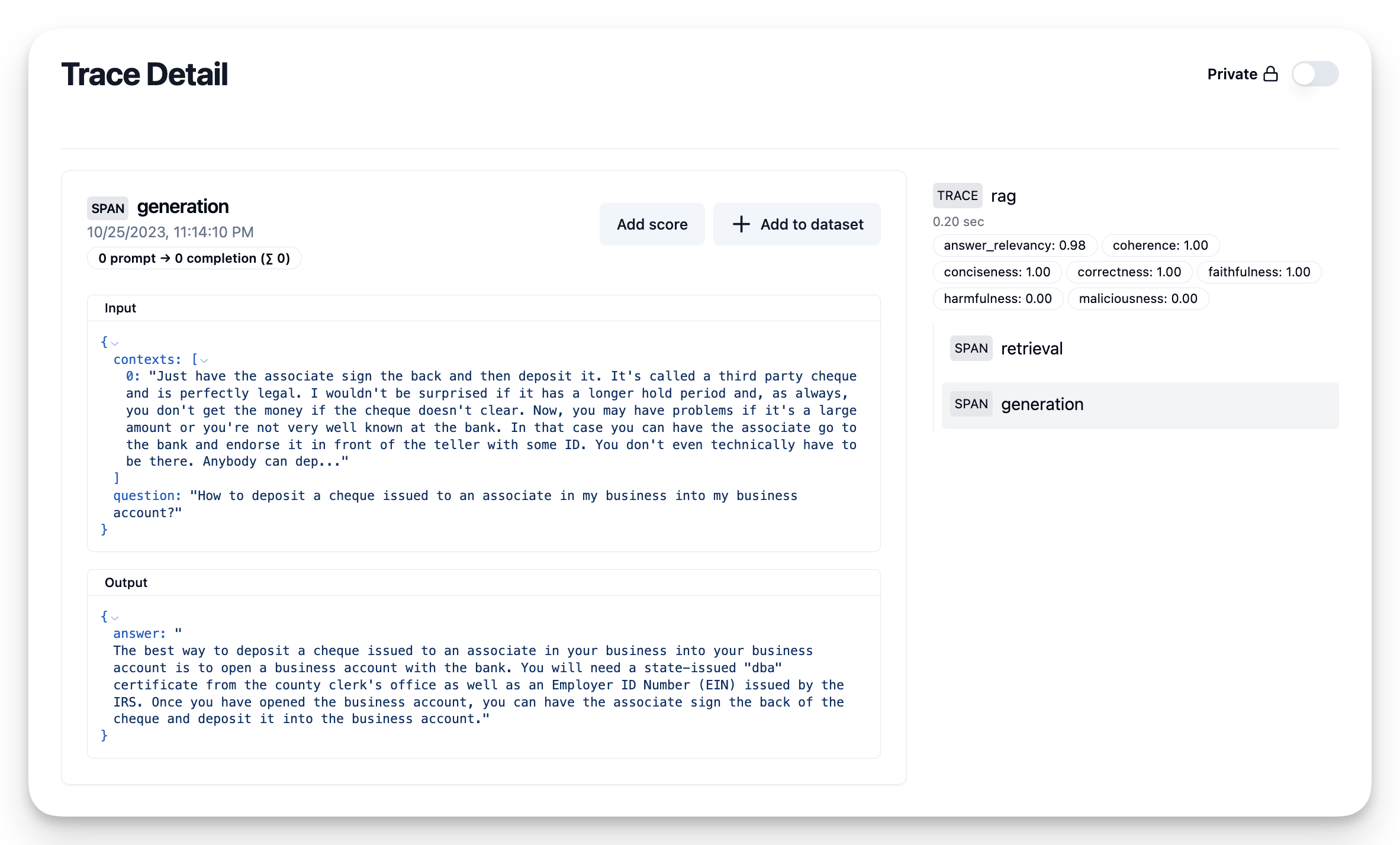
'llm_context_precision_without_reference': 0.9999999999}分数计算完毕后,可以将它们附加到 Litefuse 中的 trace 上:
# send the scores
# Use the trace_id stored from the previous cell
for m in metrics:
    langfuse.create_score(
        name=m.name,
        value=ragas_scores[m.name],
        trace_id=trace_id
    )
注意打分是阻塞的,所以请在等待分数计算之前先把生成的答案发回给用户。也可以在另一个线程里运行 score_with_ragas(),再把 trace_id 传进去记录分数。
或者可以考虑
批量打分
对每个生产 trace 都打分会比较耗时,并且成本随应用架构和流量而上升。这种情况下,更合适的做法是从批量打分开始。选定一个统计时间段,决定要从中 采样 的 trace 数量,创建一个数据集并调用 ragas.evaluate 分析结果。
你可以周期性运行这套流程,跟踪不同时间段分数的变化,发现是否存在异常。
为了在 Litefuse 中构造演示数据,我们先用 fiqa 数据集创建约 10 条 trace。
# fiqa traces
for interaction in fiqa_eval.select(range(10, 20)):
    question = interaction['question']
    contexts = interaction['contexts']
    answer = interaction['answer']

    with langfuse.start_as_current_observation(as_type="span", name="rag") as trace:
        with trace.start_as_current_observation(
            name="retrieval",
            input={'question': question},
            output={'contexts': contexts}
        ):
            pass

        with trace.start_as_current_observation(
            name="generation",
            input={'question': question, 'contexts': contexts},
            output={'answer': answer}
        ):
            pass

# await that Langfuse SDK has processed all events before trying to retrieve it in the next step
langfuse.flush()
数据上传到 litefuse 之后,可以用下面这个便捷函数按需检索。
def get_traces(name=None, limit=None, user_id=None):
    all_data = []
    page = 1

    while True:
        response = langfuse.api.trace.list(
            name=name, page=page, user_id=user_id
        )
        if not response.data:
            break
        page += 1
        all_data.extend(response.data)
        if len(all_data) > limit:
            break

    return all_data[:limit]
from random import sample
NUM_TRACES_TO_SAMPLE = 3
traces = get_traces(name='rag', limit=5)
traces_sample = sample(traces, NUM_TRACES_TO_SAMPLE)
len(traces_sample)3下面构造一个批次并打分。Ragas 使用 huggingface 的 dataset 对象构建数据集并运行评估。如果你在自己的生产数据上运行,请使用正确的字段名从 trace 中提取 question、contexts 和 answer。
# score on a sample
from random import sample

evaluation_batch = {
    "question": [],
    "contexts": [],
    "answer": [],
    "trace_id": [],
}

for t in traces_sample:
    observations = [langfuse.api.legacy.observations_v1.get(o) for o in t.observations]
    for o in observations:
        if o.name == 'retrieval':
            question = o.input['question']
            contexts = o.output['contexts']
        if o.name=='generation':
            answer = o.output['answer']
    evaluation_batch['question'].append(question)
    evaluation_batch['contexts'].append(contexts)
    evaluation_batch['answer'].append(answer)
    evaluation_batch['trace_id'].append(t.id)
# run ragas evaluate
from datasets import Dataset
from ragas import evaluate
from ragas.metrics import Faithfulness, ResponseRelevancy
ds = Dataset.from_dict(evaluation_batch)
r = evaluate(ds, metrics=[Faithfulness(), ResponseRelevancy()])Evaluating: 0%| | 0/6 [00:00<?, ?it/s]就这样!你可以看到一段时间内的分数。
r{'faithfulness': 0.5516, 'answer_relevancy': 0.9294}你也可以把分数回写到 Litefuse,或者使用导出的 pandas dataframe 做进一步分析。
df = r.to_pandas()

# add the langfuse trace_id to the result dataframe
df["trace_id"] = ds["trace_id"]

df.head()| user_input | retrieved_contexts | response | faithfulness | answer_relevancy | trace_id | |
|---|---|---|---|---|---|---|
| 0 | Do I need a new EIN since I am hiring employee... | [You don't need to notify the IRS of new membe... | \nNo, you do not need a new EIN since you are ... | 0.750000 | 0.992491 | 9a96d48d96d45b1bb6d28d48b7cc93d4 |
| 1 | Privacy preferences on creditworthiness data | [See the first item in the list: For our every... | \nThe best answer to this question is that you... | 0.571429 | 0.875799 | 18e23692aa5b2b245c176574e247a236 |
| 2 | Have plenty of cash flow but bad credit | [This is probably a good time to note that cre... | \nIf you have plenty of cash flow but bad cred... | 0.333333 | 0.919893 | 877d64dc4355743e2d2f1b2607d9ec14 |
for _, row in df.iterrows():
    for metric_name in ["faithfulness", "answer_relevancy"]:
        langfuse.create_score(
            name=metric_name,
            value=row[metric_name],
            trace_id=row["trace_id"]
        )