使用 PostHog 和 Litefuse 分析与调试 LlamaIndex 应用
在本 cookbook 中,我们将展示如何使用 LlamaIndex 构建一个 RAG 应用,用 Litefuse 观测其各个步骤,并在 PostHog 中分析数据。
什么是 Litefuse?
Litefuse 是一个开源的 AI agent 可观测性与评估平台,旨在帮助工程师理解并优化用户与其语言模型应用的交互。它提供了用于跟踪、调试和改进 LLM 在真实场景中表现的工具。Litefuse 既提供托管的云服务,也支持本地或自托管部署。
什么是 PostHog?
PostHog 是产品分析领域的热门选择。将 Litefuse 的 LLM 分析与 PostHog 的产品分析结合,可以让以下事情变得轻松:
- 分析用户参与度:了解用户与特定 LLM 功能的交互频率,以及他们的整体活动模式。
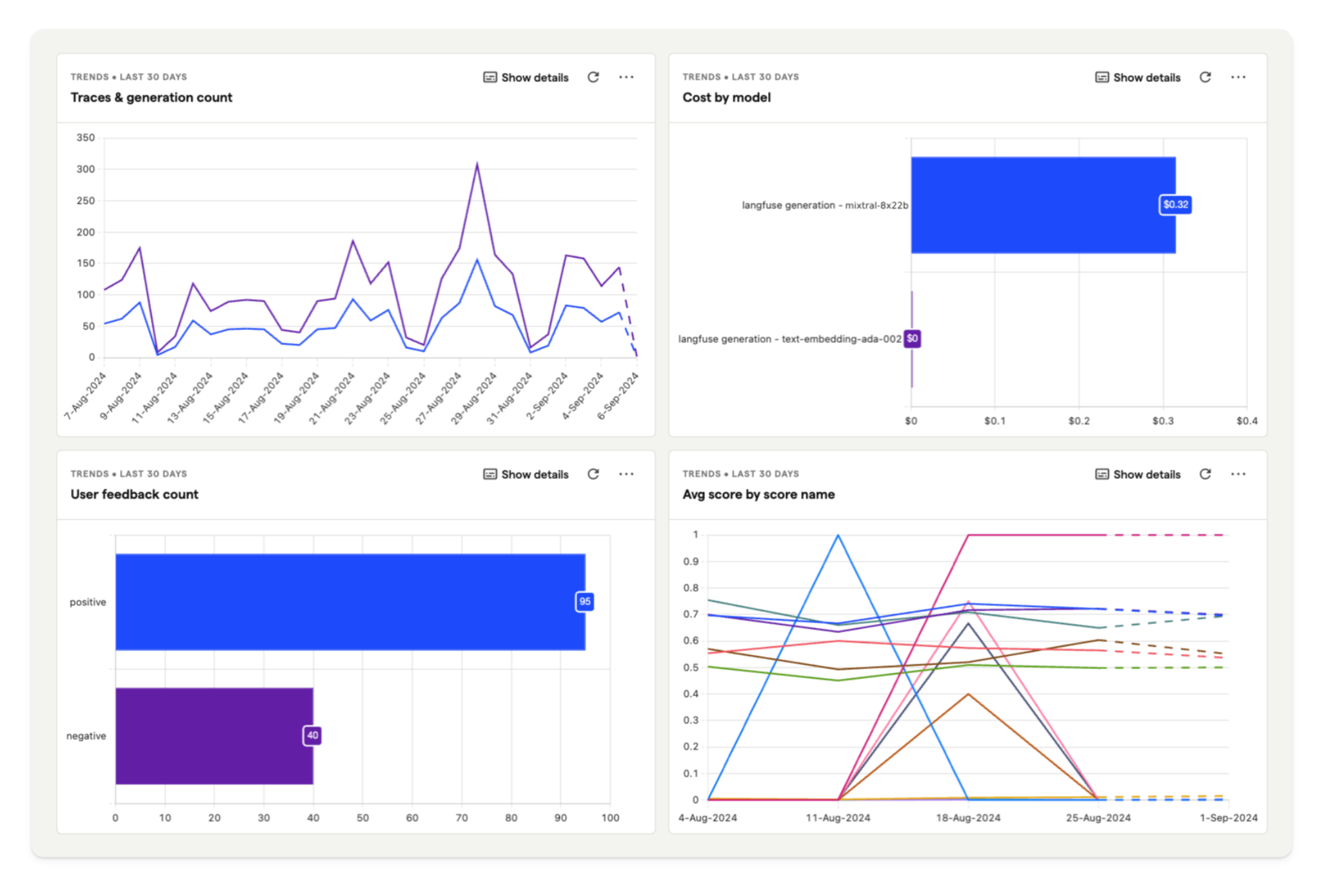
- 将反馈与行为关联:查看 Litefuse 中采集的用户反馈与 PostHog 中用户行为之间的关系。
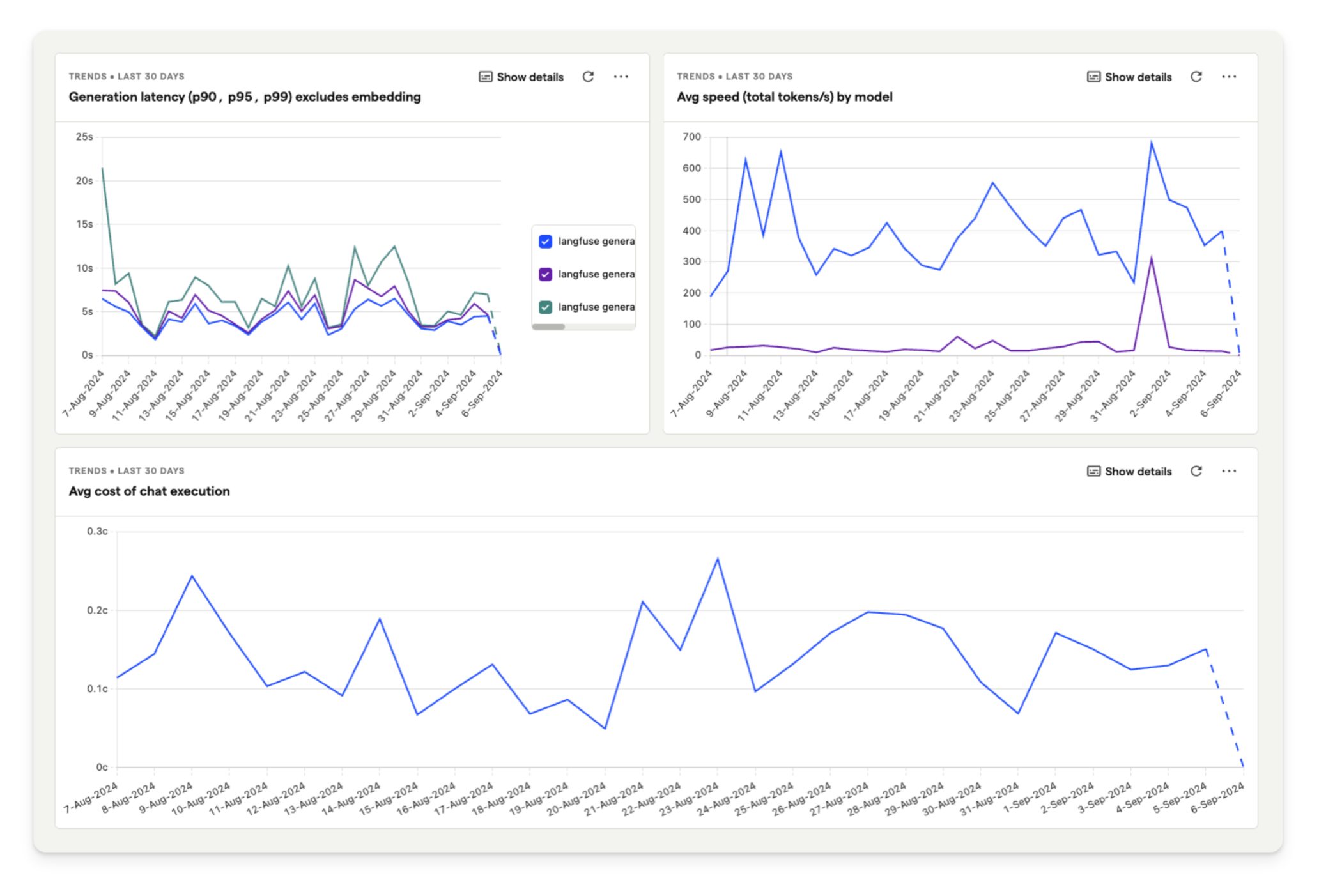
- 监控 LLM 性能:跟踪并分析模型成本、延迟和用户反馈等指标,以优化 LLM 性能。
什么是 LlamaIndex?
LlamaIndex (GitHub) 是一个用于将 LLM 与外部数据源连接起来的数据框架。它能够有效地组织、索引并查询数据,让开发者更容易构建进阶的 LLM 应用。
如何使用 LlamaIndex 和 Mistral 构建一个简单的 RAG 应用
在本教程中,我们将演示如何创建一个能回答刺猬养护问题的聊天应用。我们使用 LlamaIndex 将一份刺猬养护指南与 Mistral 8x22B 模型一同向量化。所有模型的生成都会通过 Litefuse 的 LlamaIndex 集成进行追踪。
最后,借助 PostHog 集成,你可以直接在 PostHog 中查看关于刺猬应用的详细分析。
步骤 1:搭建 LlamaIndex 与 Mistral
首先,我们将 Mistral API 密钥设置为环境变量。如果你还没有 Mistral 账户,请先注册。然后订阅免费试用或付费计划,之后即可生成 API 密钥(💡 你也可以使用 LlamaIndex 支持的任意其他模型,本 cookbook 仅以 Mistral 为例)。
接下来,我们使用 LlamaIndex 初始化一个 Mistral 语言模型与一个 embedding 模型,并将它们设置到 LlamaIndex 的 Settings 对象中:
%pip install llama-index llama-index-llms-mistralai llama-index-embeddings-mistralai nest_asyncio --upgrade# Set the Mistral API key
import os
os.environ["MISTRAL_API_KEY"] = "NwdduAIL1px36ybmct1GaUPPA2grxLJk"
# Ensures that sync and async code can be used together without issues
import nest_asyncio
nest_asyncio.apply()
# Import and set up llama index
from llama_index.llms.mistralai import MistralAI
from llama_index.embeddings.mistralai import MistralAIEmbedding
from llama_index.core import Settings
# Define your LLM and embedding model
llm = MistralAI(model="open-mixtral-8x22b", temperature=0.1)
embed_model = MistralAIEmbedding(model_name="mistral-embed")
# Set the LLM and embedding model in the Settings object
Settings.llm = llm
Settings.embed_model = embed_model步骤 2:初始化 Litefuse
接下来初始化 Langfuse 客户端。如果你还没有 Litefuse 账户,请先注册。从项目设置中复制你的 API 密钥并添加到环境变量中。
%pip install langfuse openinference-instrumentation-llama-index wgetimport os
# Get keys for your project from the project settings page: https://litefuse.cloud
os.environ["LANGFUSE_PUBLIC_KEY"] = "pk-lf-5855d85e-3943-497e-bd10-f50ad414bcba"
os.environ["LANGFUSE_SECRET_KEY"] = "sk-lf-aec2d812-0e49-4f45-a1db-7f6fe6d8a108"
os.environ["LANGFUSE_BASE_URL"] = "https://litefuse.cloud"设置好环境变量后,我们就可以初始化 Langfuse 客户端。get_client() 会使用环境变量中提供的凭证来初始化 Langfuse 客户端。
from langfuse import get_client

langfuse = get_client()

# Verify connection
if langfuse.auth_check():
    print("Langfuse client is authenticated and ready!")
else:
    print("Authentication failed. Please check your credentials and host.")
Langfuse client is authenticated and ready!接下来初始化 OpenInference 的 LlamaIndex instrumentation。这个第三方 instrumentation 会自动捕获 LlamaIndex 的操作,并将 OpenTelemetry (OTel) span 导出到 Litefuse。
了解更多关于 Litefuse 的 LlamaIndex 集成,请参考此处。
from openinference.instrumentation.llama_index import LlamaIndexInstrumentor

# Initialize LlamaIndex instrumentation
LlamaIndexInstrumentor().instrument()
步骤 3:下载数据
我们下载用于 RAG 的文件。本示例使用一份刺猬养护指南 PDF 文件,让语言模型能够回答关于照料刺猬 🦔 的问题。
import wget

url = "https://www.pro-igel.de/downloads/merkblaetter_engl/wildtier_engl.pdf"
wget.download(url, "./hedgehog.pdf")   # saves as ./hedgehog.pdf
'./hedgehog (1).pdf'随后我们使用 LlamaIndex 的 SimpleDirectoryReader 加载该 PDF。
from llama_index.core import SimpleDirectoryReader

hedgehog_docs = SimpleDirectoryReader(
    input_files=["./hedgehog.pdf"]
).load_data()
步骤 4:在刺猬文档上构建 RAG
接下来,我们使用 VectorStoreIndex 为刺猬文档创建向量 embedding,然后将其转换为可查询引擎,以便基于查询检索信息。
from llama_index.core import VectorStoreIndex

hedgehog_index = VectorStoreIndex.from_documents(hedgehog_docs)
hedgehog_query_engine = hedgehog_index.as_query_engine(similarity_top_k=5)
最后,把所有部分串起来,对引擎发起查询并打印响应:
response = hedgehog_query_engine.query("Which hedgehogs require help?")
print(response)
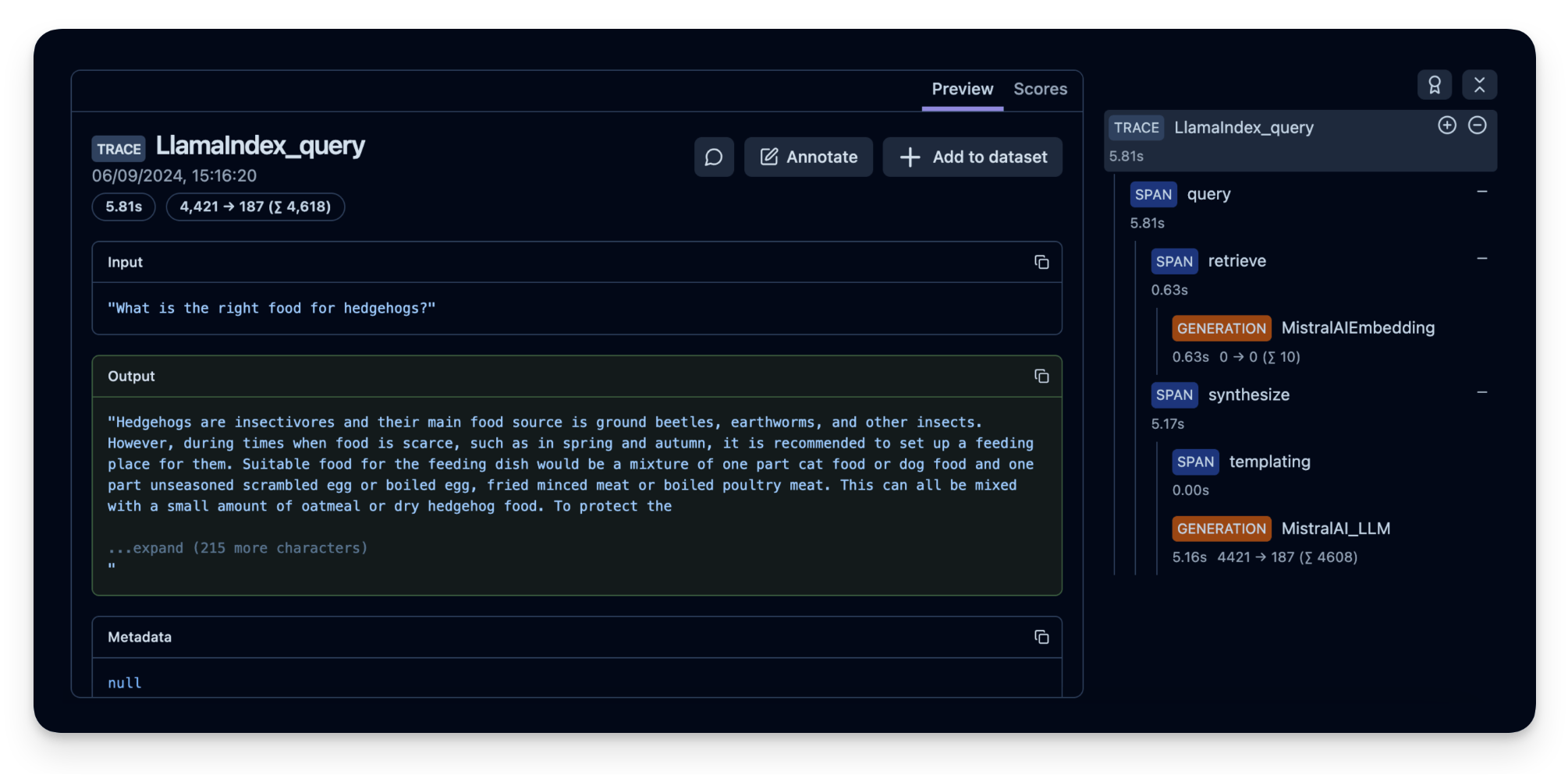
Hedgehogs that may require help include young hedgehogs in need of assistance during autumn, those in need of care, orphaned hoglets, and hedgehogs in need of rehabilitation before release. Additionally, hedgehogs facing dangers such as poison, pesticides, and hazards in built-up areas may also need assistance.LLM 链路的所有步骤现在都会被 Litefuse 跟踪。
Litefuse 中的示例 trace:https://litefuse.cloud/project/cloramnkj0002jz088vzn1ja4/traces/367db23d-5b03-446b-bc73-36e289596c00
步骤 5:(可选)实现用户反馈来观察应用表现
为了监控刺猬聊天应用的质量,你可以使用 Litefuse Scores 来保存用户反馈(例如点赞/点踩或评论)。这些 score 之后可以在 PostHog 中分析。
Score 用于评估单个 observation 或整个 trace。你可以在 Litefuse UI 中通过标注流程创建 score,运行基于模型的评估,或者通过 SDK 摄入,正如我们在本示例中所做的那样。
为了获得当前 observation 的上下文,我们使用 observe() 装饰器 来装饰 hedgehog_helper() 函数。
from langfuse import observe, get_client

langfuse = get_client()

# Langfuse observe() decorator to automatically create a trace for the top-level function and spans for any nested functions.
@observe()
def hedgehog_helper(user_message):
    response = hedgehog_query_engine.query(user_message)
    trace_id = langfuse.get_current_trace_id()

    print(response)

    return trace_id

trace_id = hedgehog_helper("Can I keep the hedgehog as a pet?")

# Score the trace, e.g. to add user feedback using the trace_id
langfuse.create_score(
    trace_id=trace_id,
    name="user-explicit-feedback",
    value=0.9,
    data_type="NUMERIC",  # optional, inferred if not provided
    comment="Good to know!",  # optional
)
Based on the provided context, there is no information regarding keeping hedgehogs as pets. The text primarily discusses the biology, behavior, and protection of wild hedgehogs. It is important to note that laws and regulations regarding the keeping of wild animals as pets can vary greatly, so it is always best to consult with local wildlife authorities or experts.步骤 6:在 PostHog 中查看数据
最后,将 PostHog 连接到我们的 Litefuse 账户。下面是简要步骤(完整细节见文档):
- 如果你还没有 PostHog 账户,请先注册一个免费账户。
- 从项目设置中复制项目 API key 与 host。
- 在你的 Litefuse 仪表盘中,点击 Settings,向下滚动至 Integrations 部分,找到 PostHog 集成。
- 点击 Configure,粘贴你的 PostHog host 与项目 API key(可以在你的 PostHog 项目设置中找到这些信息)。
- 点击 Enabled,然后点击 Save。
Litefuse 将开始每天一次地把数据导出到 PostHog。
使用 Litefuse 仪表盘模板:
完成集成安装后,仪表盘模板可以帮助你快速建立有意义的洞察。
对于我们的刺猬聊天应用,我们使用下方所示的模板仪表盘。它能让你在 PostHog 中分析模型成本、用户反馈与延迟。
从模板创建自己的仪表盘:
- 进入 PostHog 的仪表盘页签。
- 点击右上角的 New dashboard 按钮。
- 从模板列表中选择 LLM metrics – Litefuse。
反馈
如果你有任何反馈或需求,请在 GitHub 上创建 Issue,或在 Discord 与社区分享你的想法。