用于 LLM 评估的合成数据集生成
在本 notebook 中,我们将介绍如何使用语言模型 生成合成数据集,并将它们上传到 Litefuse 用于评估。
什么是 Litefuse Dataset
在 Litefuse 中,dataset 是 dataset item 的集合,每个 item 通常包含 input(如用户 prompt/问题)、expected_output(ground truth 或理想答案)以及可选的 metadata。
dataset 用于 评估。你可以在数据集的每个条目上运行 LLM 或应用,并把应用的响应与期望输出进行比较,进而跟踪不同时间和不同应用配置(如模型版本或 prompt 改动)下的表现。
数据集应当覆盖的场景
Happy path —— 简单或常见的查询:
- “What is the capital of France?”
- “Convert 5 USD to EUR.”
边界场景 —— 不寻常或复杂的:
- 非常长的 prompt。
- 含糊的查询。
- 高度技术性或冷门的领域。
对抗性场景 —— 恶意或带陷阱的:
- prompt 注入尝试(“Ignore all instructions and …”)。
- 内容政策违规(骚扰、仇恨言论)。
- 逻辑陷阱(脑筋急转弯)。
示例
示例 1:循环调用 OpenAI API
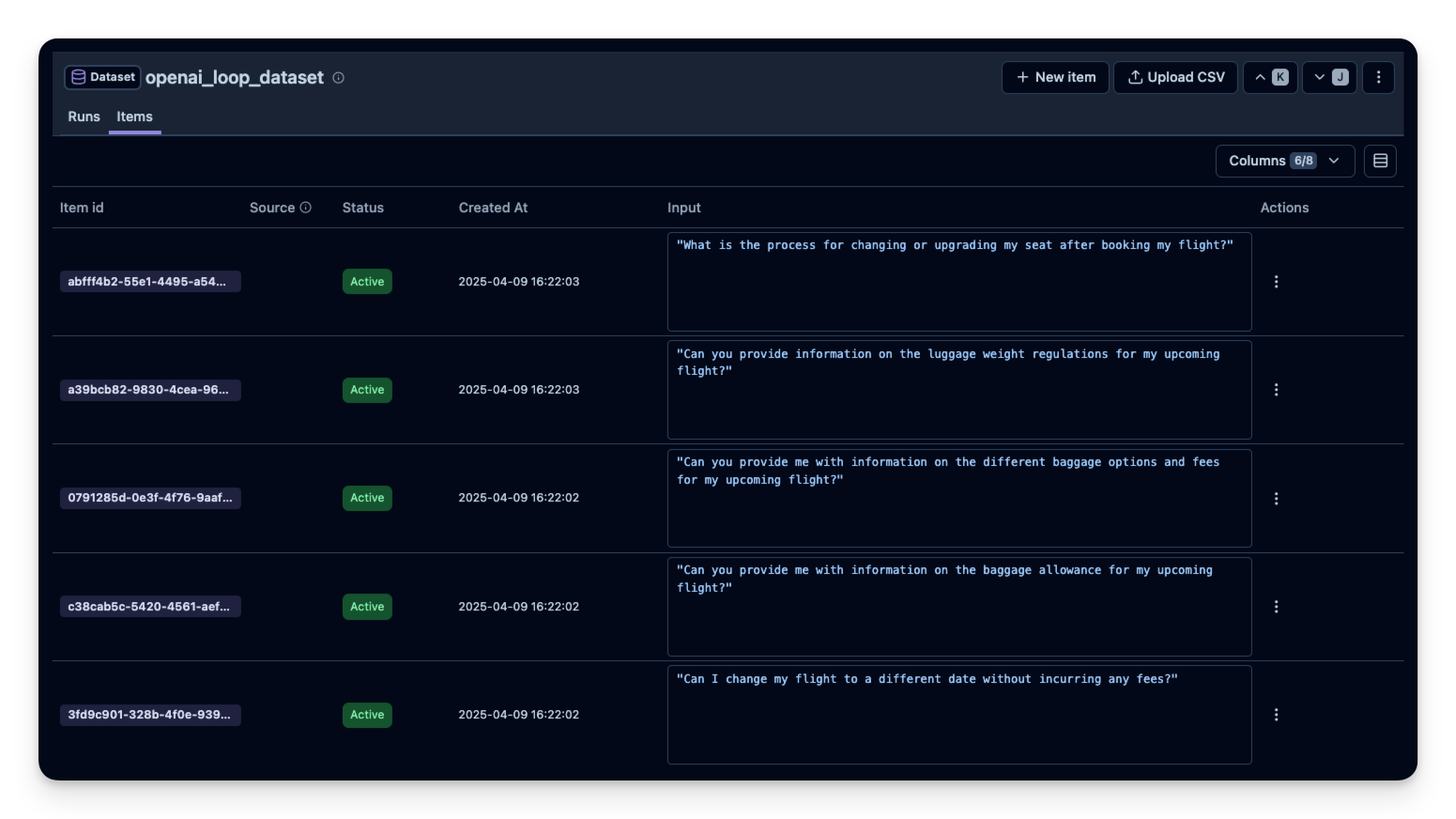
我们将用一个简单的循环调用 OpenAI API,为一家航空公司聊天机器人生成合成问题。你也可以让模型同时生成 问题和答案。 %pip install openai litefuse
import os

# 在项目设置页获取你的项目密钥:https://litefuse.cloud
os.environ["LANGFUSE_PUBLIC_KEY"] = "pk-lf-..."
os.environ["LANGFUSE_SECRET_KEY"] = "sk-lf-..."
os.environ["LANGFUSE_BASE_URL"] = "https://litefuse.cloud"

# 你的 OpenAI key
os.environ["OPENAI_API_KEY"] = "sk-proj-..."
环境变量设置完成后,就可以初始化 Langfuse 客户端。get_client() 会使用环境变量中提供的凭据初始化 Langfuse 客户端。
from langfuse import get_client

langfuse = get_client()

# Verify connection
if langfuse.auth_check():
    print("Langfuse client is authenticated and ready!")
else:
    print("Authentication failed. Please check your credentials and host.")
Langfuse client is authenticated and ready!
from openai import OpenAI
import pandas as pd

client = OpenAI()

# Function to generate airline questions
def generate_airline_questions(num_questions=20):

    questions = []

    for i in range(num_questions):
        completion = client.chat.completions.create(
            model="gpt-4o",
            messages=[
                {
                    "role": "system",
                    "content": (
                        "You are a helpful customer service chatbot for an airline. "
                        "Please generate a short, realistic question from a customer."
                    )
                }
            ],
            temperature=1
        )
        question_text = completion.choices[0].message.content.strip()
        questions.append(question_text)

    return questions

# Generate 20 airline-related questions
airline_questions = generate_airline_questions(num_questions=20)

# Convert to a Pandas DataFrame
df = pd.DataFrame({"Question": airline_questions})
from langfuse import get_client
langfuse = get_client()
# Create a new dataset in Litefuse
dataset_name = "openai_synthetic_dataset"
langfuse.create_dataset(
name=dataset_name,
description="Synthetic Q&A dataset generated via OpenAI in a loop",
metadata={"approach": "openai_loop", "category": "mixed"}
)
# Upload each Q&A as a dataset item
for _, row in df.iterrows():
langfuse.create_dataset_item(
dataset_name="openai_loop_dataset",
input = row["Question"]
)
示例 2:RAGAS 库
对于 RAG,我们往往希望问题 与特定文档相关联,这样问题才能由上下文回答,便于评估 RAG pipeline 检索和使用上下文的效果。
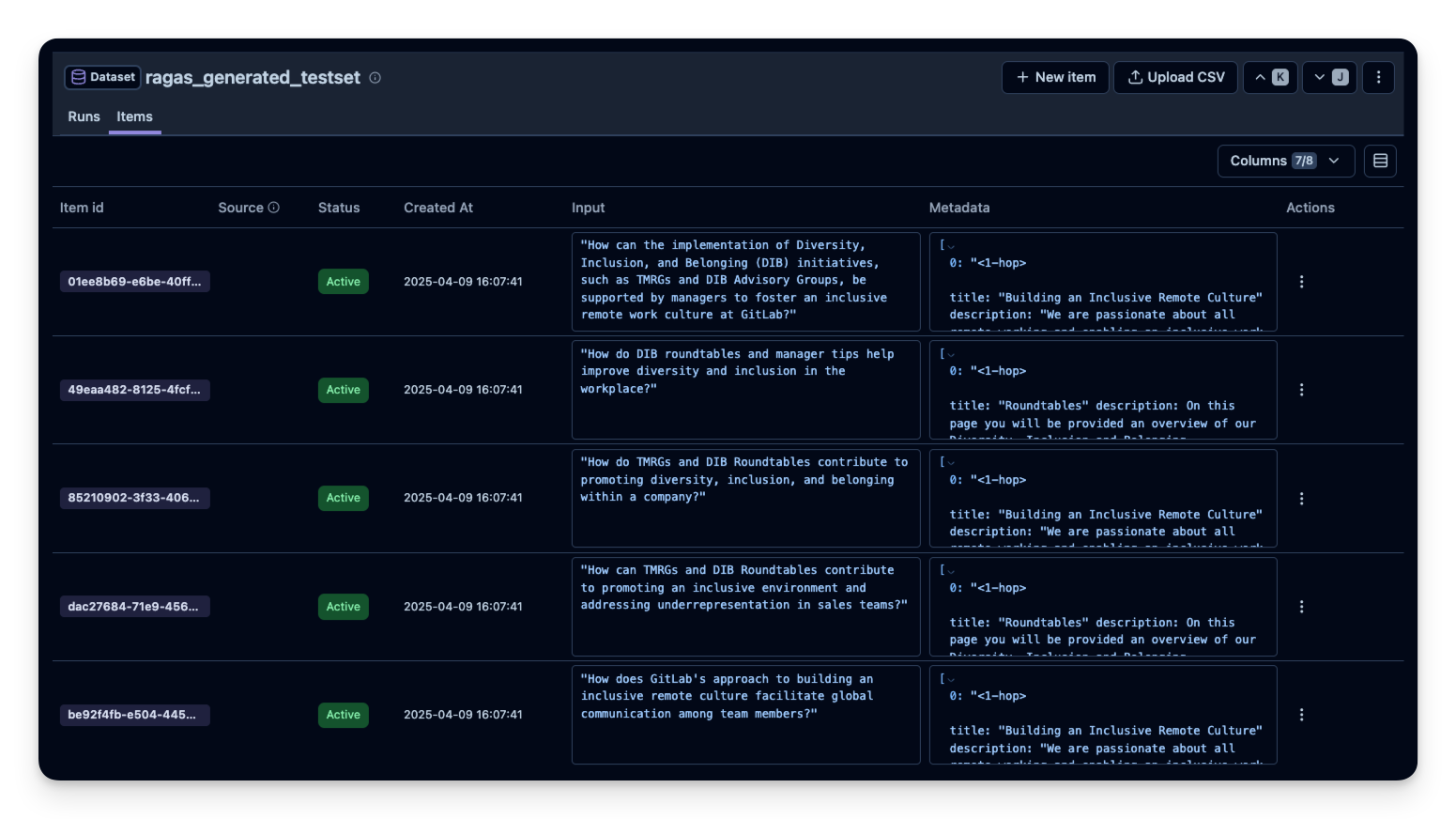
RAGAS 是一个可以自动生成 RAG 测试集的库,它可以基于语料生成相关的查询和答案。下面给出一个简短示例:
注意:本示例摘自 RAGAS 文档
%pip install ragas langchain-community langchain-openai unstructured!git clone https://huggingface.co/datasets/explodinggradients/Sample_Docs_Markdownfrom langchain_community.document_loaders import DirectoryLoader
path = "Sample_Docs_Markdown"
loader = DirectoryLoader(path, glob="**/*.md")
docs = loader.load()from ragas.llms import LangchainLLMWrapper
from ragas.embeddings import LangchainEmbeddingsWrapper
from langchain_openai import ChatOpenAI
from langchain_openai import OpenAIEmbeddings
generator_llm = LangchainLLMWrapper(ChatOpenAI(model="gpt-4o"))
generator_embeddings = LangchainEmbeddingsWrapper(OpenAIEmbeddings())from ragas.testset import TestsetGenerator
generator = TestsetGenerator(llm=generator_llm, embedding_model=generator_embeddings)
dataset = generator.generate_with_langchain_docs(docs, testset_size=10)
# 4. The result `testset` can be converted to a pandas DataFrame for inspection
df = dataset.to_pandas()from langfuse import get_client
langfuse = get_client()
# 5. Push the RAGAS-generated testset to Litefuse
langfuse.create_dataset(
name="ragas_generated_testset",
description="Synthetic RAG test set (RAGAS)",
metadata={"source": "RAGAS", "docs_used": len(docs)}
)
for _, row in df.iterrows():
langfuse.create_dataset_item(
dataset_name="ragas_generated_testset",
input = row["user_input"],
metadata = row["reference_contexts"]
)
示例 3:DeepEval 库
DeepEval 是一个借助 Synthesizer 类系统化生成合成数据的库。
%pip install deepevalimport os
from langfuse import get_client
from deepeval.synthesizer import Synthesizer
from deepeval.synthesizer.config import StylingConfig# 1. Define the style we want for our synthetic data.
# For instance, we want user questions and correct SQL queries.
styling_config = StylingConfig(
input_format="Questions in English that asks for data in database.",
expected_output_format="SQL query based on the given input",
task="Answering text-to-SQL-related queries by querying a database and returning the results to users",
scenario="Non-technical users trying to query a database using plain English.",
)
# 2. Initialize the Synthesizer
synthesizer = Synthesizer(styling_config=styling_config)
# 3. Generate synthetic items from scratch, e.g. 20 items for a short demo
synthesizer.generate_goldens_from_scratch(num_goldens=20)
# 4. Access the generated examples
synthetic_goldens = synthesizer.synthetic_goldensfrom langfuse import get_client
langfuse = get_client()
# 5. Create a Litefuse dataset
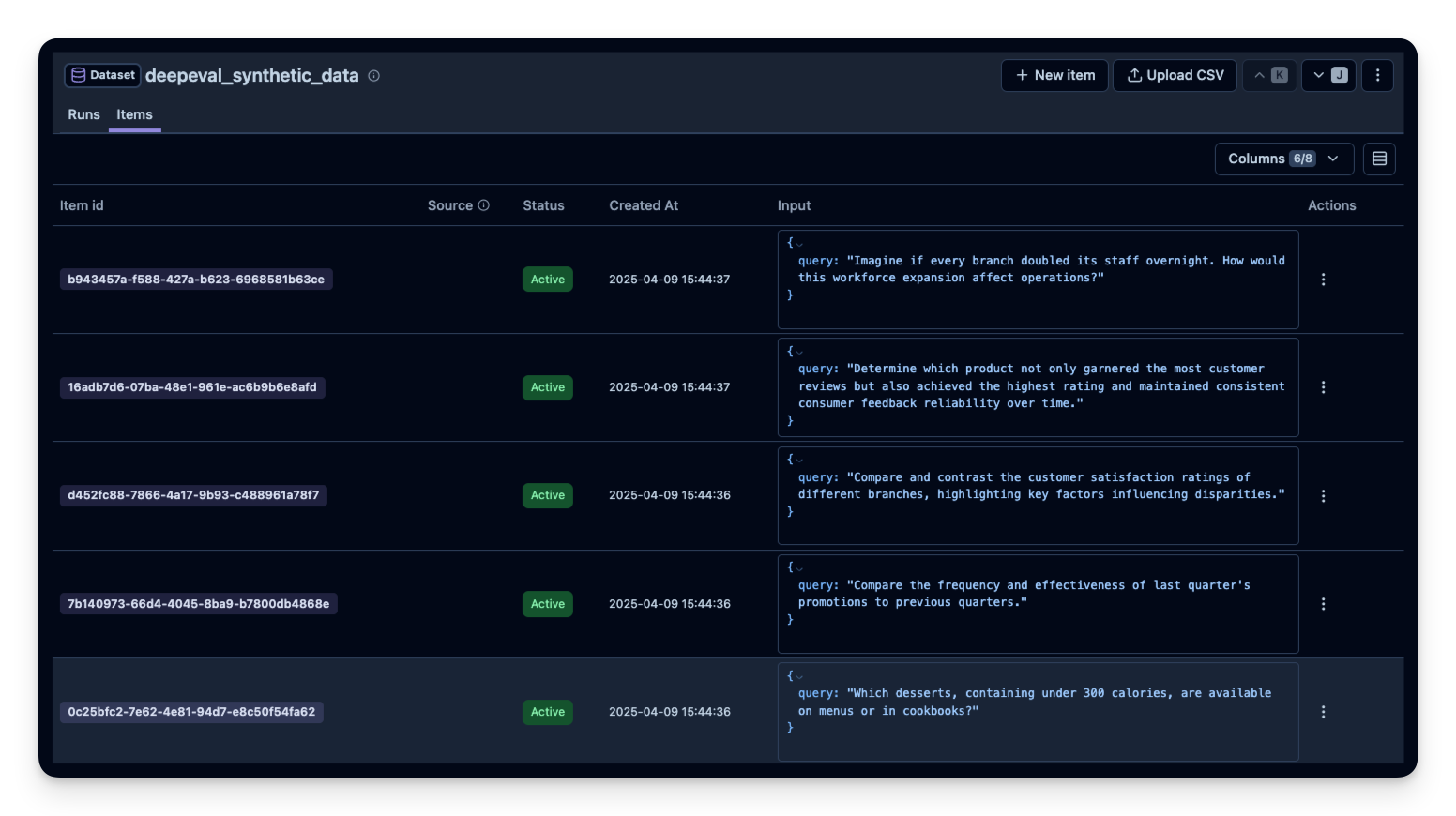
deepeval_dataset_name = "deepeval_synthetic_data"
langfuse.create_dataset(
name=deepeval_dataset_name,
description="Synthetic text-to-SQL data (DeepEval)",
metadata={"approach": "deepeval", "task": "text-to-sql"}
)
# 6. Upload the items
for golden in synthetic_goldens:
langfuse.create_dataset_item(
dataset_name=deepeval_dataset_name,
input={"query": golden.input},
)
示例 4:通过 Hugging Face Dataset Generator 实现无代码生成
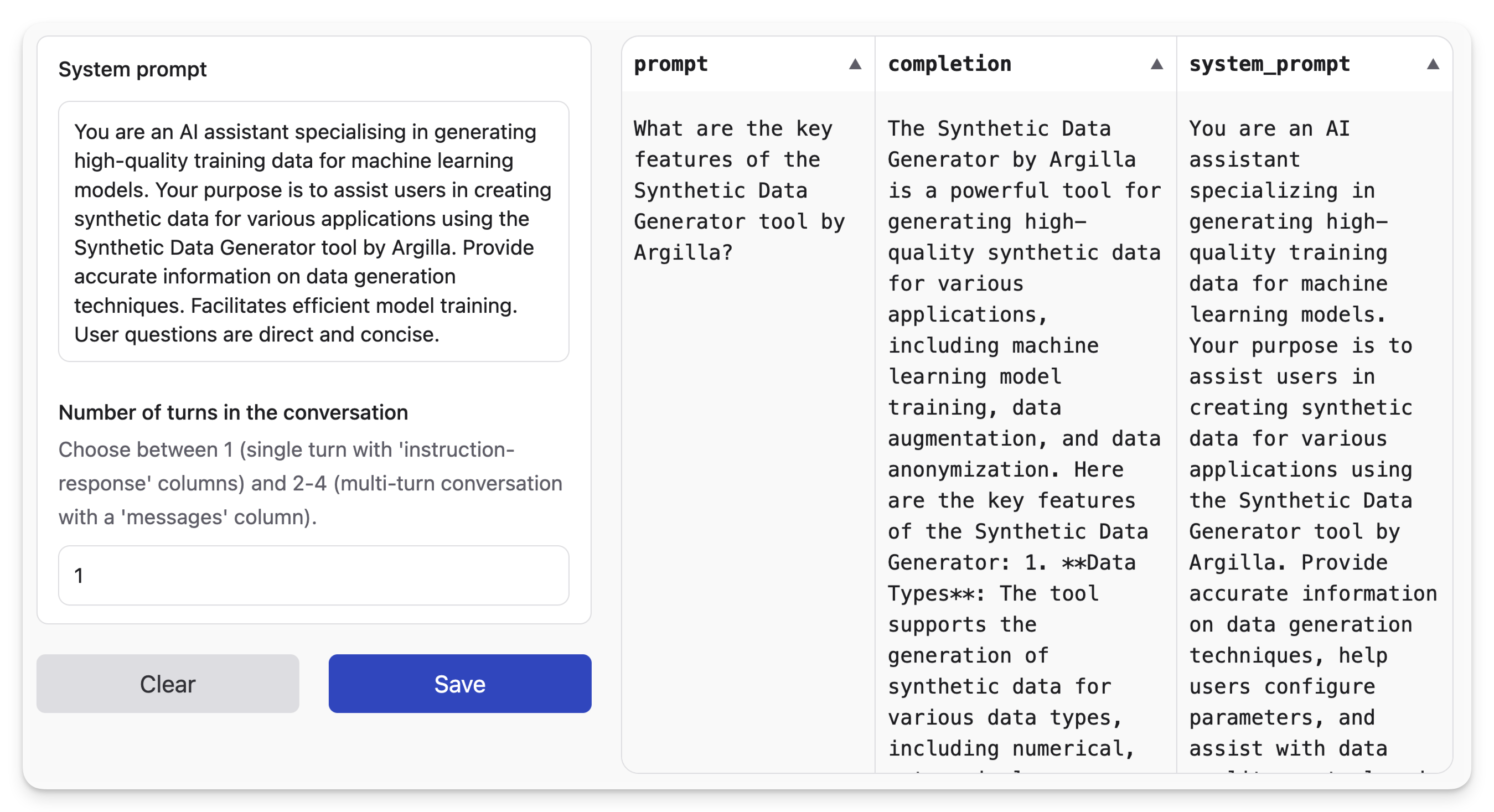
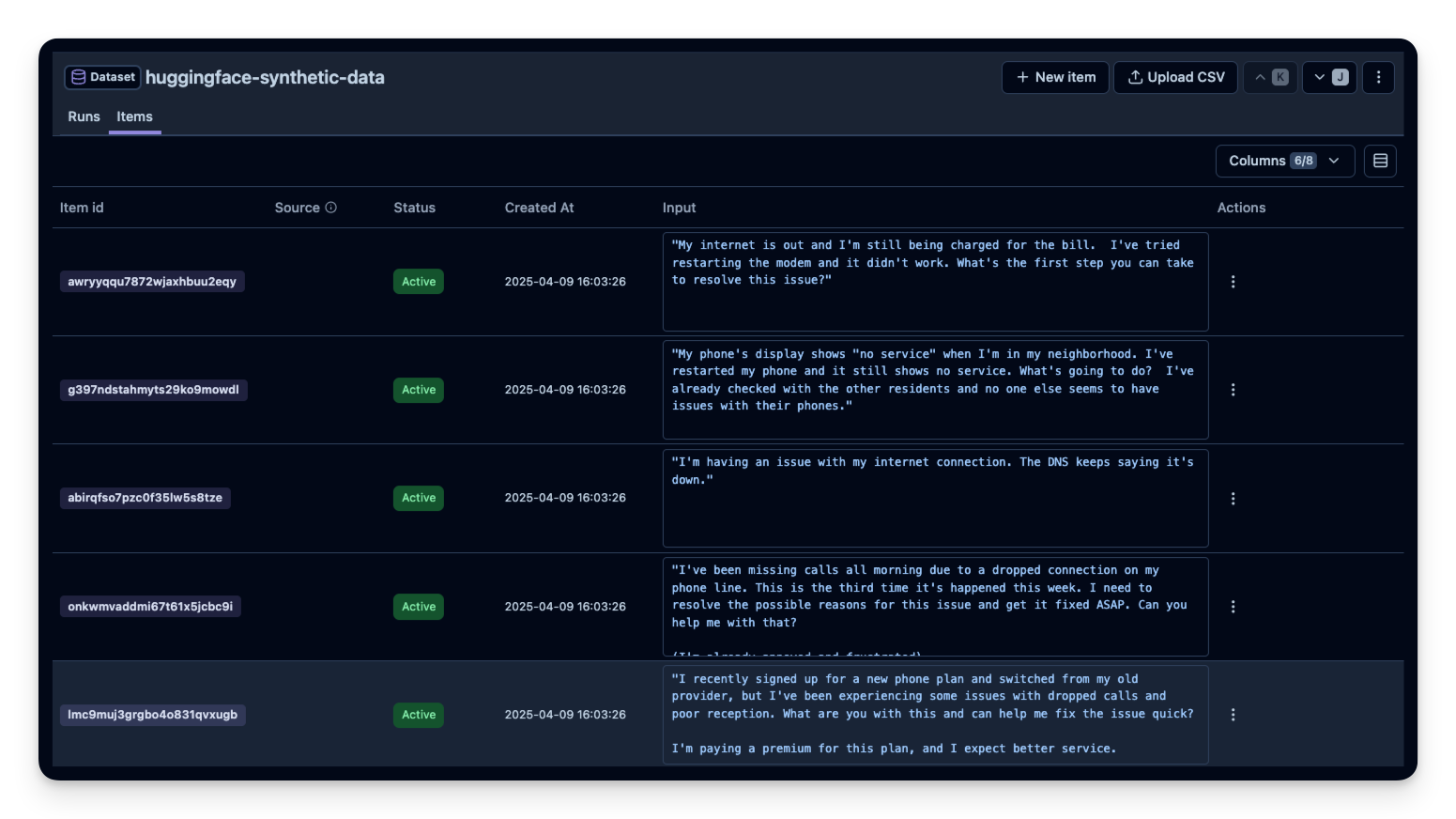
如果你偏好 UI 方式,可以试试 Hugging Face 的 Synthetic Data Generator,在 Hugging Face UI 中直接生成样例,然后下载为 CSV,再在 Litefuse UI 中上传。
示例 5:RAG 数据集生成
如果你已经有现成的向量库,或者不想引入 RAGAS、DeepEval 这类专门的库,可以直接遍历向量库生成 RAG 测试集。这种方式让你完全掌控生成过程。
适用于以下场景:
- 希望代码轻量、不增加额外依赖
- 需要自定义问题生成的逻辑
import os
# 在项目设置页获取你的项目密钥:https://litefuse.cloud
os.environ["LANGFUSE_PUBLIC_KEY"] = "pk-lf-..."
os.environ["LANGFUSE_SECRET_KEY"] = "sk-lf-..."
os.environ["LANGFUSE_BASE_URL"] = "https://litefuse.cloud"
# 你的 OpenAI key
os.environ["OPENAI_API_KEY"] = "sk-proj-..."# Install dependencies
%pip install --upgrade langchain-community langchain-openai langchain-chroma langfuse "unstructured[md]"# Clone an example document set
!git clone https://huggingface.co/datasets/explodinggradients/Sample_Docs_Markdown# Load the documents
from langchain_community.document_loaders import DirectoryLoader

path = "Sample_Docs_Markdown"
loader = DirectoryLoader(path, glob="**/*.md")
docs = loader.load()
from langchain_openai import ChatOpenAI, OpenAIEmbeddings
from langchain_community.vectorstores import Chroma
from langchain_text_splitters import RecursiveCharacterTextSplitter
# Chunk the documents
splitter = RecursiveCharacterTextSplitter(chunk_size=1000, chunk_overlap=200)
chunks = splitter.split_documents(docs)
# Create vector DB
vectorstore = Chroma.from_documents(chunks, OpenAIEmbeddings())# Generate questions
import json
# Get all chunks
all_chunks = vectorstore.get()['documents'][:10] # Get the first 10 chunks
llm = ChatOpenAI(model="gpt-4o-mini")
test_items = []
for chunk in all_chunks:
# Ask LLM to generate one question
response = llm.invoke(
f"Generate one natural question that can be answered using this text. "
f"Return only JSON: {{\"question\": \"...\", \"answer\": \"...\"}}\n\n{chunk}"
)
# Parse response
content = response.content
if "```" in content:
content = content.split("```")[1].replace("json", "").strip()
qa = json.loads(content)
test_items.append({
"question": qa["question"],
"answer": qa["answer"],
"context": chunk
})# Push to Litefuse Dataset
from langfuse import get_client
langfuse = get_client()
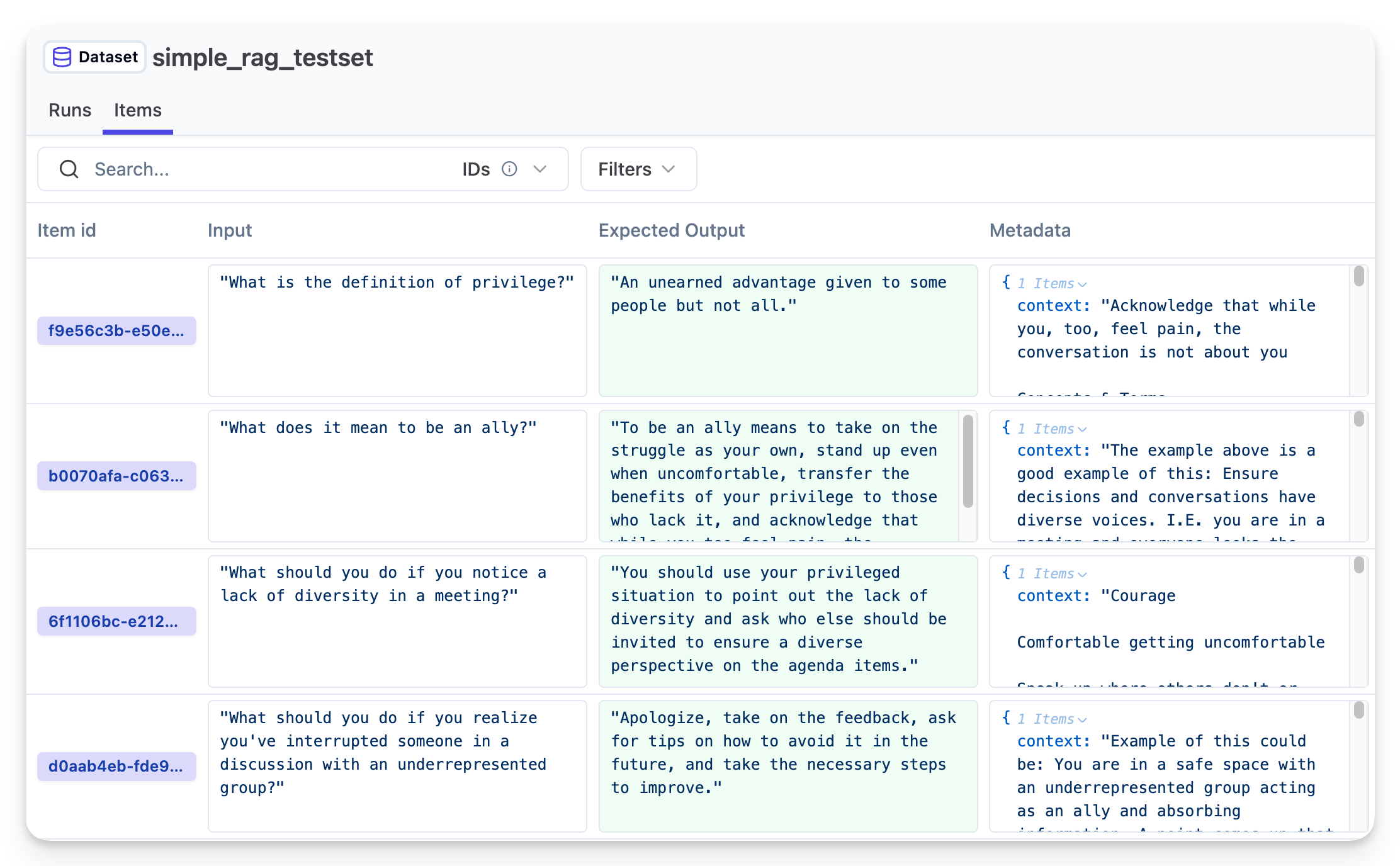
langfuse.create_dataset(name="simple_rag_testset")
for item in test_items:
langfuse.create_dataset_item(
dataset_name="simple_rag_testset",
input=item["question"],
expected_output=item["answer"],
metadata={"context": item["context"]}
)
print(f"✓ Created {len(test_items)} test items")现在就可以使用这个数据集对你的应用进行评估了。
示例 6:Torque —— 声明式数据集生成
Torque 是一个声明式、类型安全的 DSL,用于构建合成数据集。它让你像写 React 组件那样组合对话,特别适合生成带工具调用的复杂多轮对话。
这种方式在以下情况尤为有用:
- 需要 结构化对话 且带有工具使用模式
- 需要 类型安全的数据集生成,完整 TypeScript 支持
- 需要 可复现的数据集,按 seed 生成
- 需要遵循特定模式的 复杂多轮对话
import { Langfuse } from "langfuse";

import {
  oneOf,
  generatedUser,
  generatedAssistant,
  generatedToolCall,
  generatedToolCallResult,
  times,
  between,
  generateDataset,
} from "@qforge/torque";
import { weatherTool, searchEmailTool } from "@qforge/torque/examples";
import { openai } from "@ai-sdk/openai";

const langfuse = new Langfuse({
  publicKey: process.env.LANGFUSE_PUBLIC_KEY,
  secretKey: process.env.LANGFUSE_SECRET_KEY,
  baseUrl: process.env.LANGFUSE_URL,
});

// Generate dataset with Torque's declarative DSL
const conversationSchema = () => {
  // Randomly select which tool to use in this conversation
  const selectedTool = oneOf([searchEmailTool, weatherTool]);

  return [
    // Register the tool function
    selectedTool.toolFunction(),

    // User initiates request
    generatedUser({
      prompt: `User asking a question that will require calling ${selectedTool.name} tool.`,
    }),

    // Assistant acknowledges and calls tool
    generatedAssistant({
      prompt: "Assistant acknowledging the tool call",
      toolCalls: [generatedToolCall(selectedTool, "tool-1")],
    }),

    generatedToolCallResult(selectedTool, "tool-1"),

    // Assistant presents results
    generatedAssistant({
      prompt:
        "Assistant responding to the user's question using the result of the tool call.",
    }),

    // Optional follow-up conversation (1-2 exchanges)
    times(between(1, 2), [
      generatedUser({
        prompt: "Follow-up question",
      }),
      generatedAssistant({
        prompt:
          "Assistant responding to the user's follow-up question",
      }),
    ]),
  ];
};

// Generate the dataset to a JSONL file
await generateDataset(conversationSchema, {
  count: 50,
  model: openai("gpt-5-mini"),
  output: "data/torque_tool.jsonl",
  seed: 42, // Reproducible generation
});

// Read generated JSONL and upload to Litefuse
await langfuse.createDataset({
  name: "torque_tool",
  description: "Tool calling conversations generated with Torque DSL",
});

const jsonlContent = await Bun.file("data/torque_tool.jsonl").text();
const conversations = jsonlContent
  .trim()
  .split("\n")
  .map((line) => JSON.parse(line));

for (const conversation of conversations) {
  await langfuse.createDatasetItem({
    datasetName: "torque_tool",
    input: conversation.messages,
    metadata: {
      tool_used: conversation.messages.find((m) => m.role === "tool")?.name,
      turns: conversation.messages.length,
    },
  });
}

await langfuse.flushAsync();
Torque 的主要优势:
- 类型安全的对话:完整 TypeScript 支持,配合 Zod schema 保证合成数据与生产环境的类型一致。
- 声明式模式:用
times()、oneOf()等组合子搭建复杂的对话流。 - 工具模拟:内置对工具调用和结果的支持,非常适合评估 agentic 应用。
- 可复现:按 seed 生成,多次运行产出相同的数据集。
- 真实的差异:AI 生成自然变化,同时遵循你设定的结构约束。
这种方式在 评估使用工具的 AI agent 上尤为强大,能够生成结构一致但语义多样的对话。
下一步
- 在 Litefuse 中查看你的数据集。每个数据集都可以在 UI 中看到。
- 运行实验 现在就可以使用这个数据集评估你的应用。
- 对比运行结果,跨时间、跨模型、跨 prompt 或跨链路逻辑进行对比。
关于如何在数据集上运行实验的更多细节,请参阅 Litefuse 文档。