使用外部评估 Pipeline 评估 Litefuse LLM trace
本 cookbook 介绍如何构建外部评估 pipeline,用于衡量基于 Litefuse 的生产环境 LLM 应用的表现。
一般来说,我们建议你先看看 Litefuse UI 中的评估能力 是否能覆盖你的场景。如果你的需求超出了这些能力,仍然可以在 Litefuse 中无代码地实现自定义评估模板。
如果你有以下任一需求,可以考虑实现外部评估 pipeline:
- 需要更精确控制 trace 何时被评估。你可以让 pipeline 在指定时间运行,或者基于事件触发(如 Webhook)。
- 当你的需求超出 Litefuse UI 能提供的能力时,需要更灵活的自定义评估方式
- 对自定义评估进行版本控制
- 使用现有的评估框架对数据进行评估
如果你的场景符合以上任一情况,就让我们一起来实现你的第一个外部评估 pipeline 吧!
读完本 cookbook 后,你将能够:
- 创建一份合成数据集用于测试模型。
- 使用 Langfuse 客户端获取并过滤历史模型运行的 trace
- 离线、增量地对这些 trace 进行评估
- 将 score 添加到已有的 Litefuse trace 上
从概念上看,我们会实现如下架构:
注意:本 cookbook 使用了 Jupyter notebook 演示,但在生产环境中你应当使用自己偏好的编排工具。只需要把代码抽取到 .py 文件中,并确保运行时所有依赖都可用即可。
(准备工作)将合成 trace 导入 Litefuse
在本示例中,我们会构建一个 mock 应用:一个科普交流 LLM,可以用生动易懂的方式解释任何主题。
由于我们没有真实用户数据,第一步是构造一份合成数据集。我们会生成一系列真实用户可能会问的问题。这是启动 LLM 开发的好方法,但尽早收集真实用户的查询同样非常重要。
你可以在 这里 获取 Litefuse API key,在 这里 获取 OpenAI API key
%pip install langfuse openai deepeval --upgradeimport os
# Get keys for your project from the project settings page: https://litefuse.cloud
os.environ["LANGFUSE_PUBLIC_KEY"] = "pk-lf-..."
os.environ["LANGFUSE_SECRET_KEY"] = "sk-lf-..."
os.environ["LANGFUSE_BASE_URL"] = "https://litefuse.cloud"
# Your openai key
os.environ["OPENAI_API_KEY"] = "sk-proj-..."我们先来生成一组主题建议,后续会把这些主题当作用户问题发送给应用。
from langfuse.openai import openai

topic_suggestion = """ You're a world-class journalist, specialized
in figuring out which are the topics that excite people the most.
Your task is to give me 50 suggestions for pop-science topics that the general
public would love to read about. Make sure topics don't repeat.
The output must be a comma-separated list. Generate the list and NOTHING else.
The use of numbers is FORBIDDEN.
"""

output = openai.chat.completions.create(
    messages=[
        {
            "role": "user",
            "content": topic_suggestion
        }
    ],
    model="gpt-4o",

    temperature=1
).choices[0].message.content

topics = [item.strip() for item in output.split(",")]
for topic in topics:
    print(topic)
很好!现在你已经有了一份用户可能感兴趣的话题列表。接下来,我们让科普 LLM 处理这些问题,并把结果发送到 Litefuse。为了简单起见,我们使用 Litefuse 的 @observe() 装饰器。这个装饰器会自动监控函数内嵌套的所有 LLM 调用(generation)。我们同时使用 langfuse 类给 trace 打标签和命名,方便后续拉取。
from langfuse import observe, get_client, propagate_attributes
langfuse = get_client()

prompt_template = """
You're an expert science communicator, able to explain complex topics in an
approachable manner. Your task is to respond to the questions of users in an
engaging, informative, and friendly way. Stay factual, and refrain from using
jargon. Your answer should be 4 sentences at max.
Remember, keep it ENGAGING and FUN!

Question: {question}
"""

@observe()
def explain_concept(topic):

    with propagate_attributes(
        tags=["ext_eval_pipelines"],
        trace_name=f"Explanation '{topic}'"
    ):

        prompt = prompt_template.format(question=topic)

        return openai.chat.completions.create(
            messages=[
                {
                    "role": "user",
                    "content": prompt,
                }
            ],
            model="gpt-4o-mini",

            temperature=0.6
        ).choices[0].message.content


for topic in topics:
    print(f"Input: Please explain to me {topic.lower()}")
    print(f"Answer: {explain_concept(topic)} \n")
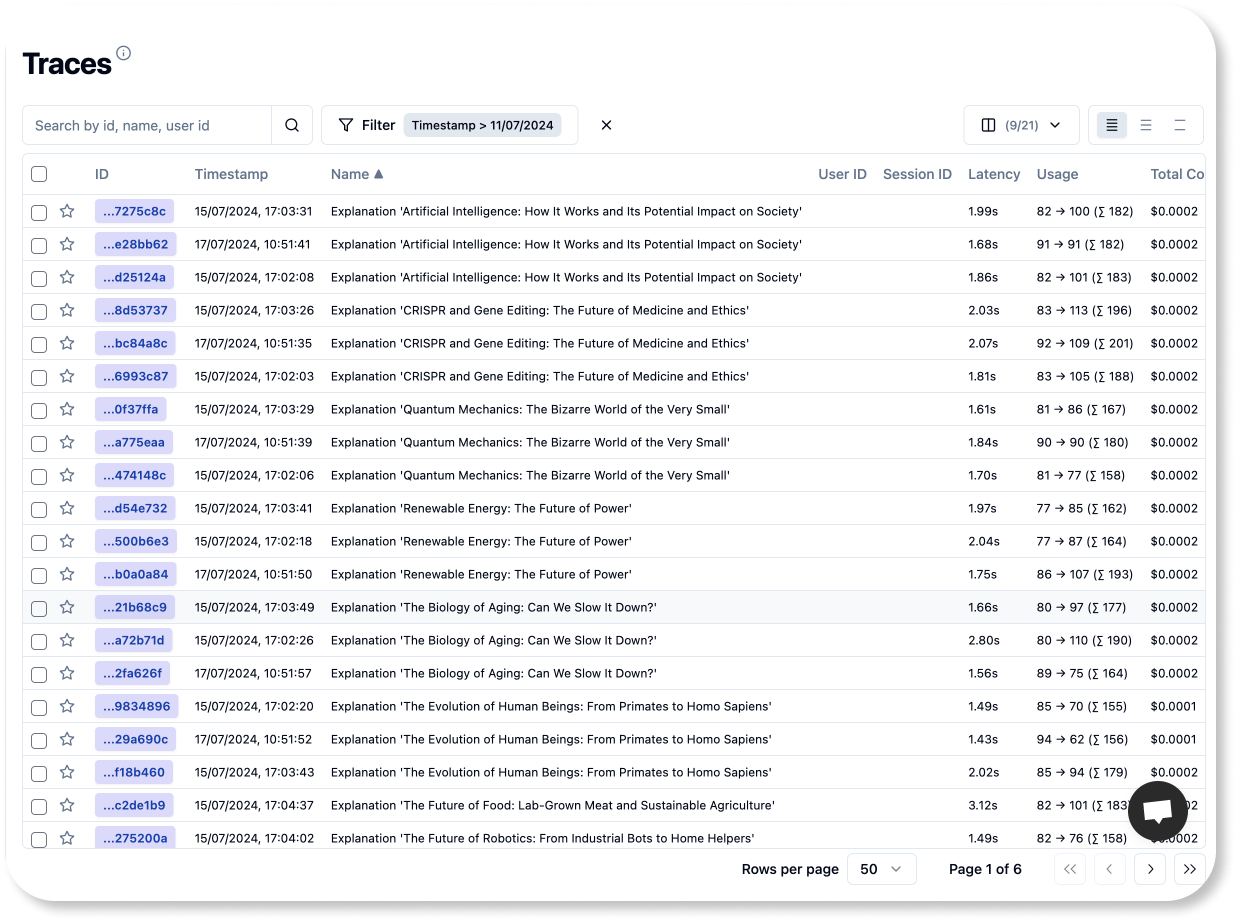
现在你应该可以在 Litefuse UI 的 Traces 页面看到刚刚新增的 trace。
请记住,本教程的目标是教你如何构建外部评估 pipeline。这些 pipeline 可以运行在 CI/CD 环境中,也可以运行在另一个独立编排的容器服务里。无论你选择哪种环境,三个关键步骤始终适用:
- 拉取 trace:把应用的 trace 取到你的评估环境
- 运行评估:使用任何你想用的评估逻辑
- 保存结果:把评估结果回写到对应的 Litefuse trace 上。
后续的 notebook 内容,我们只有一个目标:
🎯 目标:让 pipeline 每天早晨 5 点对过去 24 小时内的 50 条 trace 进行评估
1. 拉取 trace
从 Litefuse 拉取 trace 非常简单。只需初始化 Langfuse 客户端并调用其中一个函数即可。我们会采用增量方式:先拉取前 10 条 trace 并评估它们,然后把 score 回写到 Litefuse,再处理下一批 10 条 trace。这样循环直到处理满 50 条。
fetch_traces() 函数支持按 tag、时间戳等条件筛选 trace,也支持指定分页的样本数量。你可以在我们的文档中查看更多 查询 trace 的方法。
from langfuse import get_client
from datetime import datetime, timedelta

BATCH_SIZE = 10
TOTAL_TRACES = 50

langfuse = get_client()

now = datetime.now()
five_am_today = datetime(now.year, now.month, now.day, 5, 0)
five_am_yesterday = five_am_today - timedelta(days=1)

traces_batch = langfuse.api.trace.list(page=1,
                                     limit=BATCH_SIZE,
                                     tags="ext_eval_pipelines",
                                     from_timestamp=five_am_yesterday,
                                     to_timestamp=datetime.now()
                                   ).data

print(f"Traces in first batch: {len(traces_batch)}")
Traces in first batch: 10
2. 运行评估
Litefuse 支持数值、布尔和类别(string)类型的 score。把自定义评估逻辑封装成一个函数通常是一个好的实践。评估函数应当以一个 trace 作为输入,并返回一个有效的 score。我们先从一个简单的类别 score 开始。
2.1. 类别评估
在分析 LLM 应用的输出时,你可能希望评估一些更适合用定性方式描述的特征,例如情感、语气或文本复杂度(阅读难度)。
我们正在构建一个科普 LLM,它的输出应当生动、积极。 为了确保它说话的风格符合预期,我们会评估输出的语气,看看是否符合我们的意图。这里我们手写一个评估 prompt(不使用任何库),用于识别每个模型输出中最主要的三种语气。
template_tone_eval = """
You're an expert in human emotional intelligence. You can identify with ease the
 tone in human-written text. Your task is to identify the tones present in a
 piece of <text/> with precission. Your output is a comma separated list of three
 tones. PRINT THE LIST ALONE, NOTHING ELSE.

<possible_tones>
neutral, confident, joyful, optimistic, friendly, urgent, analytical, respectful
</possible_tones>

<example_1>
Input: Citizen science plays a crucial role in research by involving everyday
people in scientific projects. This collaboration allows researchers to collect
vast amounts of data that would be impossible to gather on their own. Citizen
scientists contribute valuable observations and insights that can lead to new
discoveries and advancements in various fields. By participating in citizen
science projects, individuals can actively contribute to scientific research
and make a meaningful impact on our understanding of the world around us.

Output: respectful,optimistic,confident
</example_1>

<example_2>
Input: Bionics is a field that combines biology and engineering to create
devices that can enhance human abilities. By merging humans and machines,
bionics aims to improve quality of life for individuals with disabilities
or enhance performance for others. These technologies often mimic natural
processes in the body to create seamless integration. Overall, bionics holds
great potential for revolutionizing healthcare and technology in the future.

Output: optimistic,confident,analytical
</example_2>

<example_3>
Input: Social media can have both positive and negative impacts on mental
health. On the positive side, it can help people connect, share experiences,
and find support. However, excessive use of social media can also lead to
feelings of inadequacy, loneliness, and anxiety. It's important to find a
balance and be mindful of how social media affects your mental well-being.
Remember, it's okay to take breaks and prioritize your mental health.

Output: friendly,neutral,respectful
</example_3>

<text>
{text}
</text>
"""


test_tone_score = openai.chat.completions.create(
    messages=[
        {
            "role": "user",
            "content": template_tone_eval.format(
                text=traces_batch[1].output),
        }
    ],
    model="gpt-4o",

    temperature=0
).choices[0].message.content
print(f"User query: {traces_batch[1].input['args'][0]}")
print(f"Model answer: {traces_batch[1].output}")
print(f"Dominant tones: {test_tone_score}")
识别人类意图和语气对语言模型来说并不容易。为了应对这个问题,我们使用了 multi-shot prompt,也就是给模型提供多个示例供其学习。下面我们把代码封装成一个评估函数,方便复用。
def tone_score(trace):
    return openai.chat.completions.create(
        messages=[
            {
                "role": "user",
                "content": template_tone_eval.format(text=trace.output),
            }
        ],
        model="gpt-4o",
        temperature=0
    ).choices[0].message.content

tone_score(traces_batch[1])
很好!接下来我们再创建一个数值类型的评估 score。
2.2. 数值评估
在本 cookbook 中,我们会使用 Deepeval 框架(文档)来处理数值评估。Deepeval 为大量常见 LLM 指标提供 0 到 1 范围的分数,你也可以用自然语言描述来创建自定义指标。为了确保应用的回答有趣且引人入胜,我们会定义一个自定义的 “joyfulness” 分数。
你也可以选用其它评估库,比如:
from deepeval.metrics import GEval
from deepeval.test_case import LLMTestCaseParams, LLMTestCase

def joyfulness_score(trace):
		joyfulness_metric = GEval(
		    name="Correctness",
		    criteria="Determine whether the output is engaging and fun.",
		    evaluation_params=[LLMTestCaseParams.ACTUAL_OUTPUT],
		)
		test_case = LLMTestCase(
    input=trace.input["args"],
    actual_output=trace.output)

		joyfulness_metric.measure(test_case)

		print(f"Score: {joyfulness_metric.score}")
		print(f"Reason: {joyfulness_metric.reason}")

		return {"score": joyfulness_metric.score, "reason": joyfulness_metric.reason}

joyfulness_score(traces_batch[1])
GEval 在底层使用了 chain of thought(CoT)prompt,自动为打分生成一组评判标准。在开发自己的指标时,仔细查看这些打分背后的推理过程非常重要,这样可以确保模型确实按照你编写评估 prompt 时的意图进行打分。
我们的评估函数返回一个包含分数和模型推理过程的字典。这么做是因为我们打算把推理过程一起持久化到每个 Litefuse score 上,确保可解释性。
至此,评估函数定义就完成了。接下来把这些分数回写到 Litefuse!
3. 把分数写回 Litefuse
现在评估函数已经准备就绪,是时候让它们工作了。使用 Langfuse 客户端可以把分数写回到已有的 trace 上。
langfuse.create_score(
    trace_id=traces_batch[1].id,
    name="tone",
    value=joyfulness_score(traces_batch[1])["score"],
    comment=joyfulness_score(traces_batch[1])["reason"]
)
恭喜,你已经成功把第一个外部评估的 score 写入 Litefuse 了!还剩 49 个 😁。别担心,我们的方案非常容易扩展。
4. 把所有步骤组合到一起
到目前为止,我们走完了构建外部评估 pipeline 的所有必要步骤:拉取 trace、运行评估、把分数持久化到 Litefuse。下面我们把这些步骤整合成一段紧凑的脚本,你可以直接在自己的评估 pipeline 里运行。
我们按每批 10 条 trace 进行拉取,再遍历每条 trace 打分并回写到 Litefuse。注意这里的批大小只是为了演示。在生产环境中,你可能希望并行处理多个批次以加快速度。分批处理不仅能降低系统内存压力,还能让你创建检查点,方便出错时恢复。
import math

for page_number in range(1, math.ceil(TOTAL_TRACES/BATCH_SIZE)):

    traces_batch = langfuse.api.trace.list(
        tags="ext_eval_pipelines",
        page=page_number,
        from_timestamp=five_am_yesterday,
        to_timestamp=five_am_today,
        limit=BATCH_SIZE
    ).data

    for trace in traces_batch:
        print(f"Processing {trace.name}")

        if trace.output is None:
            print(f"Warning: \n Trace {trace.name} had no generated output, \
            it was skipped")
            continue

        langfuse.create_score(
            trace_id=trace.id,
            name="tone",
            value=tone_score(trace)
        )

        jscore = joyfulness_score(trace)
        langfuse.create_score(
            trace_id=trace.id,
            name="joyfulness",
            value=jscore["score"],
            comment=jscore["reason"]
        )

    print(f"Batch {page_number} processed 🚀 \n")
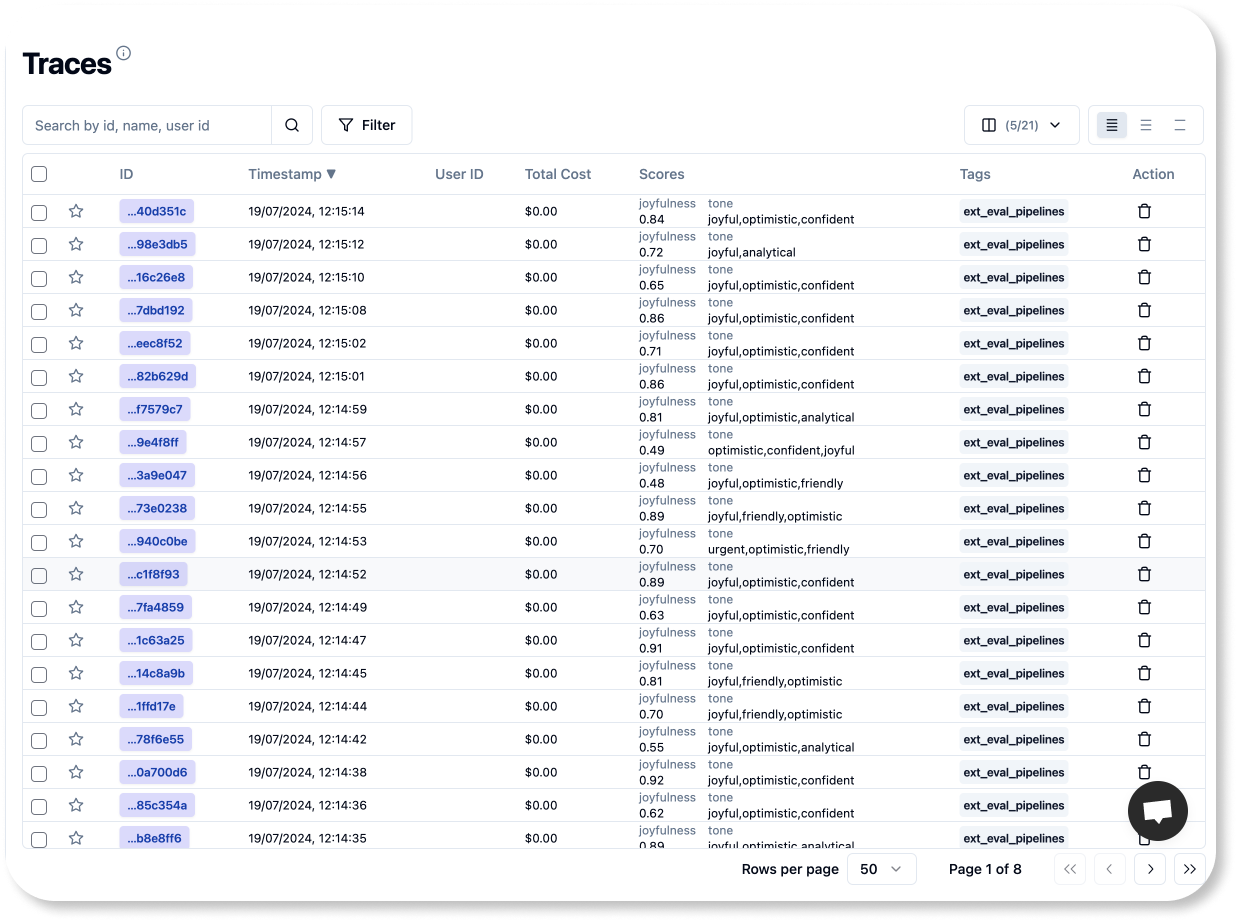
如果 pipeline 成功运行,你应该可以在 Litefuse UI 中看到这些分数。
就是这样!现在你可以把这些代码集成到你偏好的编排工具中,让它在合适的时间自动运行。
要实现我们最初的目标——每天早晨 5 点运行脚本,只需在你选定的环境中按 cron(0 5 * * ? *) 这条规则配置一个 Cron 任务即可。
感谢你跟我一起跑完整个流程!希望本教程对你有所帮助。