使用 Litefuse 为 Databricks 模型提供可观测性
Databricks 提供了一个强大的平台来托管并提供大型语言模型服务。将 Databricks 的服务端点与 Litefuse 结合使用,你可以在开发与生产环境中追踪、监控并分析 AI 工作负载。
本 notebook 演示了将 Databricks 模型与 Litefuse 一起使用的 三种 方式:
- OpenAI SDK: 通过 OpenAI SDK 使用 Databricks 模型端点。
- LangChain: 在 LangChain 流水线中集成 Databricks 的 LLM 接口。
- LlamaIndex: 在 LlamaIndex 中使用 Databricks 端点。
什么是 Databricks Model Serving?
Databricks Model Serving 允许你在生产环境中提供大规模模型服务,具备自动扩缩容与稳健的基础设施。它还支持基于私有数据微调 LLM,确保你的模型可以利用专有信息,同时保持数据隐私。
什么是 Litefuse?
Litefuse 是面向 LLM 可观测性与监控的开源平台。它通过采集元数据、prompt 详情、token 用量、延迟等信息,帮助你追踪与监控自己的 AI 应用。
1. 安装依赖
开始之前,先在你的 Python 环境中安装必要的包:
- openai:通过 OpenAI SDK 调用 Databricks 端点所需。
- databricks-langchain:通过 “OpenAI 风格” 接口调用 Databricks 端点所需。
- llama-index 与 llama-index-llms-databricks:用于在 LlamaIndex 中使用 Databricks 端点。
- litefuse:用于将 trace 数据发送到 Litefuse 平台。
%pip install openai langfuse databricks-langchain llama-index llama-index-llms-databricks openinference-instrumentation-llama-index2. 配置环境变量
将你的 Litefuse 凭证与 Databricks 凭证配置为环境变量。请将下方占位密钥替换为你各账号中的真实值。
LANGFUSE_PUBLIC_KEY/LANGFUSE_SECRET_KEY:来自你的 Litefuse 项目设置。LANGFUSE_BASE_URL:https://litefuse.cloud。DATABRICKS_TOKEN:你的 Databricks 个人访问令牌。DATABRICKS_HOST:你的 Databricks 工作区 URL(例如https://dbc-xxxxxxx.cloud.databricks.com)。
import os

# Example environment variables (replace with your actual keys/tokens)
os.environ["LANGFUSE_PUBLIC_KEY"] = "pk-lf-..."  # your public key
os.environ["LANGFUSE_SECRET_KEY"] = "sk-lf-..."  # your secret key
os.environ["LANGFUSE_BASE_URL"] = "https://litefuse.cloud"  # or https://litefuse.cloud

os.environ["DATABRICKS_TOKEN"] = "dapi-..."  # Databricks personal access token
os.environ["DATABRICKS_HOST"] = "https://dbc-XXXXX-XXXX.cloud.databricks.com"
方式 1:通过 OpenAI SDK 使用 Databricks 模型
Databricks 端点可以作为 OpenAI API 的替代品。这使得它能轻松接入依赖 openai 库的现有代码。在底层,langfuse.openai.OpenAI 会自动将你的请求追踪到 Litefuse。
步骤
- 从
langfuse.openai导入OpenAI客户端。 - 创建一个客户端,将
api_key设为你的 Databricks token,base_url设为你的 Databricks 工作区端点。 - 使用客户端的
chat.completions.create()方法发送 prompt。 - 在你的 Litefuse 仪表盘中查看 trace。
注意: 关于使用 Litefuse 追踪 OpenAI 的更多示例,请参见 OpenAI 集成文档。
# Langfuse OpenAI client
from langfuse.openai import OpenAI

# Retrieve the environment variables
databricks_token = os.environ.get("DATABRICKS_TOKEN")
databricks_host = os.environ.get("DATABRICKS_HOST")

# Create an OpenAI-like client pointing to Databricks
client = OpenAI(
    api_key=databricks_token,  # Databricks personal access token
    base_url=f"{databricks_host}/serving-endpoints",  # your Databricks workspace
)
response = client.chat.completions.create(
messages=[
{"role": "system", "content": "You are an AI assistant."},
{"role": "user", "content": "What is Databricks?"}
],
model="mistral-7b", # Adjust based on your Databricks serving endpoint name
max_tokens=256
)
# Print out the response from the model
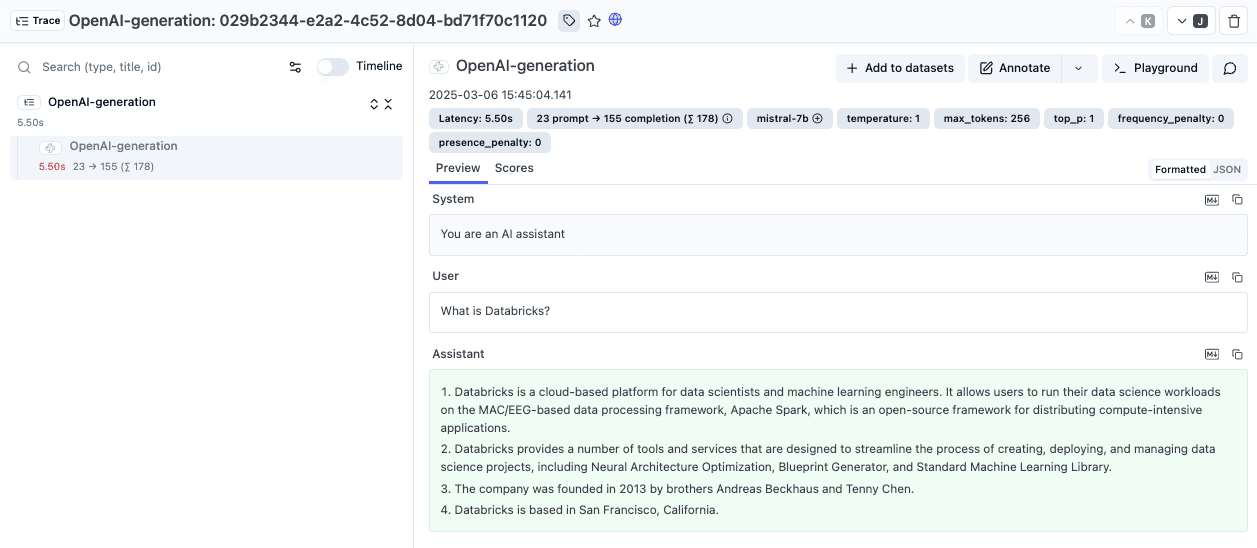
print(response.choices[0].message.content)请求完成后,登录你的 Litefuse 仪表盘,找到新的 trace。你会看到 prompt、响应、延迟、token 用量等详情。
方式 2:使用 LangChain
Databricks 模型也可以通过 LangChain 使用。ChatDatabricks 类封装了你的 Databricks Model Serving 端点。
步骤
- 将
DATABRICKS_HOST设为环境变量。 - 初始化一个 Litefuse
CallbackHandler,它会自动采集 trace 数据。 - 使用你的端点名称、temperature 或其他参数初始化
ChatDatabricks。 - 使用消息调用该模型,并传入 Litefuse callback handler。
- 在你的 Litefuse 仪表盘中查看 trace。
注意: 关于使用 Litefuse 追踪 LangChain 的更多示例,请参见 LangChain 集成文档。
import os

# Get keys for your project from the project settings page: https://litefuse.cloud
os.environ["LANGFUSE_PUBLIC_KEY"] = "pk-lf-..."
os.environ["LANGFUSE_SECRET_KEY"] = "sk-lf-..."
os.environ["LANGFUSE_BASE_URL"] = "https://litefuse.cloud"
from langfuse.langchain import CallbackHandler

# Initialize Langfuse CallbackHandler for Langchain (tracing)
langfuse_handler = CallbackHandler()
from databricks_langchain import ChatDatabricks
chat_model = ChatDatabricks(
endpoint="mistral-7b", # Your Databricks Model Serving endpoint name
temperature=0.1,
max_tokens=256,
# Other parameters can be added here
)
# Build a prompt as a list of system/user messages
messages = [
("system", "You are a chatbot that can answer questions about Databricks."),
("user", "What is Databricks Model Serving?")
]
# Invoke the model using LangChain's .invoke() method
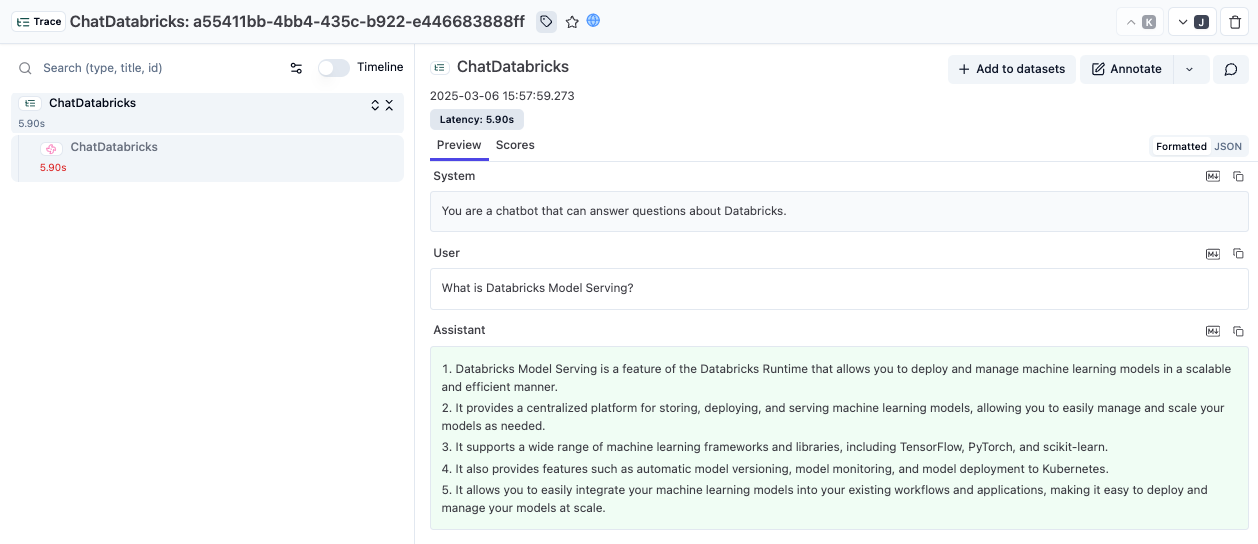
chat_model.invoke(messages, config={"callbacks": [langfuse_handler]})运行代码后,打开你的 Litefuse 仪表盘查看记录的对话。
方式 3:使用 LlamaIndex
如果你使用 LlamaIndex 进行数据摄取、索引或检索增强生成(RAG),可以将默认 LLM 替换为 Databricks 端点。
步骤
- 从
llama_index.llms.databricks导入Databricks。 - 使用你的端点名称与 Databricks 凭证初始化一个
DatabricksLLM。 - 使用
langfuse.llama_index中的LlamaIndexInstrumentor启用自动追踪。 - 用聊天请求调用该 LLM。
- 在你的 Litefuse 仪表盘中查看 trace。
注意: 关于使用 Litefuse 追踪 LlamaIndex 的更多示例,请参见 LlamaIndex 集成文档。
from llama_index.llms.databricks import Databricks

# Create a Databricks LLM instance
llm = Databricks(
    model="mistral-7b",  # Your Databricks serving endpoint name
    api_key=os.environ.get("DATABRICKS_TOKEN"),
    api_base=f"{os.environ.get('DATABRICKS_HOST')}/serving-endpoints/"
)
import os
from langfuse import get_client
from openinference.instrumentation.llama_index import LlamaIndexInstrumentor
# Get keys for your project from the project settings page: https://litefuse.cloud
os.environ["LANGFUSE_PUBLIC_KEY"] = "pk-lf-..."
os.environ["LANGFUSE_SECRET_KEY"] = "sk-lf-..."
os.environ["LANGFUSE_BASE_URL"] = "https://litefuse.cloud"
langfuse = get_client()
# Initialize LlamaIndex instrumentation
LlamaIndexInstrumentor().instrument()from llama_index.core.llms import ChatMessage
messages = [
ChatMessage(role="system", content="You are a helpful assistant."),
ChatMessage(role="user", content="What is Databricks?")
]
response = llm.chat(messages)
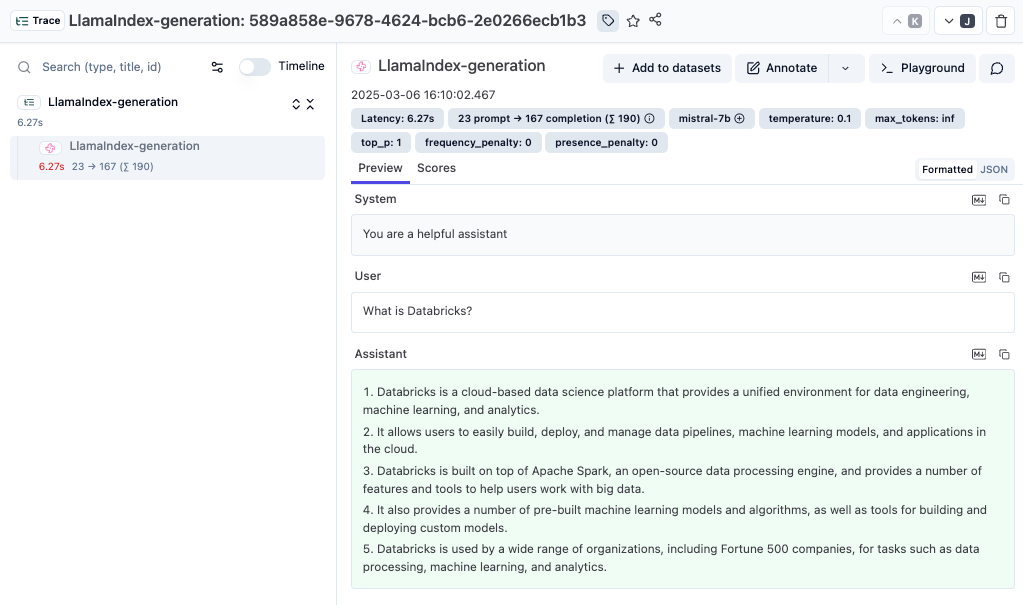
print(response)现在你可以登录 Litefuse 查看 LlamaIndex 调用的详情,包括 prompt、token 用量、completion 数据等。
Interoperability with the Python SDK
You can use this integration together with the Litefuse SDKs to add additional attributes to the observation.
The @observe() decorator provides a convenient way to automatically wrap your instrumented code and add additional attributes to the observation.
from langfuse import observe, propagate_attributes, get_client

langfuse = get_client()

@observe()
def my_llm_pipeline(input):
    # Add additional attributes (user_id, session_id, metadata, version, tags) to all spans created within this execution scope
    with propagate_attributes(
        user_id="user_123",
        session_id="session_abc",
        tags=["agent", "my-observation"],
        metadata={"email": "user@litefuse.ai"},
        version="1.0.0"
    ):

        # YOUR APPLICATION CODE HERE
        result = call_llm(input)

        return result

# Run the function
my_llm_pipeline("Hi")
Learn more about using the Decorator in the Langfuse SDK instrumentation docs.
Troubleshooting
No observations appearing
First, enable debug mode in the Python SDK:
export LANGFUSE_DEBUG="True"Then run your application and check the debug logs:
- OTel observations appear in the logs: Your application is instrumented correctly but observations are not reaching Litefuse. To resolve this:
- Call
langfuse.flush()at the end of your application to ensure all observations are exported. - Verify that you are using the correct API keys and base URL.
- Call
- No OTel spans in the logs: Your application is not instrumented correctly. Make sure the instrumentation runs before your application code.
Unwanted observations in Litefuse
The Langfuse SDK is based on OpenTelemetry. Other libraries in your application may emit OTel spans that are not relevant to you. These still count toward your billable units, so you should filter them out. See Unwanted spans in Litefuse for details.
Missing attributes
Some attributes may be stored in the metadata object of the observation rather than being mapped to the Litefuse data model. If a mapping or integration does not work as expected, please raise an issue on GitHub.
Next Steps
Once you have instrumented your code, you can manage, evaluate and debug your application:
Interoperability with the Python SDK
- 了解如何在 Litefuse Playground 与 LLM-as-a-Judge 评估中使用 Databricks 模型,详见此处。
- 浏览 Databricks 文档,了解更进阶的模型服务配置。
- 了解更多关于 Litefuse 的 tracing 功能,跟踪应用的完整执行流程。
- 试用 Litefuse 的 Prompt 管理,或搭建 LLM-as-a-Judge 评估。