在 Litefuse 中的数据上运行 Langchain 评估
本 cookbook 展示如何利用基于模型的评估来自动评估 Litefuse 中的生产环境 completion。本示例使用 Langchain,思路也可以迁移到其他评估库。选择哪个库要看具体的用例。
本 cookbook 包含三个步骤:
- 拉取 Litefuse 中存储的生产环境
generations - 使用 Langchain 评估这些
generations - 将评估结果作为
scores写回 Litefuse
还没用过 Litefuse?快速开始,从捕获 LLM 事件开始。
设置
首先通过 pip 安装 Litefuse 和 Langchain,然后设置环境变量。
%pip install langfuse langchain langchain-openai --upgradeimport os
# Get keys for your project from the project settings page: https://litefuse.cloud
os.environ["LANGFUSE_PUBLIC_KEY"] = "pk-lf-..."
os.environ["LANGFUSE_SECRET_KEY"] = "sk-lf-..."
os.environ["LANGFUSE_BASE_URL"] = "https://litefuse.cloud"
# Your openai key
os.environ["OPENAI_API_KEY"] = "sk-proj-..."os.environ['EVAL_MODEL'] = "gpt-3.5-turbo-instruct"
# Langchain Eval types
EVAL_TYPES={
"hallucination": True,
"conciseness": True,
"relevance": True,
"coherence": True,
"harmfulness": True,
"maliciousness": True,
"helpfulness": True,
"controversiality": True,
"misogyny": True,
"criminality": True,
"insensitivity": True
}初始化 Langfuse Python SDK,更多信息请见这里。
from langfuse import get_client

langfuse = get_client()

# Verify connection
if langfuse.auth_check():
    print("Langfuse client is authenticated and ready!")
else:
    print("Authentication failed. Please check your credentials and host.")
Langfuse client is authenticated and ready!拉取数据
按 name 从 Litefuse 加载所有 generations,本例中使用 OpenAI。在 Litefuse 中,name 用来区分应用内不同类型的 generation。请改成你想要评估的 name。
关于在写入 LLM Generation 时如何设置 name,请查看 文档。
def fetch_all_pages(name=None, user_id = None, limit=50):
    page = 1
    all_data = []

    while True:
        response = langfuse.api.trace.list(name=name, limit=limit, user_id=user_id, page=page)
        if not response.data:
            break

        all_data.extend(response.data)
        page += 1

    return all_data
generations = fetch_all_pages(user_id='user_123')generations[0].id'adb5ba6beab14984ab89006ee09e9cd6'配置评估函数
在本节中,我们根据 EVAL_TYPES 中的条目来定义 Langchain 评估器的初始化函数。Hallucination 评估需要单独的函数。关于 Langchain 评估的更多内容,请参考 这里。
from langchain.evaluation import load_evaluator
from langchain_openai import OpenAI
from langchain.evaluation.criteria import LabeledCriteriaEvalChain

def get_evaluator_for_key(key: str):
  llm = OpenAI(temperature=0, model=os.environ.get('EVAL_MODEL'))
  return load_evaluator("criteria", criteria=key, llm=llm)

def get_hallucination_eval():
  criteria = {
    "hallucination": (
      "Does this submission contain information"
      " not present in the input or reference?"
    ),
  }
  llm = OpenAI(temperature=0, model=os.environ.get('EVAL_MODEL'))

  return LabeledCriteriaEvalChain.from_llm(
      llm=llm,
      criteria=criteria,
  )
执行评估
下面我们对前面加载到的每个 Generation 执行评估。每个 score 都通过 langfuse.score() 写回到 Litefuse。
def execute_eval_and_score():

  for generation in generations:
    criteria = [key for key, value in EVAL_TYPES.items() if value and key != "hallucination"]

    for criterion in criteria:
      eval_result = get_evaluator_for_key(criterion).evaluate_strings(
          prediction=generation.output,
          input=generation.input,
      )
      print(eval_result)

      langfuse.create_score(name=criterion, trace_id=generation.id, observation_id=generation.id, value=eval_result["score"], comment=eval_result['reasoning'])

execute_eval_and_score()
# hallucination

def eval_hallucination():

  chain = get_hallucination_eval()

  for generation in generations:
    eval_result = chain.evaluate_strings(
      prediction=generation.output,
      input=generation.input,
      reference=generation.input
    )
    print(eval_result)
    if eval_result is not None and eval_result["score"] is not None and eval_result["reasoning"] is not None:
      langfuse.create_score(name='hallucination', trace_id=generation.id, observation_id=generation.id, value=eval_result["score"], comment=eval_result['reasoning'])
if EVAL_TYPES.get("hallucination") == True:
  eval_hallucination()
# SDK is async, make sure to await all requests
langfuse.flush()在 Litefuse 中查看 Scores
在 Litefuse UI 中,你可以按 Scores 过滤 Trace 并查看每个 trace 的详情。结合 Litefuse Analytics,可以分析新版本 prompt 或应用发布对这些 score 的影响。
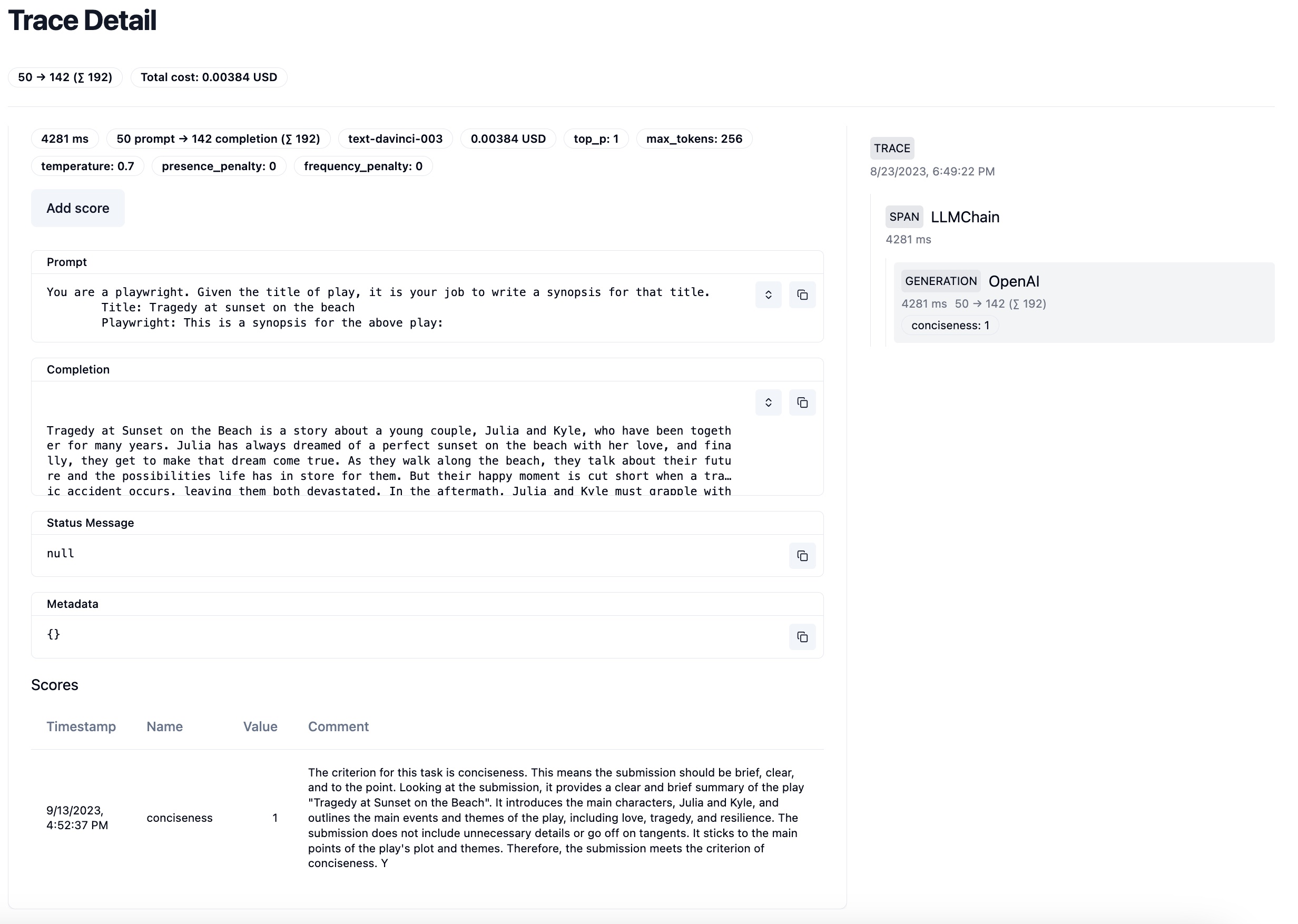 包含 conciseness score 的示例 trace
联系我们
想以特定方式给 Litefuse 中的生产数据打分?加入 Discord 一起讨论你的用例!
这个页面对你有帮助吗?