评估多轮对话(模拟)
带有对话界面的 AI 应用(例如聊天机器人)会与用户进行多次交互,也就是所谓的对话轮次。要结构化地评估这些应用的表现,方法有很多种,例如 N+1 Evaluations。
在这份 cookbook 中,我们将介绍如何使用 agent 模拟用户与聊天机器人进行对话,并衡量这些对话的输出。我们会涵盖:
- 创建结构化的数据集,用于测试功能、场景、人设等。
- 使用 OpenEvals 模拟特定的用例。
- 在生产应用上运行模拟。
- 使用 LLM-as-a-Judge 评估模拟的输出。
还没用上 Litefuse?先从捕获 LLM 事件开始快速开始。
准备工作
在这个示例中,我们会构建一个烹饪助手聊天机器人,然后对它进行模拟对话。
步骤 1 - 创建一个聊天应用,并在 Litefuse 中生成 trace
首先通过 pip 安装 Litefuse,并设置环境变量。
%pip install langfuse openevals --upgradeimport os
# Get keys for your project from the project settings page: https://litefuse.cloud
os.environ["LANGFUSE_PUBLIC_KEY"] = "pk-lf-1234"
os.environ["LANGFUSE_SECRET_KEY"] = "sk-lf-1234"
os.environ["LANGFUSE_BASE_URL"] = "https://litefuse.cloud"
# Your openai key
os.environ["OPENAI_API_KEY"] = 'sk-proj-1234'接下来我们会创建一个简单的烹饪助手聊天机器人,使用 OpenAI 作为 LLM,并通过 Litefuse 进行 trace。
# This is a simple cooking assistant chatbot traced with Litefuse and uses OpenAI as the LLM.
from langfuse.openai import openai
from langfuse import get_client, observe


class SimpleChat:
    def __init__(self, model="gpt-3.5-turbo"):
        self.conversation_history = [
          {
            "role": "system",
            "content": "You are a helpful cooking assistant that answers questions about recipes and cooking."
          }
        ]
        self.model = model

    @observe
    def add_message(self, messages):
        """
        Args:
            messages: Either a string (single user message) or a list of message dictionaries
        """
        try:
            # Handle both string and array inputs
            if isinstance(messages, str):
                messages = [{"role": "user", "content": messages}]

            # Add messages to history
            self.conversation_history.extend(messages)

            # Call OpenAI API using the new client
            response = openai.chat.completions.create(
                model=self.model,
                messages=self.conversation_history,
                max_tokens=500,
                temperature=0.7
            )

            # Extract and add assistant response
            assistant_message = response.choices[0].message.content
            self.conversation_history.append({"role": "assistant", "content": assistant_message})
            get_client().update_current_observation(input=messages, output=assistant_message)

            return assistant_message

        except Exception as e:
            return f"Error: {str(e)}"

    def show_history(self):
        import json
        print("Conversation history:")
        print(json.dumps(self.conversation_history, indent=2))
        print()

    def clear_history(self):
        self.conversation_history = [
          {
            "role": "system",
            "content": "You are a helpful cooking assistant that answers questions about recipes and cooking."
          }
        ]
        print("Conversation cleared!")

# Create a chat instance
chat = SimpleChat()
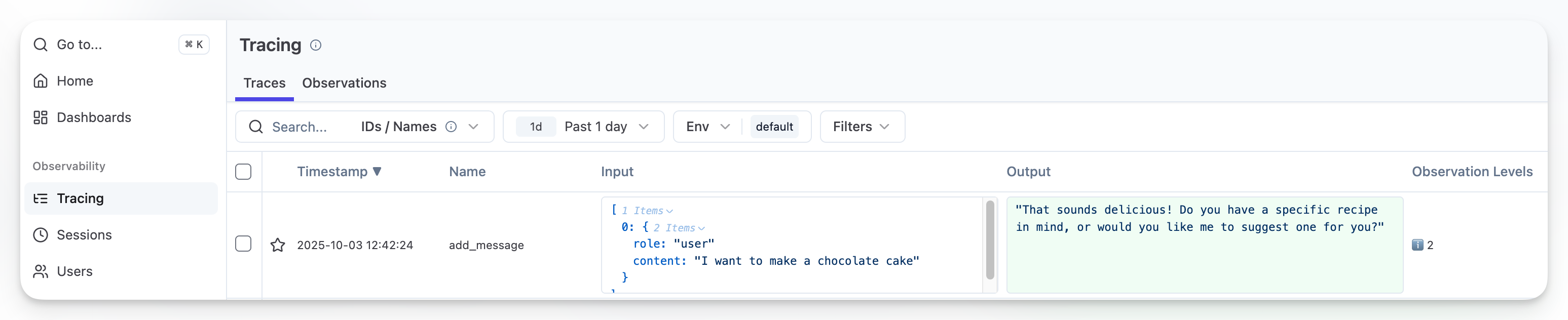
现在如果你运行一个简单的问题,应该就能在 Litefuse 中看到 trace 了:
chat.add_message("I want to make a chocolate cake")‘That sounds delicious! Do you have a specific recipe in mind, or would you like me to suggest one for you?’
步骤 2 - 创建一份结构化的用户场景数据集
为你的用例定义相关的维度,例如:
- Features:AI 产品的具体功能。
- Scenarios:AI 可能遇到并需要处理的情境或问题。
- Personas:具有不同特征和需求的代表性用户画像。
对于我们的烹饪助手聊天机器人,我们会创建若干 Scenario 与 Persona 的组合,如下所示:
| Persona | Scenario |
|---|---|
| A nervous first-time host cooking multiple dishes for a dinner party at 6:30 PM. Anxious about timing, unfamiliar with multitasking in the kitchen, needs reassurance and asks many clarifying questions. | It’s 4:30 PM and they need to coordinate: roasted chicken (1.5 hours), roasted vegetables (45 min), mashed potatoes (30 min), and gravy. They only have one oven and are worried everything won’t be ready on time. |
| A stressed home cook whose beef stroganoff sauce just curdled when they added sour cream. Guests arrive in 20 minutes. Frustrated, urgent, needs quick realistic solutions. | The sour cream curdled in the hot pan, making the sauce grainy and separated. They have heavy cream, butter, flour, beef broth, and more sour cream available. Need to know if it can be salvaged or if they need a backup plan. |
你可以为自己的具体用例添加更多列,例如加入用于测试系统的数据。比如说,如果你在为一家物流公司开发客服聊天机器人,你可能希望模拟”提供一个不存在的订单追踪 ID”这样的场景,以观察聊天机器人如何应对。
定义好你的数据集后,将其创建到 Litefuse 的 Dataset 中。这样每次系统更新后,你都可以基于该数据集打分,衡量系统是否真的在变好:
from langfuse import get_client

langfuse = get_client()

dataset = langfuse.create_dataset(
    name="simulated-conversations",
    description="Synthetic conversations from persona/scenario pairs"
)

langfuse.create_dataset_item(
    dataset_name="simulated-conversations",
    input={
      "persona": "A nervous first-time host cooking multiple dishes for a dinner party at 6:30 PM. Anxious about timing, unfamiliar with multitasking in the kitchen, needs reassurance and asks many clarifying questions.",
      "scenario": "It's 4:30 PM and they need to coordinate: roasted chicken (1.5 hours), roasted vegetables (45 min), mashed potatoes (30 min), and gravy. They only have one oven and are worried everything won't be ready on time."
    }
)

langfuse.create_dataset_item(
  dataset_name="simulated-conversations",
  input={
    "persona": "A stressed home cook whose beef stroganoff sauce just curdled when they added sour cream. Guests arrive in 20 minutes. Frustrated, urgent, needs quick realistic solutions.",
    "scenario": "The sour cream curdled in the hot pan, making the sauce grainy and separated. They have heavy cream, butter, flour, beef broth, and more sour cream available. Need to know if it can be salvaged or if they need a backup plan."
  }
)
步骤 3 - 让你的应用适配模拟器
OpenEvals 库要求输入与输出符合特定的格式,并且需要管理对话历史,因此我们会将聊天机器人的实例与 OpenEvals 提供的 thread_id 关联起来存储。
from openevals.simulators import run_multiturn_simulation, create_llm_simulated_user

def create_app_wrapper():
    """
    Creates an app function that works with OpenEvals multiturn simulation.
    Manages conversation history per thread_id internally.

    OpenEvals expects:
    - Input: ChatCompletionMessage (dict-like with 'role' and 'content')
    - Output: ChatCompletionMessage (dict-like with 'role' and 'content')
    """
    # Store chat instances per thread
    chat_instances = {}

    def app(inputs, *, thread_id: str, **kwargs):
        if thread_id not in chat_instances:
            chat_instances[thread_id] = SimpleChat()

        chat = chat_instances[thread_id]

        # inputs is a message dict/object with 'role' and 'content'
        # Access content - handle both dict and object
        content = inputs.get("content") if isinstance(inputs, dict) else inputs.content

        response_text = chat.add_message(content)

        return {
            "role": "assistant",
            "content": response_text
        }

    return app

def generate_synthetic_conversation(persona: str, scenario: str, max_turns: int = 3):
    """
    Generate a synthetic conversation from persona/scenario pair.

    Args:
        persona: User characteristics/personality
        scenario: The cooking situation
        max_turns: Max conversation turns

    Returns:
        Simulation result with trajectory and evaluation scores
    """
    # Create app function (manages chat instances internally)
    app = create_app_wrapper()

    # Create simulated user
    # The system prompt should include the scenario so the user naturally introduces it
    system_prompt = f"""You are a user in the following situation:
    {scenario}

    You have these characteristics:
    {persona}

    Start the conversation by naturally describing your situation and asking for help. Then behave naturally based on your emotional state and ask follow-up questions."""

    user = create_llm_simulated_user(
        system=system_prompt,
        model="openai:gpt-4o-mini",
    )

    # Run simulation (evaluators will be configured in Litefuse)
    result = run_multiturn_simulation(
        app=app,
        user=user,
        max_turns=max_turns,
    )

    return result
步骤 4 - 运行一个实验
我们会使用 Litefuse 的 Dataset Experiments SDK 取出之前创建的 scenario/persona 组合,并 trace、存储实验输出,方便后续评估。
from langfuse import get_client

def run_dataset_experiment(dataset_name: str, experiment_name: str):
    """
    Load persona/scenario pairs from Litefuse Dataset and run experiment.

    Args:
        dataset_name: Name of dataset in Litefuse containing persona/scenario pairs
        experiment_name: Name for this experiment run
    """
    langfuse = get_client()
    dataset = langfuse.get_dataset(dataset_name)

    print(f"Loaded dataset '{dataset_name}' with {len(dataset.items)} items")

    def run_task(*, item, **kwargs):
        """
        Task function for Litefuse experiment.
        Item input should be: {"persona": "...", "scenario": "..."}
        """
        # Extract persona and scenario from dataset item
        persona = item.input.get("persona")
        scenario = item.input.get("scenario")

        if not persona or not scenario:
            raise ValueError(f"Dataset item must have 'persona' and 'scenario' fields. Got: {item.input}")

        print(f"\nGenerating conversation for scenario: {scenario[:80]}...")

        result = generate_synthetic_conversation(
            persona=persona,
            scenario=scenario
        )

        return {
            "trajectory": result["trajectory"],
            "num_turns": len([m for m in result["trajectory"] if m.get("role") == "user"])
        }

    print(f"\nRunning experiment '{experiment_name}'...")
    result = dataset.run_experiment(
        name=experiment_name,
        description="Synthetic conversations from persona/scenario pairs",
        task=run_task
    )

    get_client().flush()

    print(f"\n✅ Experiment complete!")
    print(f"View results in Litefuse: {os.environ.get('LANGFUSE_BASE_URL')}")

    return result


run_dataset_experiment(
  dataset_name="simulated-conversations",
  experiment_name="synthetic-conversations-v1"
)
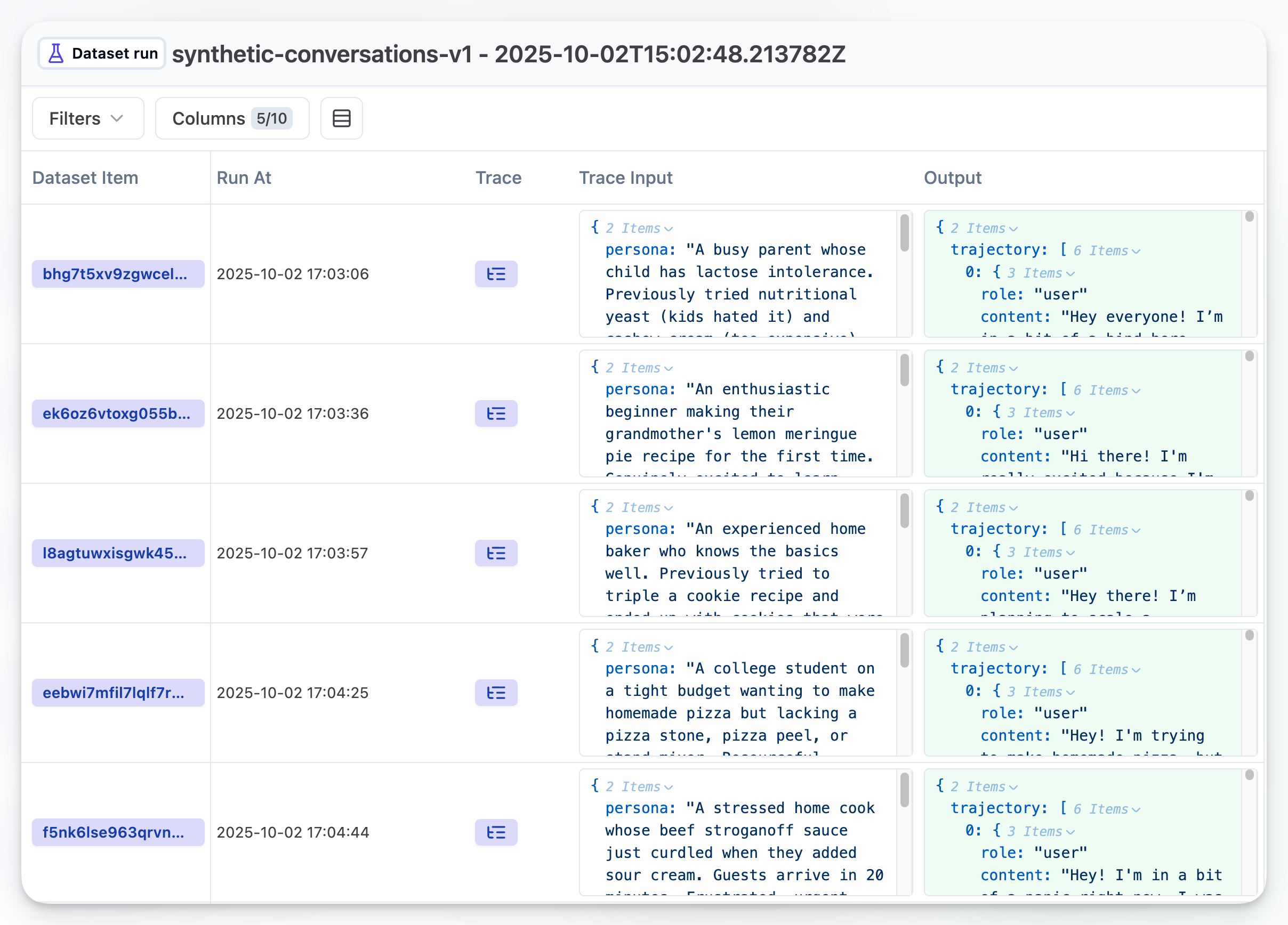
运行完实验后,你应该能在 Dataset runs 标签页中看到结果:
步骤 5 - 针对 Dataset run 运行评估
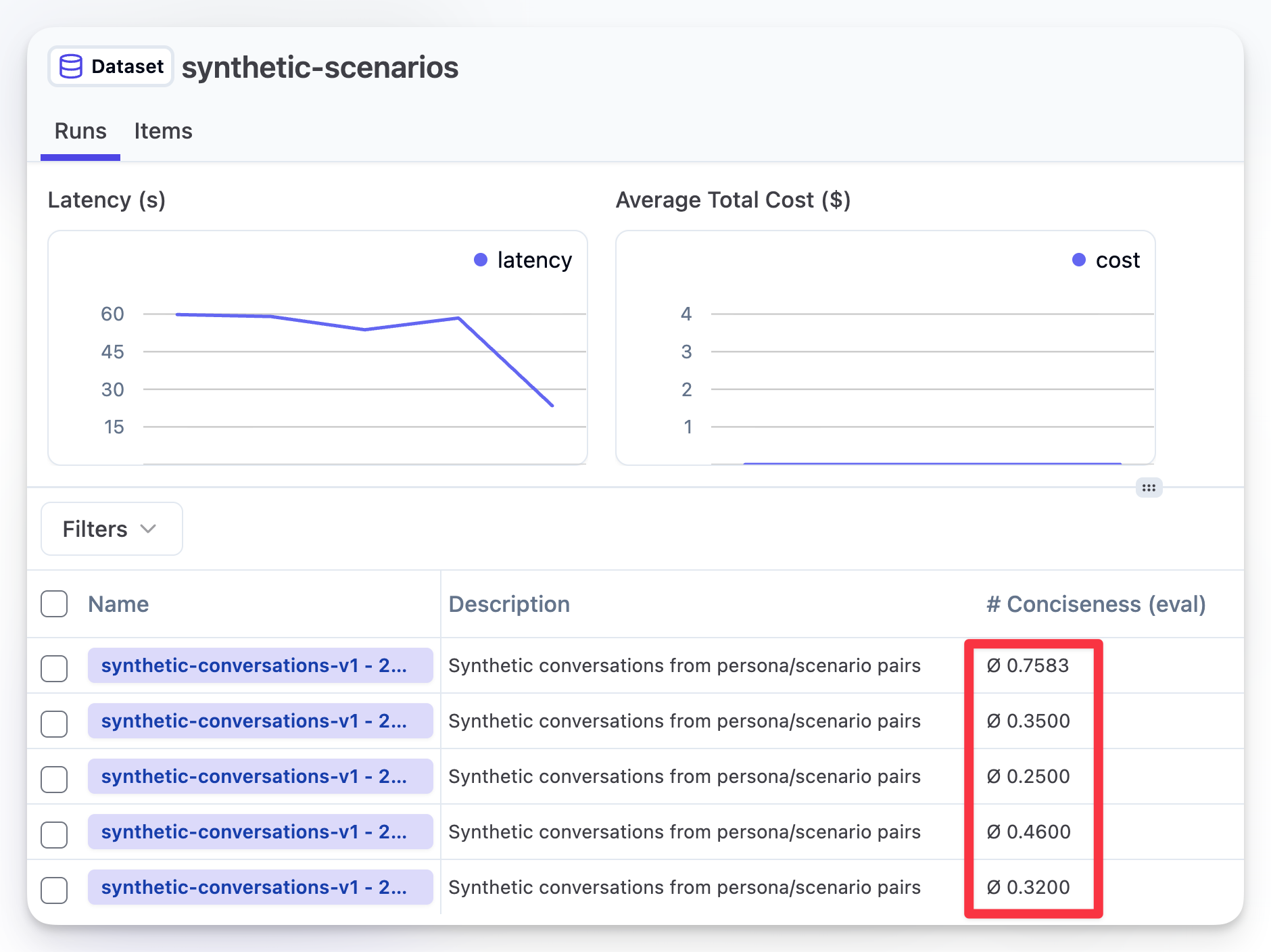
要评估输出,你可以创建 LLM-as-a-Judge,让它针对你的 Dataset Run 运行并打分。它会为每个 scenario/persona 组合给出单独的得分和理由,同时为整个 dataset run 给出一个总体平均分。
在这个例子中,我从内置的 evaluator 库中创建了一个简单的 “Conciseness” evaluator,但你完全可以基于自己的用例和需求创建一个(甚至多个!)evaluator。在下面这张图中,你可以看到分配给多次 Dataset run 的总分,以及随着 prompt 的调整,分数随时间的变化趋势。
总结
这个 notebook 演示了一种系统化方法,用来模拟并评估多轮对话,特别是聚焦于与聊天机器人实际相关的用例和场景。
你可以在这里读到更多关于如何为实验高效构建数据集的内容。