示例:在 OpenAI functions 中使用 Litefuse Prompt Management(Python)
Litefuse Prompt Management 帮助团队在一个统一位置协作地管理和版本控制 prompt。本示例演示如何利用 Litefuse prompt 上灵活的 config 对象来存储 function calling 选项和模型参数。
设置
%pip install langfuse openai --upgradeimport os
# Get keys for your project
os.environ["LANGFUSE_PUBLIC_KEY"] = ""
os.environ["LANGFUSE_SECRET_KEY"] = ""
os.environ["LANGFUSE_BASE_URL"] = "https://litefuse.cloud"
# OpenAI key
os.environ["OPENAI_API_KEY"] = ""from langfuse import get_client
langfuse = get_client()True将 prompt 添加到 Litefuse Prompt Management
我们通过 SDK 添加本示例使用的 prompt。或者,你也可以在 Litefuse UI 中编辑并对 prompt 进行版本管理。
Name:在 Litefuse Prompt Management 中标识该 prompt- 包含
json_schema变量的 prompt - 包含
model_name、temperature和json_schema的 config - 在
labels中加入production,将该 prompt 立即设为默认版本
langfuse.create_prompt(
    name="story_summarization",
    prompt="Extract the key information from this text and return it in JSON format. Use the following schema: {{json_schema}}",
    config={
        "model":"gpt-3.5-turbo-1106",
        "temperature": 0,
        "json_schema":{
            "main_character": "string (name of protagonist)",
            "key_content": "string (1 sentence)",
            "keywords": "array of strings",
            "genre": "string (genre of story)",
            "critic_review_comment": "string (write similar to a new york times critic)",
            "critic_score": "number (between 0 bad and 10 exceptional)"
        }
    },
    labels=["production"]
);
Litefuse UI 中的 prompt
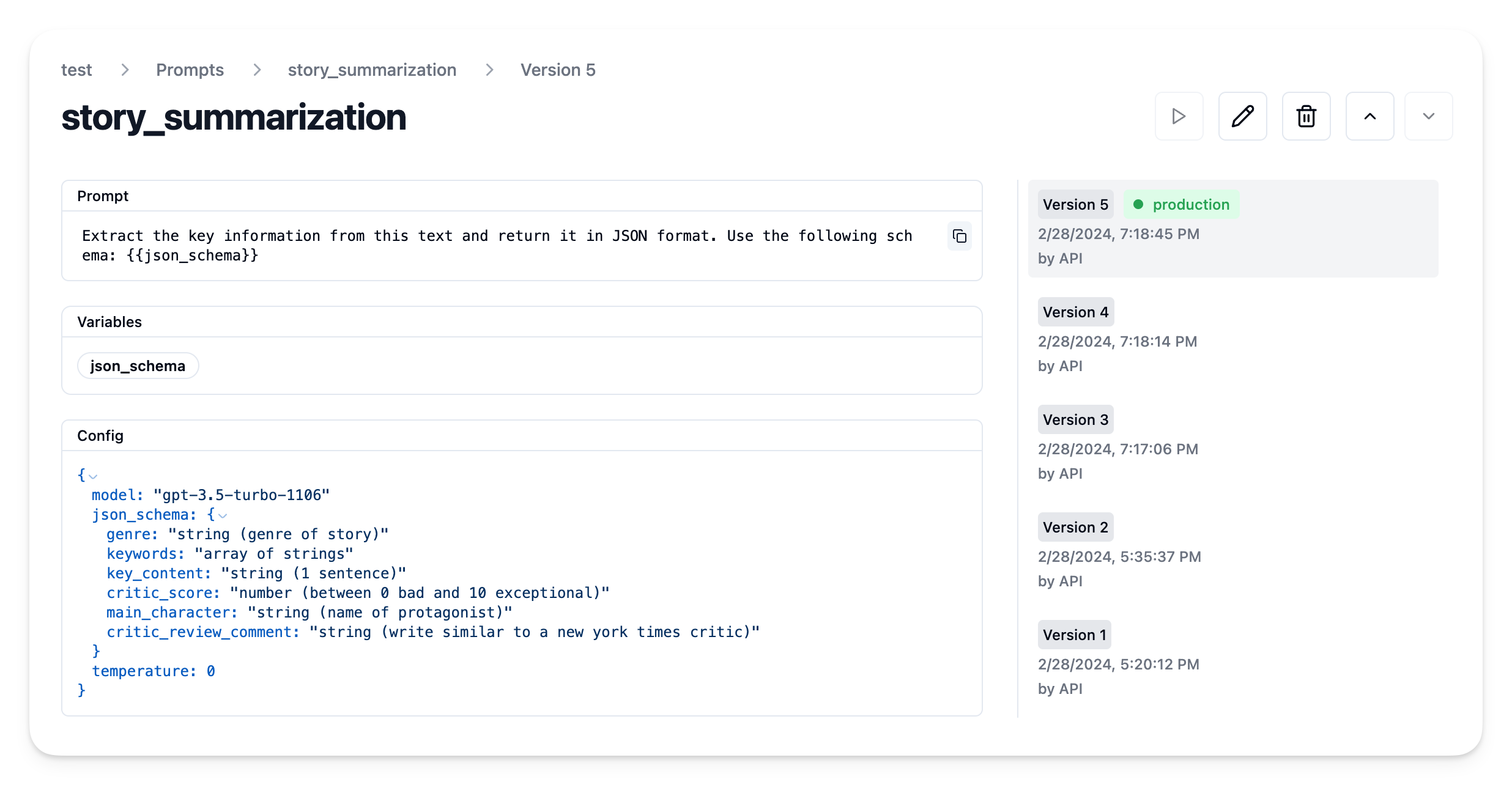
示例应用
从 Litefuse 获取当前 prompt 版本
prompt = langfuse.get_prompt("story_summarization")现在可以使用这个 prompt 来编译系统消息
prompt.compile(json_schema="TEST SCHEMA")'Extract the key information from this text and return it in JSON format. Use the following schema: TEST SCHEMA'它还包含 config 对象
prompt.config{'model': 'gpt-3.5-turbo-1106',
'json_schema': {'genre': 'string (genre of story)',
'keywords': 'array of strings',
'key_content': 'string (1 sentence)',
'critic_score': 'number (between 0 bad and 10 exceptional)',
'main_character': 'string (name of protagonist)',
'critic_review_comment': 'string (write similar to a new york times critic)'},
'temperature': 0}创建示例函数
在本例中,我们通过从 langfuse.openai 导入来使用原生的 Litefuse OpenAI 集成。这会开启 Litefuse 中的 trace,使用 Litefuse prompt management 本身并不需要它。
from langfuse.openai import OpenAI
client = OpenAI()
使用 Litefuse prompt 来构造示例函数 summarize_story。
注意: 你可以在调用 create 方法时传入 langfuse_prompt 参数,将 Litefuse Tracing 中的 generation 与对应的 prompt 版本关联。请参考我们的 prompt management 文档,了解如何在其他集成和 SDK 中关联 prompt 与 generation。
import json

def summarize_story(story):
  # Stringify the JSON schema
  json_schema_str = ', '.join([f"'{key}': {value}" for key, value in prompt.config["json_schema"].items()])

  # Compile prompt with stringified version of json schema
  system_message = prompt.compile(json_schema=json_schema_str)

  # Format as OpenAI messages
  messages = [
      {"role":"system","content": system_message},
      {"role":"user","content":story}
  ]

  # Get additional config
  model = prompt.config["model"]
  temperature = prompt.config["temperature"]

  # Execute LLM call
  res = client.chat.completions.create(
    model = model,
    temperature = temperature,
    messages = messages,
    response_format = { "type": "json_object" },
    langfuse_prompt = prompt # capture used prompt version in trace
  )

  # Parse response as JSON
  res = json.loads(res.choices[0].message.content)

  return res
执行函数
# Thanks ChatGPT for the story
STORY = """
In a bustling city where the nighttime glittered with neon signs and the rush never calmed, lived a lonely cat named Whisper. Amidst the ceaseless clatter, Whisper discovered an abandoned hat one day. To her enigmatic surprise, this was no ordinary accessory; it had the unusual power to make her invisible to any onlooker.
Whisper, now carrying a peculiar power, started a journey that was unexpected. She became a benevolent spirit to the less fortunate, the homeless people who equally shared the cold nights with her. Nights that were once barren turned miraculous as warm meals mysteriously appeared to those who needed them most. No one could see her, yet her actions spoke volumes, turning her into an unsung hero in the hidden corners of the city.
As she carried on with her mysterious deed, she found an unanticipated reward. Joy started to kindle in her heart, born not from the invisibility, but from the result of her actions; the growing smiles on the faces of those she surreptitiously helped. Whisper might have remained unnoticed to the world, but amidst her secret kindness, she discovered her true happiness.
"""
summary = summarize_story(STORY){'genre': 'Fantasy',
'keywords': ['lonely cat',
'invisible',
'benevolent spirit',
'unsung hero',
'mysterious deed',
'true happiness'],
'key_content': 'In a bustling city, a lonely cat named Whisper discovers an abandoned hat with the power to make her invisible, leading her to become a benevolent spirit and unsung hero to the less fortunate.',
'critic_score': 9,
'main_character': 'Whisper',
'critic_review_comment': "Whisper's journey from loneliness to self-discovery through acts of kindness is a heartwarming and enchanting tale that captivates the reader with its magical elements and profound message about true happiness."}在 Litefuse 中查看 trace
由于我们使用了 Litefuse 与 OpenAI SDK 的原生集成,可以直接在 Litefuse 中查看 trace。
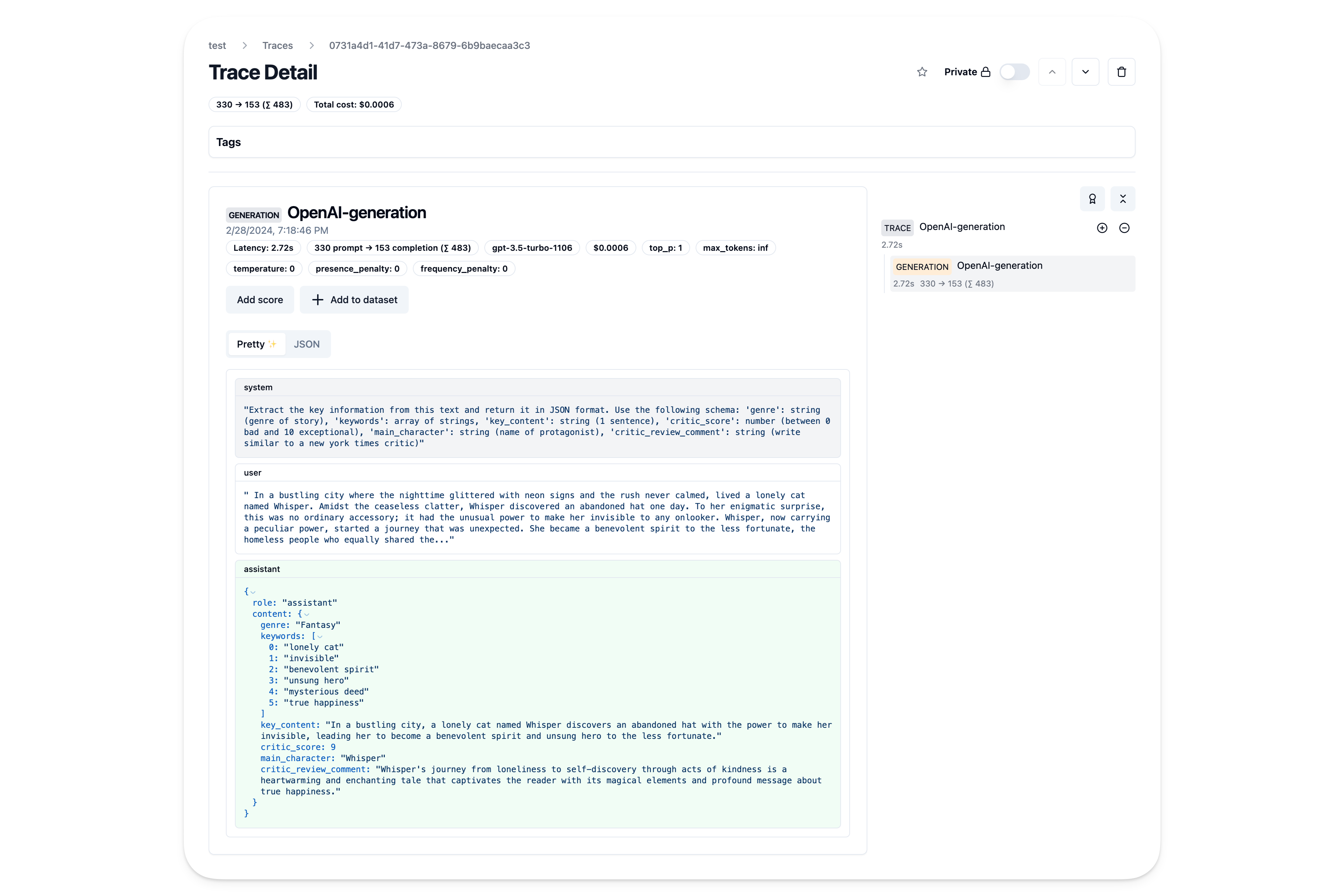
在 Litefuse 中迭代 prompt
现在可以直接在 Litefuse UI 中迭代 prompt,包括模型参数和 function calling 选项,无需修改代码或重新部署应用。
这个页面对你有帮助吗?