通过 OpenTelemetry 接入 OpenLLMetry
Litefuse 提供了一个基于 OpenTelemetry 的后端用于接收 trace 数据,你可以使用不同的 instrumentation 库将应用的 trace 导出过来。本指南展示如何使用 Traceloop 的 OpenLLMetry instrumentation 库 为你的 LLM 应用注入 instrumentation。
关于 OpenLLMetry: OpenLLMetry 是一个开源项目,简化了 LLM 应用的监控和调试。它基于 OpenTelemetry,以非侵入的方式采集 trace 数据。
步骤 1:安装依赖
先安装所需的 Python 包。本例中我们需要 openai 库来调用 OpenAI 的 API,以及 traceloop-sdk 来启用 OpenLLMetry instrumentation。
%pip install openai traceloop-sdk langfuse步骤 2:配置环境变量
在发送任何请求之前,先在环境里配好凭据和 endpoint。这里我们把 Litefuse 的 public key 和 secret key 拼成一个 Base64 编码的 token 完成认证,并根据你所在的区域(EU 或 US)指定 Litefuse 的 endpoint,同时提供 OpenAI 的 API key。
import os
import base64

# Get keys for your project from the project settings page: https://litefuse.cloud
os.environ["LANGFUSE_PUBLIC_KEY"] = "pk-lf-..."
os.environ["LANGFUSE_SECRET_KEY"] = "sk-lf-..."
os.environ["LANGFUSE_BASE_URL"] = "https://litefuse.cloud"

# Build Basic Auth header.
LANGFUSE_AUTH = base64.b64encode(
    f"{os.environ.get('LANGFUSE_PUBLIC_KEY')}:{os.environ.get('LANGFUSE_SECRET_KEY')}".encode()
).decode()

# Configure OpenTelemetry endpoint & headers
os.environ["OTEL_EXPORTER_OTLP_ENDPOINT"] = os.environ.get("LANGFUSE_BASE_URL") + "/api/public/otel"
os.environ["OTEL_EXPORTER_OTLP_HEADERS"] = f"Authorization=Basic {LANGFUSE_AUTH}"

# Your openai key
os.environ["OPENAI_API_KEY"] = "sk-proj-..."
环境变量设好之后,就可以初始化 Langfuse 客户端了。get_client() 会根据环境变量中的凭据初始化 Langfuse 客户端。
from langfuse import get_client

langfuse = get_client()

# Verify connection
if langfuse.auth_check():
    print("Langfuse client is authenticated and ready!")
else:
    print("Authentication failed. Please check your credentials and host.")
Langfuse client is authenticated and ready!步骤 3:初始化 Instrumentation
接下来用 traceloop-sdk 初始化 OpenLLMetry instrumentation。如果你在 notebook 里运行这段代码,建议开启 disable_batch=True,这样 trace 会立即发送而不必等批处理。
from traceloop.sdk import Traceloop

Traceloop.init(disable_batch=True,
               api_endpoint=os.environ.get("OTEL_EXPORTER_OTLP_ENDPOINT"),
               headers=os.environ.get(f"Authorization=Basic {LANGFUSE_AUTH}"),)
[39m
ERROR:root:Error initializing redis instrumentor: No module named 'opentelemetry.instrumentation.redis'步骤 4:执行一次示例 LLM 请求
启用 instrumentation 后,每一次 OpenAI API 调用都会被 trace。下面的例子发起一次 chat completion 请求来展示集成效果。
from openai import OpenAI

openai_client = OpenAI()

chat_completion = openai_client.chat.completions.create(
    messages=[
        {
          "role": "user",
          "content": "What is LLM Observability?",
        }
    ],
    model="gpt-4o-mini",
)

print(chat_completion)
ChatCompletion(id='chatcmpl-BjRWj0Gn9A1PdPYslJ9rDNW730I97', choices=[Choice(finish_reason='stop', index=0, logprobs=None, message=ChatCompletionMessage(content="LLM observability refers to the practices, tools, and methodologies used to monitor, analyze, and understand the behavior and performance of Large Language Models (LLMs) in real time. As organizations increasingly rely on LLMs for various applications—such as natural language processing, chatbots, content generation, and more—ensuring their reliability, accuracy, and ethical alignment has become critical.\n\nKey components of LLM observability include:\n\n1. **Monitoring Performance**: Tracking metrics such as response time, resource utilization, and throughput to ensure that the model operates efficiently under load.\n\n2. **Quality Analysis**: Evaluating the quality of the model's outputs through various means, including user feedback, automated evaluation metrics, and comparison to ground truth data.\n\n3. **Behavior Analysis**: Analyzing the model's behavior in different contexts to identify biases, unintentional outputs, or other anomalies. This includes examining edge cases where the model might fail or produce unexpected results.\n\n4. **Debugging Tools**: Implementing tools that help trace issues or problems back to specific inputs, configurations, or model parameters that may be causing suboptimal performance.\n\n5. **Data Drift Detection**: Monitoring the input data for changes over time that could affect the model's performance, such as shifts in language use, terminology, or user behavior.\n\n6. **Feedback Loops**: Establishing mechanisms for continuous feedback from users and incorporating that information back into the model development lifecycle for fine-tuning and improvements.\n\n7. **Compliance and Safety**: Ensuring that the model adheres to ethical standards and legal requirements, especially regarding data usage and content generation.\n\nEffective observability can help organizations better manage their LLM deployments, minimize risks, and enhance the overall user experience by ensuring that models perform accurately and reliably in a wide range of scenarios.", refusal=None, role='assistant', annotations=[], audio=None, function_call=None, tool_calls=None))], created=1750170273, model='gpt-4o-mini-2024-07-18', object='chat.completion', service_tier='default', system_fingerprint='fp_34a54ae93c', usage=CompletionUsage(completion_tokens=368, prompt_tokens=14, total_tokens=382, completion_tokens_details=CompletionTokensDetails(accepted_prediction_tokens=0, audio_tokens=0, reasoning_tokens=0, rejected_prediction_tokens=0), prompt_tokens_details=PromptTokensDetails(audio_tokens=0, cached_tokens=0)))步骤 5:在 Litefuse 中查看 trace
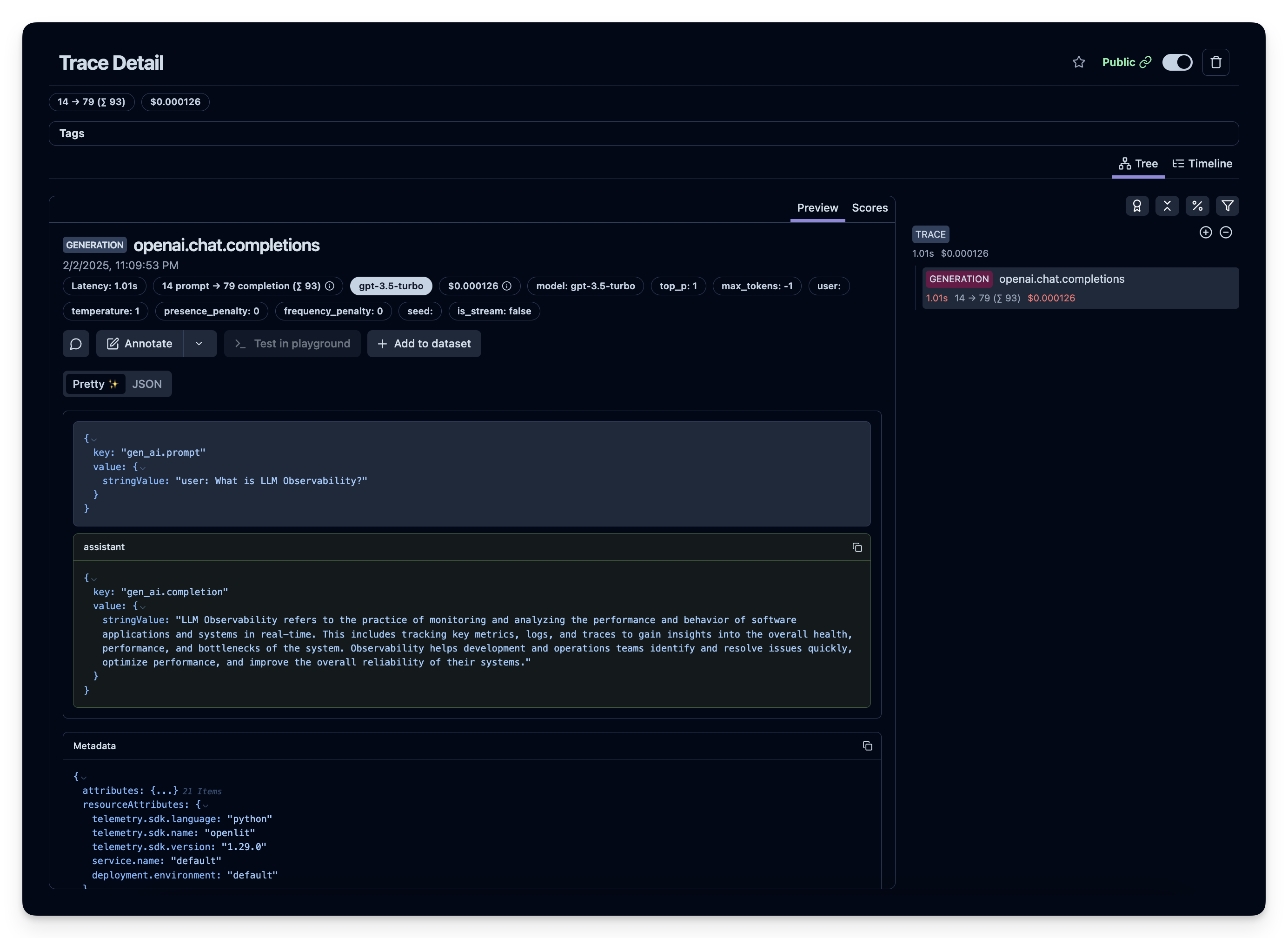
运行上面的代码之后,你可以在 Litefuse 控制台中查看生成的 trace: